
The Focus Stack
About 27 min read
If you need persuading on why any of this is worth doing, go back to The Operator's Reset. This document assumes you are already convinced and want to install it.
What this produces
An environment decision, the smallest set of friction layers that reliably stops your own pattern, a project structure you can recover context from, and a reset process for the day you bypass it.
Time: about 30 minutes to read and deploy. Longer if you are changing where you work, because that involves going and looking at places.
Window: a week for the stack, two if the environment is changing.
Next: SOP 2, Tech Teardown and Spring Cleaning.
Definition of Done
Facts. You know which of the three forces is producing today's version of the problem, which severity tier you are in, and what each layer does.
Feelings. A diagnosis rather than another list to feel guilty about.
Functionality. At least one layer running before you close this document, and a reset process that does not involve a two-hour internal trial.
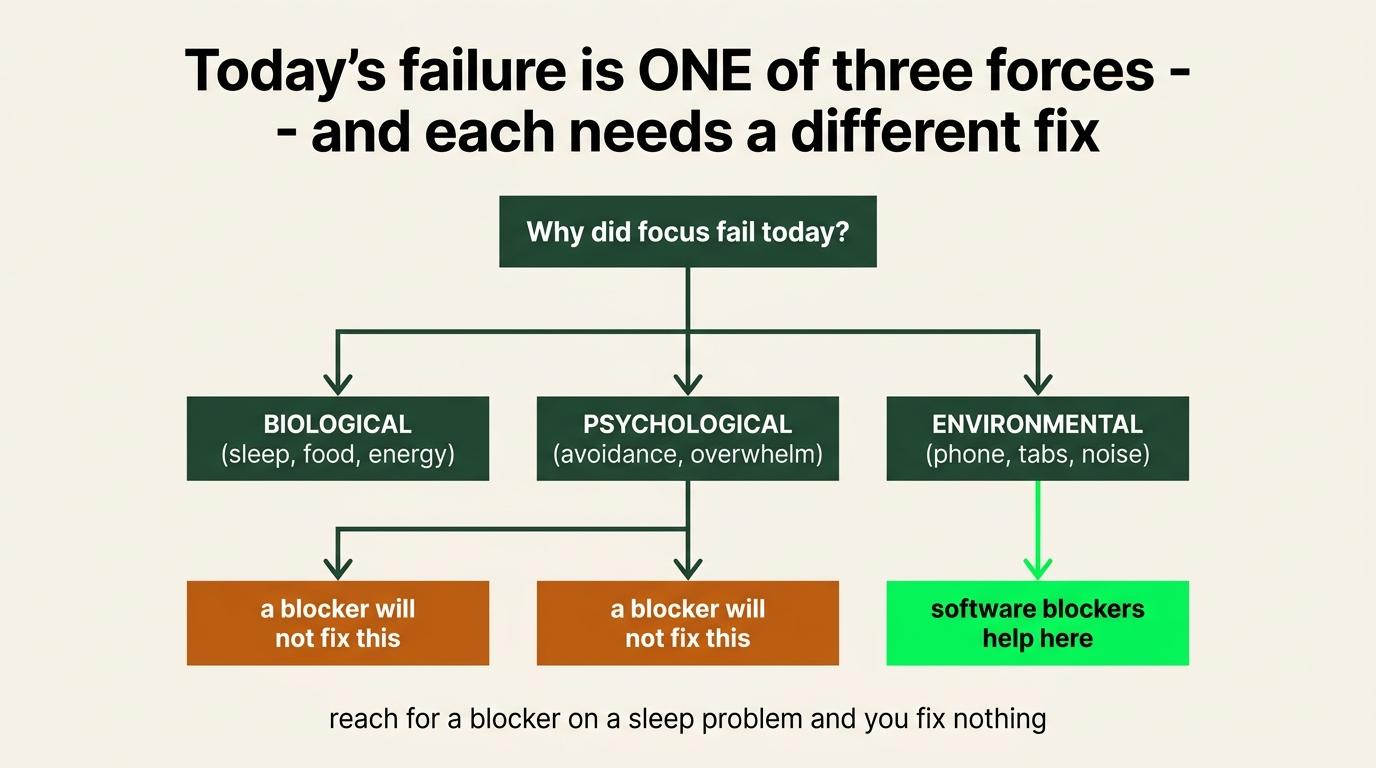
Step 1: Diagnose which force is the problem
Before reaching for a tool, work out which layer is actually producing today's failure. A psychological problem does not respond to a blocker and a biological one does not respond to better planning.
| Force | What it covers | If this is the problem |
|---|---|---|
| Biological | Sleep, energy, hunger, illness, physical discomfort, caffeine | Fix the input. No software helps here |
| Psychological | Stress, anxiety, uncertainty, conflict, financial pressure, unresolved problems | Name the actual thing. Often SOP 3 rather than this one |
| Environmental | Location, devices, apps, notifications, people, sounds, routines, cues | Everything below |
Then check whether you are in a reactive state, because the response tells you what you are avoiding.
| Response | What it looks like |
|---|---|
| Fight | Doing a lot of work that does not matter. Reorganizing, inventing projects, answering low-priority messages |
| Flight | Scrolling, video, notifications, eating, random tabs |
| Freeze | Sitting there, doing nothing meaningful, exhausted by the fact you are supposed to be |
| Productive procrastination | Cleaning, folding, tidying. A real chore that does not need doing right now |
The last one is the most convincing and the most common.
Step 2: Pick your severity tier, then apply it everywhere
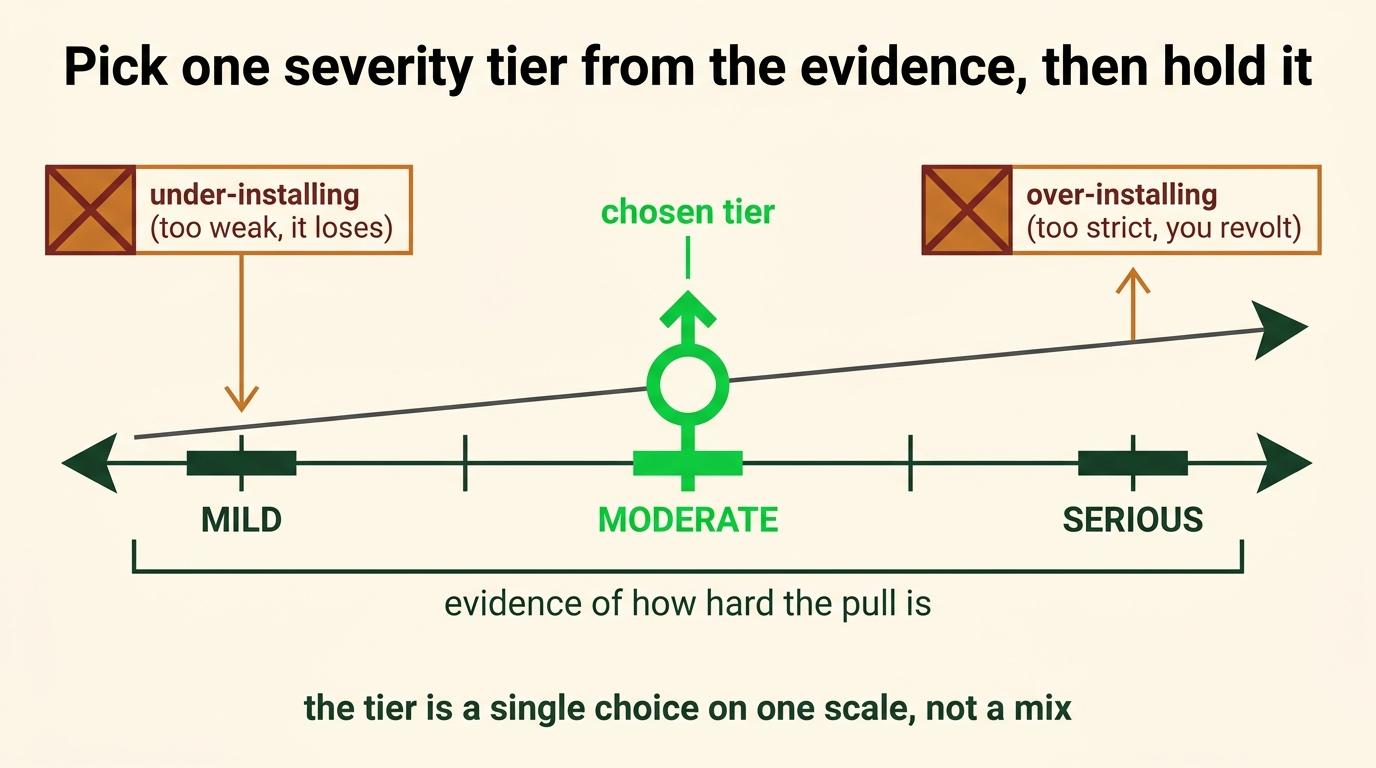
Everything after this step gets configured against the tier you pick here. That is why it comes second rather than in the middle.
The most common way this SOP fails is somebody reading the whole thing, installing everything that sounded good, and ending up with a four-layer blocking system defending against a problem they do not have. The second most common way is somebody at the serious end installing one browser extension and concluding the approach does not work.
| Tier | What qualifies you | What changes |
|---|---|---|
| Mild | Occasional reflexive opens, but you get back to work without losing real time | Friction only. One Sec, notifications off, a clear daily plan, the single-tasking practice |
| Moderate | You regularly beat basic limits, or lose real parts of the day to the phone or browser | Friction plus enforcement. Add Canopy with an accountability partner, and Cold Turkey during deep-work blocks |
| Serious | Focus does not hold regardless of intent, and every softer system has already been defeated | All four layers, an accountability partner, communication moved off the phone, content batch-scheduled, and a time study running |
How the tier changes each domain
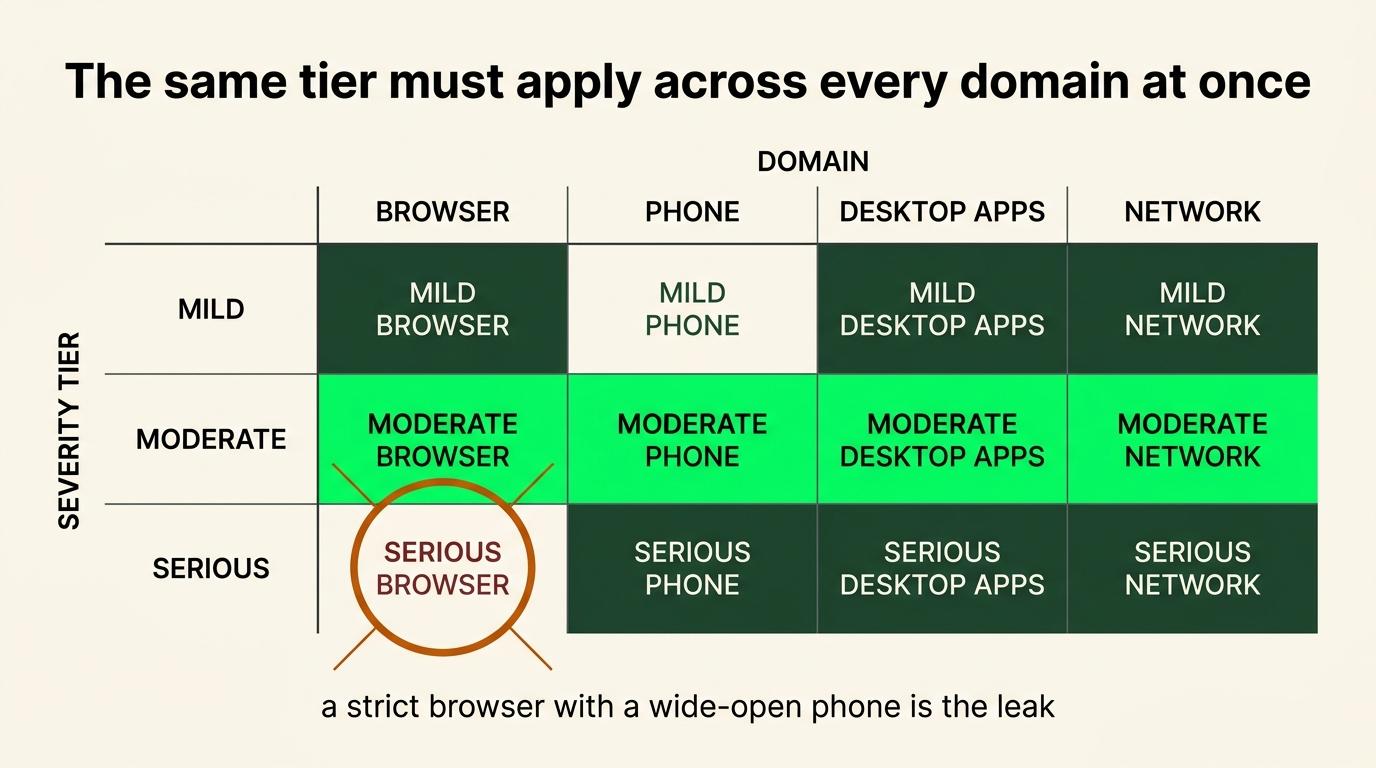
Apply the tier consistently rather than picking the strict version in one place and the loose version everywhere else.
A serious tier on the browser and a mild tier on the phone is a moderate system with extra steps.
The red highlighted sections is where I currently ended up but your choices could be different - as you can tell I need all the help I can get lol.
| Mild | Moderate | Serious | |
|---|---|---|---|
| Phone | Notifications off, One Sec on the worst two apps | One Sec everywhere, category blocks on a schedule | Apps removed, communication moved to the computer, partner-held passcode |
| Browser | Close what you are not using | Scheduled blocks during work hours | Category-level blocks, allowlist rather than blocklist |
| Applications | Quit what is not in use | Blocked during deep-work windows | Blocked by default, unblocked deliberately |
| Entertainment | Nothing | Blocked during work hours | Off the work machine entirely, and batch-scheduled if you produce content so you don’t have to go on the app |
| Food and stimulants | Whatever you already do | Caffeine timed rather than continuous, food that does not spike and crash | Deliberate, meal prep planned, and not a decision you make while hungry |
| Physical environment | Tidy desk, phone out of reach | Phone in another room, dedicated working location | Timed lock box, separate location (in car), no personal devices present |
| Project Windows | Tab groups | Named project windows, one or two getting active attention | Current project plus at most one authorised wait-state project loaded, everything else saved or closed |
| Accountability | None needed | A partner holding one passcode | A partner holding every passcode, and a scheduled check-in |
What stays required regardless of tier
Four things do not scale with severity, because they are the difference between a system and a pile of software.
Block categories rather than individual apps. Blocking one platform relocates the behavior. I deleted an app and started compulsively checking email inside a week.
Somebody else holds the passcode at moderate and above. A blocker you can turn off is a speed bump you have agreed to respect, and you will stop respecting it on the exact day it matters most.
One decided task before the block starts. A blocked phone and no plan produces a person staring at a wall, and then producing a reason the block is not working.
A pathway back. Every session ends. The tier controls how hard it is to get out, not whether you are allowed to.
Moving between tiers
Run a tier for at least two weeks before judging it. The first three days of any new friction feel worse than the problem, which is not evidence about the tier, it is evidence that you are used to the old thing.
Move up when the current tier gets beaten repeatedly. Not once. Repeatedly, and without much effort, which is the tell that it stopped being a real barrier.
Move down when you have run a tier for a month without wanting to defeat it. That usually means the underlying behavior changed and you are now paying maintenance cost for a problem you no longer have.
Under-deploying and over-deploying fail differently. If technology distraction is genuinely not costing you much, take the mild tier and go to Step 7. If every light intervention has already failed, install several layers at once, because you already have the evidence that one bump does not slow you down.
Before you move on, write down which tier you picked and what evidence put you there. If the honest answer is that you picked moderate because serious felt embarrassing, that is worth knowing now rather than in three weeks.
The thing this is actually doing
In practical terms: this is not about trying harder to get into the right mental state.
It removes access to everything except the one thing that matters. Once the easier option is gone, the mind tends to apply itself to whatever is left, which is the work.
Remove the competing options and focus stops requiring negotiation.
Step 3: Decide the environment
Do this before buying any software.
The question: is my current environment helping produce the behavior I want, or am I trying to overpower years of conditioning every time I sit down?
Then take the highest option actually available to you.
| Option | |
|---|---|
| Best | A well-designed coworking space, consistently |
| Second | A private or shared office with other people also working |
| Third | A quiet library or controlled public working environment |
| Fourth | A café, for limited sessions where noise and movement will not interfere |
| Last | Home, deliberately reconstructed so it stops carrying the same cues as the rest of your life |
Finding a coworking space
Mine costs around $185 a month for a private desk and floor access. That specific setup will not exist everywhere and it is worth searching properly for, because the search is where most people give up too early.
- Do not stop at the first three search results. Newer spaces have less visibility online because they have not accumulated search traffic or reviews.
- Look outside the center of the nearest major city. Search newer business parks.
- Look for office companies offering both private suites and coworking memberships. Many make most of their money leasing larger offices, so individual desks are additional revenue rather than the business model, and the best spaces are often not the ones advertising hardest.
- Visit in person.
- Ask how crowded it is on a normal weekday, rather than during the tour.
Write down what you decided about your environment and what it costs you per month.
Testing a location before committing
The required outcome is environment separation. A coworking membership is one implementation of it. A different room, a library, a friend's office, or a deliberately reconstructed corner of your home all reach the same outcome at different costs.
If you are going the coworking route, test before you buy.
- Use day passes. Most spaces sell them and most people skip them. A tour shows you the space at its best. A day pass shows you what a normal Tuesday sounds like.
- Look for quiet rooms or underused meeting rooms before paying for a private office. Many spaces have rooms sitting empty most of the day that members can book, which gets you most of the benefit of a private office at membership price.
- Consider newer locations. They have less visibility online and often lower occupancy, which is the thing you actually want.
What to check for
Can you leave your things at the desk? Can you walk around, take a lap, go outside and come back without dismantling the session? Is there space to take a call or record something?
Those three are the practical difference between a coworking space and a café.
Two more that matter more than they sound.
Can you take calls and record voice notes without feeling self-conscious? This is the one people underrate. If you cannot speak freely, you will start typing things you would have said, and typing is slower and worse for thinking out loud.
Is there somewhere to walk? A location with nowhere to go on a break is a location where breaks become scrolling.
If you live with somebody
Worth checking honestly, because it is a common and invisible constraint.
If you live with a partner, a roommate, or a business partner, are you avoiding speaking because somebody else is around? If every idea gets typed rather than spoken, and every call gets kept short so as not to disturb somebody, the environment is quietly taxing you and it will not show up as an obvious problem.
That alone can justify working somewhere else, independent of focus.
Human contact is part of the specification
The unexpected value of the coworking space was not networking. I did not go for the community events and I have not gotten a client from one.
It was having optional human contact during natural breaks. Somebody to say two sentences to at the coffee machine, rather than filling the gap with another entrepreneurial podcast.
My rough split is 80 to 90 percent focused work and 10 to 20 percent human interaction. That is a personal number rather than a target. The principle is that you want enough contact to reset and not so much that the space becomes a social environment with desks in it.
Part III of the context document has the full argument for why this matters. The short version is that deep work without a return leg is the failure mode, and a location with people in it supplies the return leg by default.
Step 4: Answer the direction question
Write two or three sentences before installing anything:
If I protected my attention perfectly for the next thirty days, what would I point it at, and would that actually move anything?
Name the single thing. Then ask whether it is genuinely the constraint or just the loudest item.
This is a filter rather than a planning exercise. SOP 3 does the real directional work.
Step 5: Install the layers
The mindfulness layer, underneath all of them
Fifteen to twenty minutes in the morning where possible, then presence in whatever gaps appear during the day.
The interruption, when the pull shows up:
- Stop moving for a second.
- Notice where the urge sits physically.
- Notice the thought riding with it. I need a break. I should check. I will start after this.
- Ask what discomfort showed up immediately before it.
- Do not argue with it or shame yourself for having it.
- Let it sit there without handing it the reward.
- Go back to the smallest next visible step in the work.
No perfect mental state required before starting.
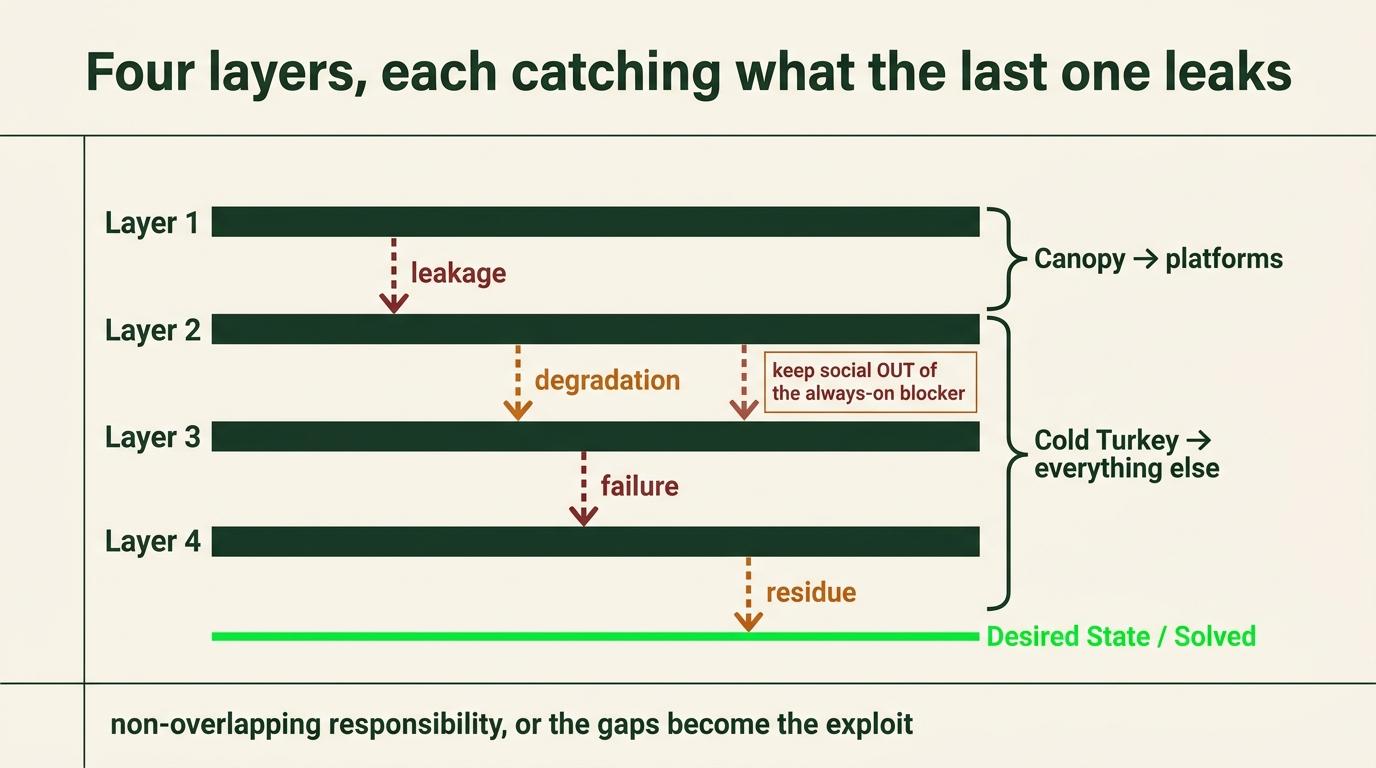
Layer 1: One Sec
Purpose: interrupt the automatic cue-to-behavior sequence.
Platforms: phone and browser.
Price: free for limited use. one-sec.app for current Pro pricing.
Puts a pause between you and a flagged app or site. Delay, breathing prompt, or a confirmation check depending on configuration.
Setup: flag categories rather than individual apps. Set the delay long enough to be annoying.
Where it fits: mild problems on its own, or the first barrier in front of the stronger layers. Easy to push through when the urge is strong, so it is not the whole answer for a real pattern.
Layer 2: Canopy
Purpose: restrict apps, sites, and content at the device level.
Platforms: iPhone, iPad, Android, macOS, Windows, Chromebook.
Price: canopy.us
Setup, in order:
- Configure the blocks aggressively. Calls and essential functions stay working.
- Turn on the accountability structure. Canopy's adult plans include Ally, where somebody gets notified if protection changes and loosening it requires their approval.
- Use the human option rather than the private AI one. The mechanism depends on a real person who might say no, and an AI is something you can talk into unlocking things.
- If the partner structure is not set up: generate a long random password, hand it to somebody you trust, and delete every copy off your own devices once they confirm they have it.
Never use a memorable code. Somebody can read you four digits and you will still have them two minutes later. That is the actual difference from iPhone Screen Time.
My setup: my business partner holds my passwords. Not a vault I control, a person. The friction is social and I cannot argue my way past it at eleven at night.
For legitimate access: request a defined window of ten to twenty minutes, do the specific thing, restore the restriction.
Heads-up before pointing a teammate at it: Canopy's current marketing leans heavily toward pornography-blocking and recovery. It still does the general job, it is just not the first thing you see on the site.
Layer 3: Cold Turkey
Purpose: scheduled, difficult-to-bypass blocks on a computer.
Platforms: macOS and Windows.
Price: free version available, Blocker Pro is a one-time purchase. getcoldturkey.com
Once a block is locked you cannot disable the extension or uninstall the software. No passcode, nothing to delete your way out of.
Setup:
- Import the premade website lists, then remove the handful of sites you actually need. Ten minutes, and it catches a hundred things you would never have thought of. Subtracting from a comprehensive list beats adding to an empty one.
- Set the schedule to 23 hours a day, with a one-hour configuration window at a time you are never awake. Mine is 4 to 5am, which doubles as a filter on whether a change is necessary.
- Block: news, shopping, streaming, entertainment forums, plus email and messaging during protected blocks.
Keep social media out of Cold Turkey. If Canopy grants an unblock for a legitimate reason and Cold Turkey is still blocking the same site on the same machine, you are locked out at exactly the moment you needed in, with no resolution until 4am.
Canopy owns the platforms. Cold Turkey owns everything else.
Layer 4: Physical separation
Purpose: remove access to the device entirely.
Product: Vaydeer Metal Timed Lock Box.
Metal body, plastic lid, USB-C charging, child lock, audible prompt, emergency unlock via the seller or an included service card.
Vaydeer sells several similar boxes at different sizes. Confirm dimensions on the listing before quoting them.
Prerequisites, or this will not survive a week:
- Batch-schedule content instead of publishing through the day.
- Move as much messaging as possible onto the computer.
Then: phone in the box in the morning, box in the car. Mine is parked about three hundred yards away, down several flights of stairs. Far enough that retrieval is genuinely annoying rather than mildly inconvenient.
The distance is the variable. Widen the gap until the gap wins.
Test before any long lock:
- Calls still come through
- It charges while locked
- You understand exactly how the emergency unlock works and what it costs
- Alarms are audible
- No authentication code or work app is trapped inside for the duration
The emergency process only stays useful while it is reserved for actual emergencies.
Step 6: Handle the platforms you genuinely need
Running ads, checking the Ads Library, researching hooks, studying competitors, publishing, and reviewing creative all genuinely require the platforms. The goal is stopping research from becoming an unlimited permission slip.
The structure that actually works: a designated window with an output attached.
If the block produces a written list of hooks, a competitor teardown, or a creative brief, it was research. If it produces nothing, it was scrolling with a justification. Attaching a deliverable resolves most of the problem by itself.
Other structures that hold:
- A separate browser profile. Platforms in the work profile, not the personal one. Switching is a deliberate act rather than a tab.
- A secondary device for business research only. No personal accounts, no notifications.
- Desktop access while the phone stays blocked. The one I lean on most, because research needs a real screen and the phone is where the compulsive version lives.
The YouTube expand trick
Best tactic in this section.
- Search on Google, go to the video tab.
- Each result has a small expand icon.
- Click it and the video plays inline in the search results rather than sending you into YouTube.
No recommendation feed, no sidebar, no browsing. You have to search for something specific to reach anything at all, and clicking through to the official link gets caught by the blockers.
Canopy can block the expand behavior too if you want it gone entirely.
If you cannot find it: the button sits in the video player controls and the label varies by browser version. Hovering the player controls and looking for the expand or theater-mode icon finds it in every version I have used.
Step 7: Stop interrupting yourself
The layers stop the phone. They do nothing about the tabs you open yourself.
- One task, one window, one output at a time. Close everything belonging to a finished task before opening the next.
- Log out of platforms after necessary use. Leaving one open means the next moment of friction has an exit ramp already built.
- Phone out of the room during a protected block, rather than face-down on the desk.
- Finish the loop before opening another one. A half-done thing takes attention until it closes, which is why ten half-finished tasks feel heavier than three completed ones.
One exception, and only one. A complete unit of work submitted to an AI and genuinely processing is a closed handoff rather than a half-done thing. The loop is finished on your side and you are waiting on a machine.
The test is whether something is actually pending. If it is, moving to the paired project is bounded interleaving. If the honest answer is that the current task became difficult or ambiguous, that is the failure this step exists to prevent, and it will happily disguise itself as a wait state.
The pairing test: does combining these two things train the attention mode I want more of? A podcast on a walk trains nothing bad. Instagram open beside a document trains exactly what you are removing.
Step 8: Organize so you can find your place
Group tabs by project
One group per active project, holding the specific documents and applications and references that piece of work needs.
Collapse the group when the project is not active, or save it and close the window entirely.
Nothing gets thrown away, it goes into a labelled drawer, and coming back means opening one group instead of rebuilding context.
Use it as an end-of-day close. Work goes into a group, window closes, and the day reads as finished rather than paused.
Project Windows
Tab groups keep a project together. Windows keep projects apart, and the second is what stops four projects collapsing into one undifferentiated browser surface.
Both Mac and Windows let you name a window. Most people use tab groups and never touch this, which is why the layer exists and nobody uses it.
The model is four rules.
| One project per named window | Four live projects means four named windows |
|---|---|
| One task holding active human attention at any moment | This is the part that does not bend |
| Multiple windows may stay available | They are organised working contexts, not four things you are doing at once |
| Switching happens at an explicit wait point | Not whenever the current task becomes uncomfortable |
Available and active are different states. A window that exists is not a project you are working on. It is a project whose context is preserved so you do not have to rebuild it from memory when you get there.
The method
1. Every active project gets its own clearly named browser window.
2. The tabs inside it form a left-to-right working roadmap. Source material, then conversations, then drafts, then references, then whatever remains. Reading the window left to right should tell you where the project is.
3. A tab belonging to another project moves into that project's window. If the same source legitimately supports two projects, the link can exist in both. That is not duplication, it is two contexts that both need it.
4. Arrange the windows in visible execution order. Nearest work closest to the utility window, and projects move forward as windows clear.
5. Keep a utility window on the far left. Toggl, the repeating fifteen-minute reminder, and whatever music, white noise or focus audio you are running. It is the only window that is not a project.
6. Rename every project window objectively, so you can see what is active without reconstructing it from memory.
7. Treat tab scanning as a warning signal. Moving anxiously through unrelated tabs is what it looks like when unresolved ideas and projects have collapsed into one surface. It is a symptom rather than a habit.
8. Clearing a window should represent real progress, not deleting useful context to manufacture tidiness. An empty browser and an unfinished project is not a win.
Why this works
The browser becomes an external working-memory surface.
Projects, references and unfinished ideas stop competing inside one undifferentiated pile of tabs. You can see the path through the work without holding the relationship between every tab and every project in your head.
And it does that without converting every temporary thought into a task. Most of what is open right now is not a commitment. It is a source you are part way through, a conversation you will return to, or an idea you have not decided about. Forcing all of that into a task system is administrative work that produces nothing.
Working context is not a durable record
A browser window is a temporary execution surface. It holds where you are, not what you have committed to.
It is not the source of truth for ownership, deadlines, commitments, approved decisions or final outputs.
Durable information moves out when it becomes real. A source that turns out to be a reusable asset goes into the project document. A decision that becomes a commitment goes into the task system with an owner and a date. Everything else can stay a tab and then stop being one.
Do not require every tab to become a task. That is the failure mode this replaces.
How this changes by tier
| Serious | Current project loaded, plus at most one authorised wait-state project. Save or close everything else |
|---|---|
| Moderate | Multiple named windows may persist. One or two receive active attention |
| Mild | Broader flexibility is fine. Tab scanning triggers an immediate return to the named structure |
On hardware. If your machine cannot hold many loaded windows, use saved tab groups, browser sessions, or fewer windows open at once. The number of windows I run is evidence from my implementation rather than a requirement.
AI wait-state interleaving
An explicit exception to ordinary context switching, and the only one in this document.
Modern AI work creates real dead time. You submit a complete instruction, analysis request, render or revision, and you cannot productively advance that exact thread until the result comes back.
Staring at that screen is not deep work. It may simply be idle time wearing the appearance of focus.
The cadence I actually run
Two projects, paired by cognitive mode.
| One demanding exploratory project | Usually developed through twenty to forty minute Apple Voice Memos |
|---|---|
| One lighter refinement or review project | Usually shorter six to eight minute Wispr Flow instructions and exchanges with Claude or ChatGPT |
The loop: submit a complete unit of work, leave an obvious re-entry cue, move to the paired project while the AI processes, return when the result is ready.
Voice Memos and Wispr Flow are what I use. They are an example rather than a required stack.
This is bounded interleaving, not multitasking
The rules are what make it bounded.
Switch only at an explicit external wait point. Something has to actually be processing.
Do not switch because the current task got difficult or ambiguous. That is the ordinary failure this document exists to prevent, and it will disguise itself as a wait state if you let it.
Pair different cognitive modes. Exploratory thinking with refinement, review, cleanup, or something already understood. Two demanding projects at once is not interleaving.
Keep the number of actively interleaved projects low, even when more windows stay organised. Two is usually the number.
Leave a visible resume cue before you go. A half-typed line, an open document at the right place, a note. Re-entry cost is what decides whether this works.
Judge it on data. SOP 4 measures this directly, and it records active human attention rather than unattended AI processing, which is what makes interleaving visible in the numbers.
If re-entry cost exceeds the time recovered, stop using it.
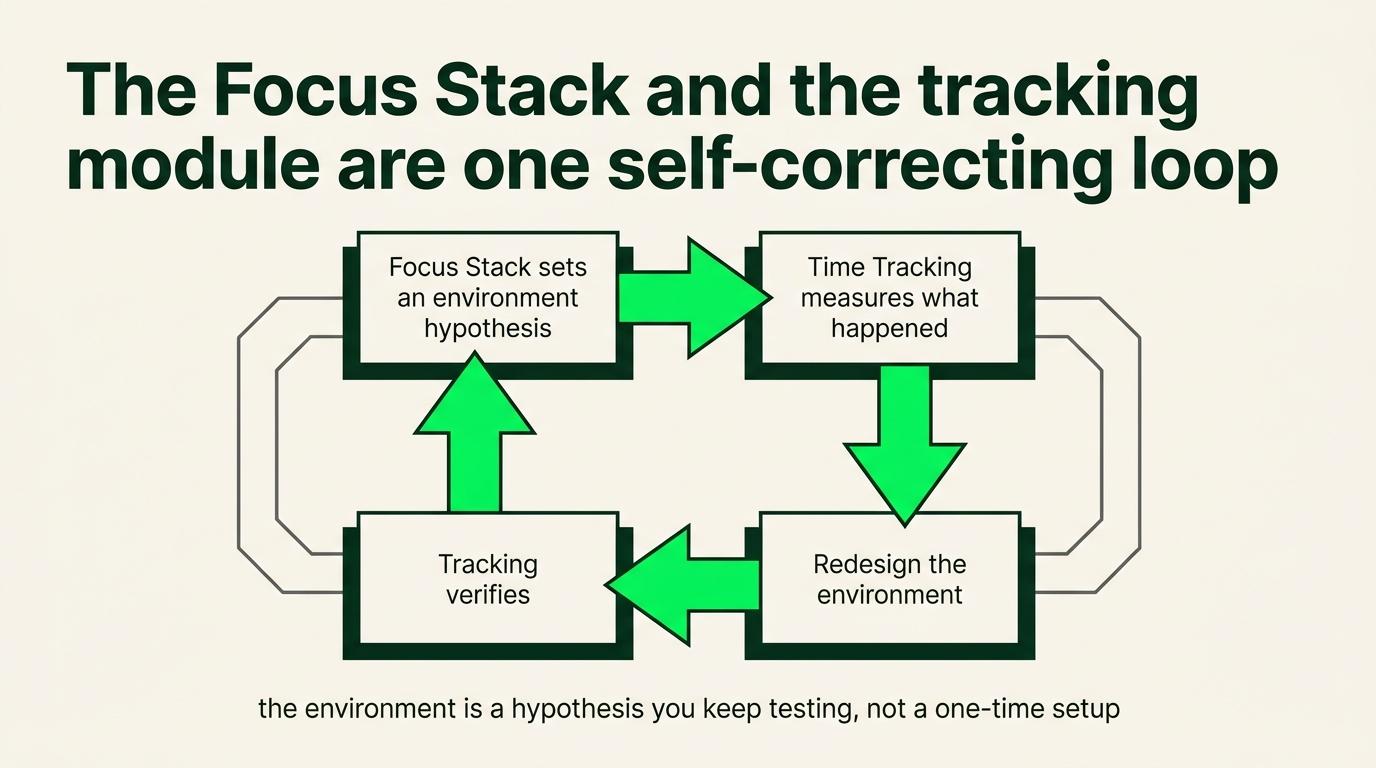
This is the loop the whole stack runs on. The Focus Stack sets an environment hypothesis. Radical Time Tracking measures what actually happens inside it.
You redesign based on the evidence, and continued tracking verifies whether the redesign worked. Project Windows and bounded interleaving are what that loop produced for me. Your data may say something different, and that answer is equally valid.
Both of these are still subtraction
Project Windows subtract visual ambiguity. Bounded interleaving subtracts dead AI waiting time.
Neither adds a new thing to manage, and neither turns the day into uncontrolled switching. That is the test any addition to this stack has to pass.
Where information lives, and where order lives
The document is the source of truth. The task system records the order of execution.
| Holds | Where |
|---|---|
| Information, reasoning, links, examples, the standard | Document |
| Sequence, ownership, dependencies, dates, next action | Task system |
The hierarchy:
- Project. The outcome.
- Milestone. The stages that mean something.
- Subtask. The work completing each stage.
- Checklist. Makes the next fifteen minutes unambiguous.
SOP 5 builds the recurring layer on top of this. For now the principle is enough.
When you are overwhelmed rather than facing something hard
Choose the highest-leverage visible task. Open the project context. Work on it until you can clearly state the next step.
The first several minutes feel bad, every time. Nothing clicks, and there is a pull toward checking whether another project would feel better.
Ignore the pull. The switching is what turns a hard morning into a lost day.
Two things sit underneath every one of these and they are covered in Part III of the context document rather than here: sleep, and time around people who are not asking you for anything. Both are easy to cut first and both are load-bearing, which is a bad combination.
Step 9: Test the amplifiers
Optional. Worth testing rather than adopting.
Consumption primers
Deliberately chosen input, before a specific behavior, to produce the state that makes the behavior likely.
| Before | Put on |
|---|---|
| Training | Fitness podcast, training discussion, a rant from somebody whose approach you respect |
| Work | A business conversation |
| A low-competence day | Material about skill, execution, and the standards of people operating higher than you |
| A low-belief day | Basic success or lifestyle content. Not sophisticated, and it reminds you the thing you are treating as impossible is somebody else's Tuesday |
Put a timer on it. A primer running ninety minutes stopped being a primer around minute fifteen and became a comfortable way of not starting. Podcasts feel like productivity when they are not.
The line: deliberate input selected to support the next behavior is infrastructure. The same input opened because you felt a flicker of boredom mid-task is the thing the rest of this SOP exists to stop.
Reading before work is worth testing. It seems to reset the pace your attention expects. I have not run it consistently enough to know whether the effect is real.
Audio
White or brown noise underneath instrumental music. The noise pulls down the distracting dynamic range of the music, the beat stops the environment going as flat as noise alone.
Avoid lyrics if the work involves producing language. Personal, and other people do not report the same effect.
Spotify, SoundCloud, and YouTube all have enough material to test for nothing. Brain.fm builds audio specifically for focus states.
Running two applications at once, one for noise and one for music, gives independent volume control, which is most of the value.
The reset, for when you break it
Something gets bypassed eventually. Recovery speed is the variable, not whether it happens.
- Name the exact cue.
- Name what you were feeling or avoiding.
- Work out which layer was open.
- Strengthen that layer.
- Go back to the next physical step in the work.
Twenty minutes lost is twenty minutes. Two hours spent judging yourself for the twenty is a more sophisticated version of the same avoidance.
And expect to take the layers off eventually
The pattern is consistent. A few good months, then a decision that it is not that bad anymore, then a few weeks later thirty minutes deep into something and wondering why.
The gap gets longer each time. Mine has run two to three months, then four, then five or six. The pattern is not that anybody fixes it, it is that each cycle buys more time than the last.
Put it back on and keep going.
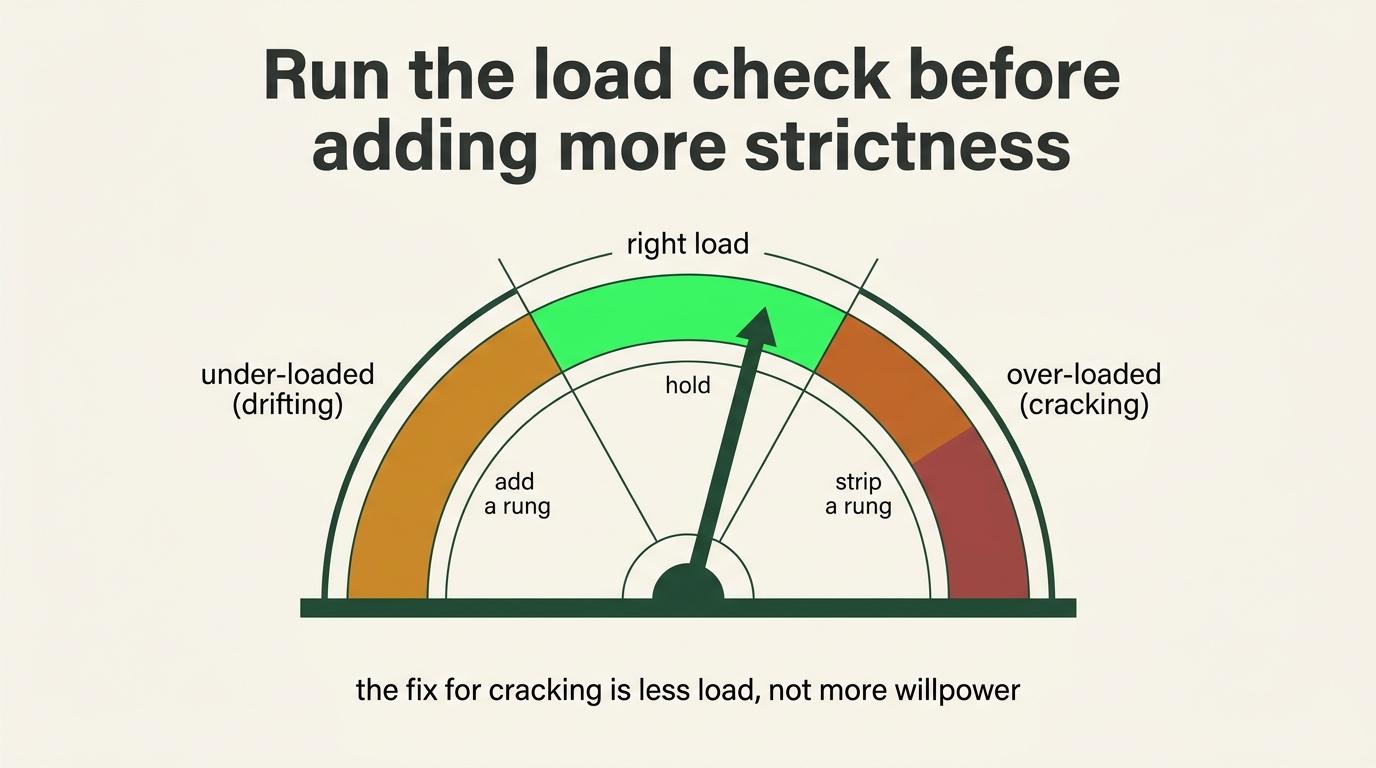
The load check
Run this monthly. The stack creates a high-constraint operating mode and it has a ceiling.
Warning signs, and several running together is the trigger:
- Work quality dropping while hours stay the same
- Emotional regulation going, meaning snapping at people who did nothing
- Fog that sleep does not clear
- Sleep breaking
- Rest that stops restoring anything
- Withdrawing from people you normally want to see
Take real recovery before it becomes involuntary. If severe or persistent, that is a conversation with a doctor rather than another productivity protocol.
The rest test: what condition does this activity reliably leave me in?
Scrolling for forty minutes and standing up feeling worse fails. A walk with no phone, a nap, a sauna, real time with people, or an hour where nothing is being asked of you all pass.
Run it honestly and a meaningful share of what you call resting is avoidance.
SOP 5 builds the quarterly version of this into an operating cadence.
By role
Founder or CEO. Least imposed structure, most authority to interrupt yourself. Protect the blocks where the strategic work happens.
Project leader, operator, integrator, or EA. You are the routing layer for everyone else's questions. Get a defensible communication window and a stated response time your team can plan around.
Technical operator or VA. The hard part of your job needs extended concentration and notification switching destroys it. Protect the deep blocks.
Sales rep, setter, or CSM. Your day is structurally reactive and that is the job. Separate the reactivity rather than removing it, so the dialing block is a dialing block and the prep block is a prep block.
Completion check
- Environment question answered, and the highest available option taken
- Highest-risk apps and sites named
- Layers matching your actual tier are running, and not more
- Accountability partner is a person rather than an AI
- Social media owned by the phone-level blocker, not locked inside Cold Turkey
- Lockbox tested before any extended lock
- Emergency access and authentication accounted for
- Research window has an output attached, if you need the platforms
- Tabs grouped by project
- You know where information lives and where sequence lives
- Loops closing before new ones open
- Two or three sentences written on the direction question
- Reset process exists
- You know your own warning signs
Next: SOP 2, Tech Teardown and Spring Cleaning.