
Radical Time Tracking
About 52 min read
If you need persuading on why any of this is worth doing, go back to The Operator's Reset.
This document assumes you are already convinced and want to install it.
What this produces
A tracked window of real behavior, sorted into six decisions, with the ones that create work turned into tasks that have owners.
Time: 15 to 30 minutes to configure. After that, tracking happens inside your working day rather than alongside it.
It is not a separate project. You are not carving out hours to run a time study. You are pressing start and stop while doing the work you were already going to do, and the review at the end is 30 to 90 minutes once.
Diagnostic window: 3 to 7 consecutive days.
Definition of Done
Facts. Every meaningful block carries a clean label under a scoring method you chose deliberately, with notes wherever the work got confusing or repeated or delayed.
Feelings. Clearer and less foggy rather than judged.
Functionality. Every meaningful activity sorted into one of the six decisions, with the ones that create work existing as real tasks and the ones that do not existing as written decisions. If the study does not change what happens next, it did not finish.
What actually breaks
Original screen recording preserved. Open the full-size GIF below when you want to view the motion; it does not autoplay in this lesson.
Before you choose a mode or a tool, know what fails, because it is not what the rest of this document spends its time on.
Twelve days of my own tracking, audited. There was a single test day early on to see how the tool behaved, then a stretch where I was not genuinely trying, then real tracking.
Twelve days is the dataset. The forty-six day window around it is context for the gaps rather than a compliance score.
| Median entry length | 17 minutes, against a 15-minute goal |
|---|---|
| Entries under an hour | 129 of 152 |
| Gaps over 15 minutes inside a tracked day | 8 in the entire dataset |
| Overlapping timers | effectively zero |
| Coverage on a day I tracked | 87 to 100% of the active window |
| Tracked time carrying no label | 28% |
The resolution habit builds itself. Once you start, you are naturally close to fifteen minutes and you barely leave holes. That is not the part that requires discipline.
A quarter of what I did track was unusable, because I started timers without typing anything. Blank time is worse than no tracking, because it looks like data and answers nothing.
Intensity is not more important than consistency
This is the lesson the gaps actually teach, and it is the opposite of what a compliance score would suggest.
Tracking six or seven hours on one day produces far more usable information than tracking nothing. A day with partial coverage still shows you where the time went. A day with no coverage shows you nothing, forever.
So the failure mode is an all-or-nothing mentality, not an imperfect day. Somebody who tracks four days a week honestly learns more about their time than somebody who runs a perfect week and then quits.
Two rules carry the module.
Type the prefix before you press start. No exceptions. This is the one that decides whether the data is usable.
A missed day does not reset the practice. Resume with the next entry, and remember that difficult days are frequently the most informative to measure.
Two ways this runs
A diagnostic and an ongoing practice. They use the same mechanics and they answer different questions, and confusing them is why people either quit after a week or never start.
| The diagnostic | 3 to 7 consecutive days, run deliberately. Enough to see the shape of a normal week. This is what produces the decisions in Step 7, and it is what the rest of this module is written around |
|---|---|
| The ongoing practice | Runs indefinitely once it is a habit. Not a study any more, just measuring. This is the default state and it is where the compounding is |
Run the diagnostic first. Three days if your week is uniform, seven if it is not.
Then keep going, without treating it as a study. A tracked week where nothing surprising happens is still worth more than an untracked one, because the surprises arrive without warning and you cannot retroactively track a week that already ended.
A focused study is the diagnostic pointed at something narrower. Somebody asks where the time actually goes on a specific project, or something feels off and you want data instead of a theory. Same mechanics, three to seven days, specific question.
Missing a day does not reset the practice
Resume with the next entry. A gap is a gap rather than a failure state, and treating it as one is how people abandon the whole thing after a bad week.
And difficult days are frequently the most informative to measure. The day that falls apart is the day carrying the most usable information about what actually breaks your attention, which makes it the worst possible day to skip on principle.
The standard when you run it: honest coverage. Not perfect coverage, and not a streak.
Step 1: Pick your mode
The same data means different things depending on why you are collecting it. Decide before logging a single entry.
| Mode | For | Window | The question it answers |
|---|---|---|---|
| Delegation | Founders and operators deciding what should leave their plate | 3 to 5 working days, repeated every 4 to 6 weeks | What work should not be mine |
| Domination | Anybody who needs more structure rather than less | Continuous, or a defined sprint | How do I make sure the best minutes go to the work that matters |
| Clarification | Understanding the true time cost of a specific task or workflow | The full duration of that task | Why does this keep costing more than it should |
Delegation Mode
The broadest version, and the hard part is ego rather than tracking.
The questions to hold while running it: What am I doing that somebody else could do? What could AI handle? What am I doing only because I never built the context to hand it off? What recurring work keeps landing back on me? What feels important without moving the business?
The belief that breaks: no one can do this like me. That is usually a sign that the context and the examples and the standard and the review loop have never left your head, rather than a truth.
If a teammate gets a task eighty percent right and a few rounds of revision train them to a hundred, it does not need to live with you forever.
Domination Mode
For the all-or-nothing worker, the chronic overworker, the context switcher, the person who can drop into deep flow and also lose an afternoon.
The belief that breaks: I should be able to rely on willpower. The system exists because willpower fails under fatigue and stress and a stack of open loops.
The warning attached is serious. It can make overwork feel justified. The question is not how to work every minute, it is how to make sure the best minutes land on the work that matters, so the healthy version includes recovery and real stopping points and honest review.
Clarification Mode
Exists because remote work hides effort. Online you see the finished task and the gap between assignment and delivery, and that gap lies.
The belief that breaks: if the task took too long, the person must be slow. Sometimes. Just as often the tool or the process or the view or the SOP or the automation or the acceptance criteria is broken.
Somebody looks slow until you notice they have been typing on a broken keyboard. For digital work that is usually the wrong CRM view, no power dialer, no automation on a repetitive step, missing permissions, an unclear SOP, or a template nobody built.
Framing decides whether this helps or poisons the team. It is help us understand the work so we can improve the system, rather than prove you were working.
Step 2: Pick your tool
Two layers, and they answer different questions. The first is the system. The second is optional and gets added when it answers a question the first cannot.
| Layer | The question it answers | Status |
|---|---|---|
| Macro | What did I intend to spend my time on, and was that allocation any good | Required. Toggl |
| Micro | What was actually happening on the computer inside that time | Optional. Rize |
Time tracking and habit tracking stay separate. One asks where attention went across the whole day and the other asks whether specific commitments happened. Merging them produces a number that answers neither.
On tracking time inside your task system. It sounds right, because it attaches time to work and work to outcomes. In practice it makes the one operation that has to be frictionless depend on your task system being structured well and being open.
A dedicated tracker is built for this and nothing else, and the one-click start is the difference between tracking and intending to track.
Delegation into a task system is a separate problem and it is not what this SOP is for. See the end of Step 7.
Toggl, the macro layer
Toggl records intention. You start a timer because you have decided to work on something, and the entry is a statement about where you chose to put an hour. That is the layer that answers whether your allocation matched your stated priorities, and it captures work that happens away from a screen.
Setup:
- Get the API token under the bottom-left avatar, then Profile settings and API Token. Only one is active at a time
- If you are storing it anywhere, put it in an environment variable rather than a document
- Skip projects and tags for now. All signal lives in the description text, and there is a reason for the "for now" at the end of this module
- Start and stop against actual work blocks, typing the convention before you press start
Rize 2.0, the optional micro layer
rize.io. Paid, and check current pricing yourself.
Rize records behavior. It watches active-window metadata and reconstructs what actually happened, which is a different fact from what you intended.
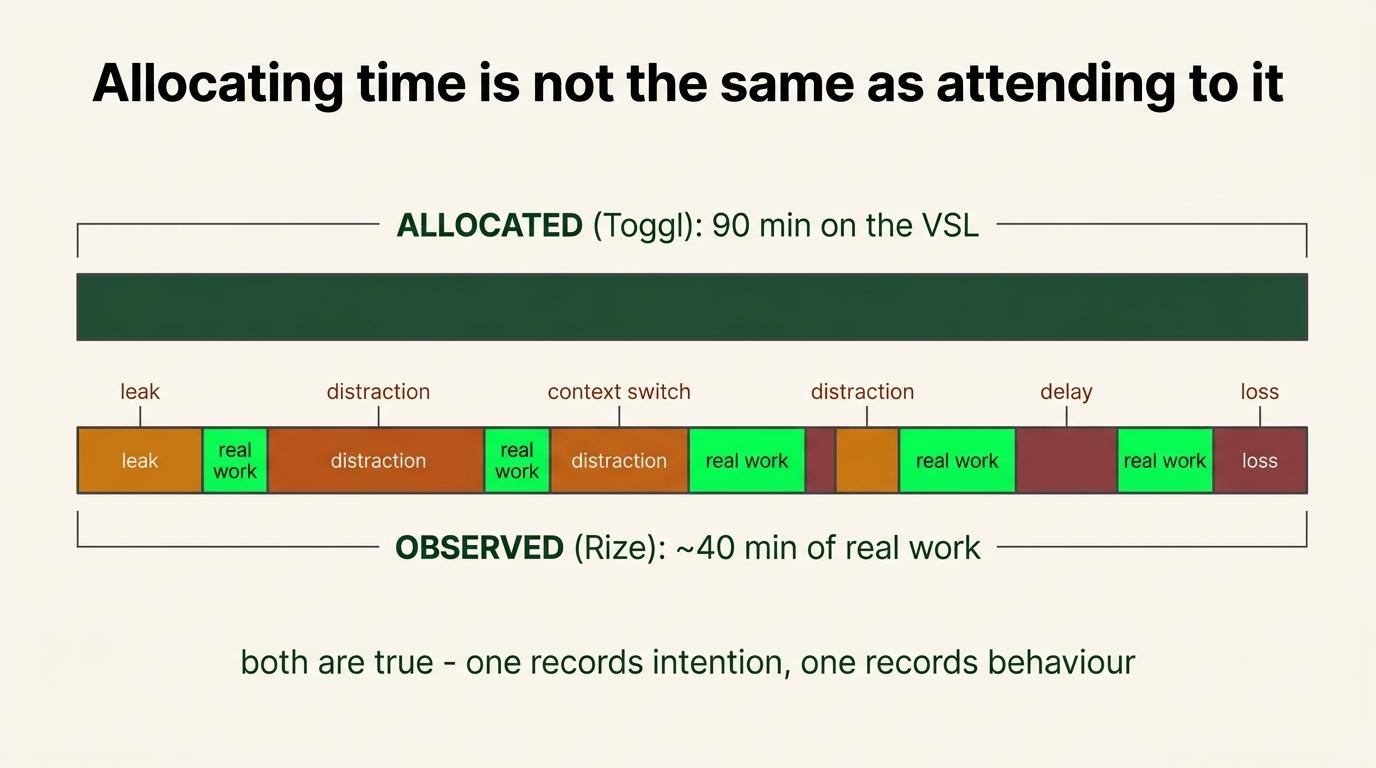
The example that makes the distinction obvious. Toggl says you spent ninety minutes on the VSL. Useful. Rize can tell you whether those ninety minutes were ninety minutes, or forty minutes of writing interleaved with chat, a browser, three docs and a pricing page you did not need to look at.
Both are true and neither is the other. Toggl says you allocated ninety minutes. Rize says what the machine saw inside them.
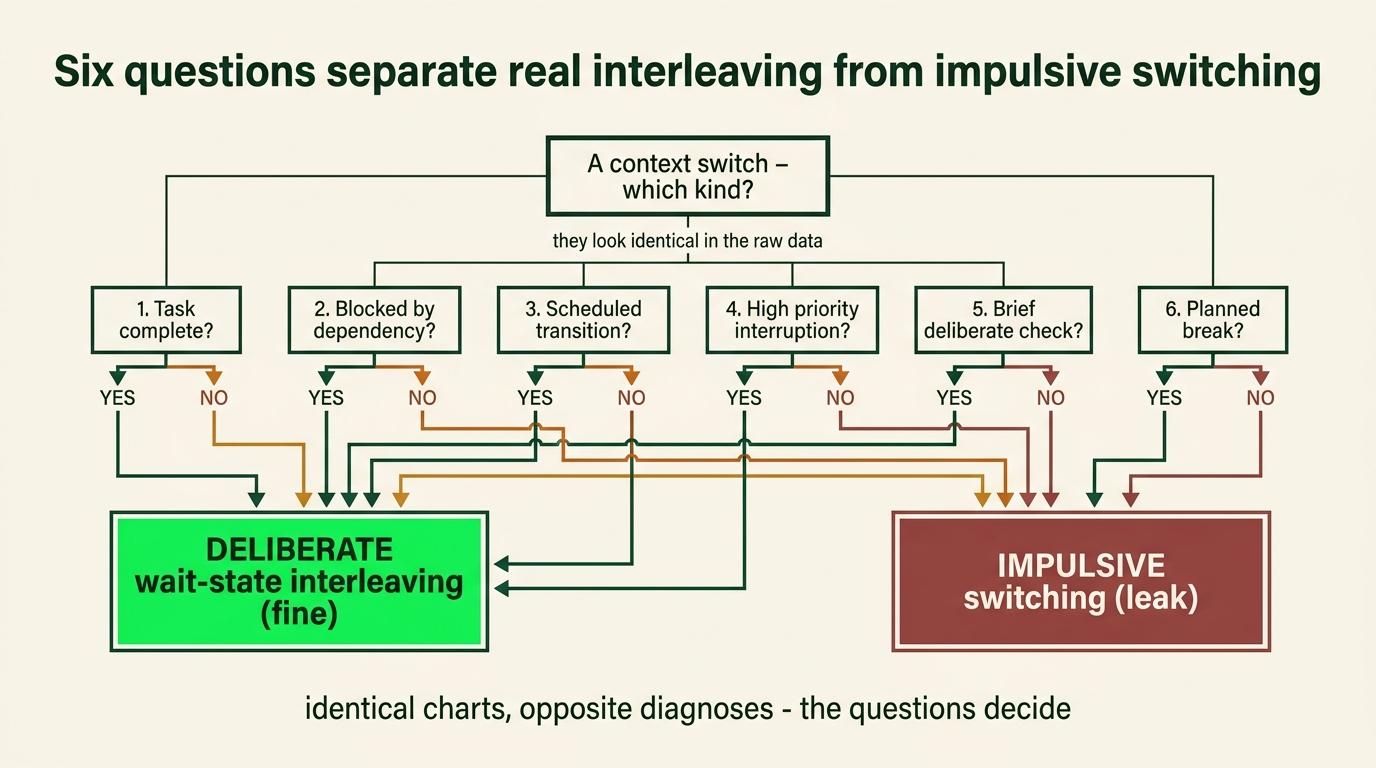
Fragmentation is evidence rather than automatically a defect. Rize can show you that the active window changed eleven times. It cannot know whether a switch was impulsive or deliberately timed around an AI process, because both look identical at the window level.
So read fragmentation against the six questions in Step 6. A fragmented block with wait points, pre-selected paired projects, clean re-entry and higher output is interleaving working. The same chart without those is the thing this document exists to fix.
Rize cannot see most of your life. It watches a computer. Work on your phone, a call, a walk where you thought the problem through, notes on paper, a whiteboard, anything away from the machine, none of it exists to Rize. Toggl still represents all of it, because you started the timer.
So the micro layer is a lens on desktop work specifically, and treating a quiet Rize day as a lazy day is a category error. Sometimes the most productive four hours of a week leave no computer evidence at all.
What it actually does, and you do not need more than this.
It captures active-window metadata. Application, URL, window title, timestamps. Not screenshots and not screen contents. There is an event log so you can inspect exactly what is being recorded, and you should look at it once before deciding whether you are comfortable.
It classifies that activity into categories. Email, coding, design, research, meetings.
Categories drive whether time counts as work, whether it counts toward focus, whether idle detection applies, and whether it triggers a distraction warning. Keep them broad. The common mistake is a category per project, which duplicates work you are already doing elsewhere.
It detects sessions. Focus, meeting, break. Which is a guess about your working mode rather than a statement about what you produced.
It proposes entries you approve or correct. The raw activity is evidence. The approved entry is a record. Those are different things and the gap between them is where your judgment goes.
The setting that matters most. For continuous tracking, disable the scheduled days rather than building a midnight-to-11:59 schedule. Rize then runs unless you manually pause it.
The trade: under that configuration a manual pause may not resume on its own, and if you pause and forget you lose the day without noticing.
Two products, two different questions. Toggl Track records what you declared you were doing. Rize 2.0 records what was observed happening on the machine. There is no "Toggl 2.0" in this system, and the comparison is Toggl Track against Rize 2.0.
If you want to go deeper on Rize than this section goes, the full training and the original webinar are optional background rather than required reading. Everything you need to run it is above.
**Mastering Rize 2.0 training** **youtube.com/watch?v=drROMapgJmI**
Add Rize when it answers a specific micro-level question Toggl cannot.
That question is usually why a block you allocated ninety minutes to produced forty minutes of output. Toggl records what you intended. Only the micro layer can tell you what happened inside it.
There is no waiting period. Some people install both in week one and it works. The reason to sequence them is that a second system with its own configuration and its own review habit is genuinely more to carry.
The risk to know about: somebody installs it, leaves it running, and never opens the reports. Then the software collected information and changed nothing.
Step 3: Learn the labels
You are not tracking what task this was. That is the task manager's job. You are measuring one thing, and it is narrower than people expect.
{P|U} - <what it was>What the letter actually answers
One question. Were you working.
| P | You were working |
|---|---|
| U | You were not working |
That is the entire definition of P, and the narrowness is deliberate.
P does not mean high leverage. It does not mean strategically aligned, or important, or related to your central constraint, or something only you could do, or non-delegable, or intelligent, or profitable.
You can be P for three hours doing something you should have delegated in week one. You were still working. That is a real fact about your day and the tracker should record it accurately.
Whether it was the right work is a different question, it gets asked in Step 6, and cramming it into the label is what makes the label unusable.
Two layers, and they run at different times
| Layer 1 | Work state | While it happens. Mechanical, no judgment |
|---|---|---|
| Layer 2 | Work quality | When you read the data. Was it the right work, was it aligned, was it delegable, should it have happened at all |
Layer 1 measures reality. Layer 2 evaluates it.
Keeping them apart is what makes the first one honest. The moment the label carries a verdict, you start hesitating over what to type, and a tracker you hesitate over is a tracker you stop using.
| What you type | What it means |
|---|---|
| P - deep focus on the VSL | Working |
| P - reformatting a deck nobody asked for | Working. Badly, and that is Layer 2's problem |
| U - gym | Not working |
| U - doom scroll | Not working |
| U - dinner with Simone | Not working |
| U - sleep | Not working |
An entry with no prefix counts as unclassified and gets flagged rather than guessed at.
One open question on sleep, flagged rather than decided
Sleep is correctly U by the definition above. You were not working.
The arithmetic problem is real though. In my own audit, 11.5 hours of sleep sat inside U as my single largest entry, with roughly twenty more hidden in blank entries. A number that says "you worked 31 percent of your tracked time" while a third of that time was you being unconscious is not telling you much.
One possible answer is a third prefix, S, for sleep and required recovery, pulled out of the ratio so P / (P + U) measures available waking time instead.
This is proposed rather than settled. It came out of reading my own data under an older definition of the labels, and it has not been run for a full period. Start with two letters. If your sleep is landing in the tracker and distorting the read, add the third and note when you changed it, because a mid-period definition change breaks the comparison either way.
Name recurring activities the same way every time
Canonical stem first. Everything else appended after.
Right U - Morning Routine
         U - Morning Routine + House Clean Up
         U - Morning Routine + Workout + Shower

Wrong    U - Workout + Shower + Morning Routine
The stem lets you sum an activity across weeks. The suffix answers the question that summing raises, which is why one instance ran two hours and another ran forty-five minutes.
Bury the stem at the end and nothing can match it, which is how I ended up with three names for one activity and no way to count any of them.
Your stems should emerge from your own recurring data rather than getting invented upfront. Morning Routine, Training, Deep Work, Admin, Client Calls are examples of the shape rather than a list to adopt. Six or seven usually covers a life, and the right six are the ones that keep showing up.
What the labels are not measuring
Read this before labelling anything, because the common failure is a category error rather than a tagging error.
The labels work out whether work was happening. They are not a judgment about whether an activity was valuable or healthy or worthwhile.
A ninety-minute walk with a business partner discussing the business is work. Work happened, outdoors, on foot.
A ninety-minute walk with your partner relaxing is not. Both may be valuable, both may improve your life, and only one was a work function.
Sleep is not work and a nap can still be the best decision available on a given afternoon. Part III of the context document makes that case directly, and the tracker filing it under U does not contradict it. The tracker is measuring work hours, which is all it was ever for.
Do not use these labels as a moral assessment of your life. The business is supposed to improve the quality of your life, and your relationships and health and recovery matter independently of whether they land in a column.
Step 4: Decide how you score a broken block
The most consequential choice in the system, and almost nobody makes it deliberately.
The situation. You start a fifteen-minute block, get ten minutes of real focus, then check something, and the last five minutes are gone.
| Method | How it records | What it measures |
|---|---|---|
| Chronological | Ten minutes productive, five unproductive break | Accurate duration |
| Block integrity | The whole fifteen as one unproductive entry | Integrity of the focus block |
Why I use the stricter one
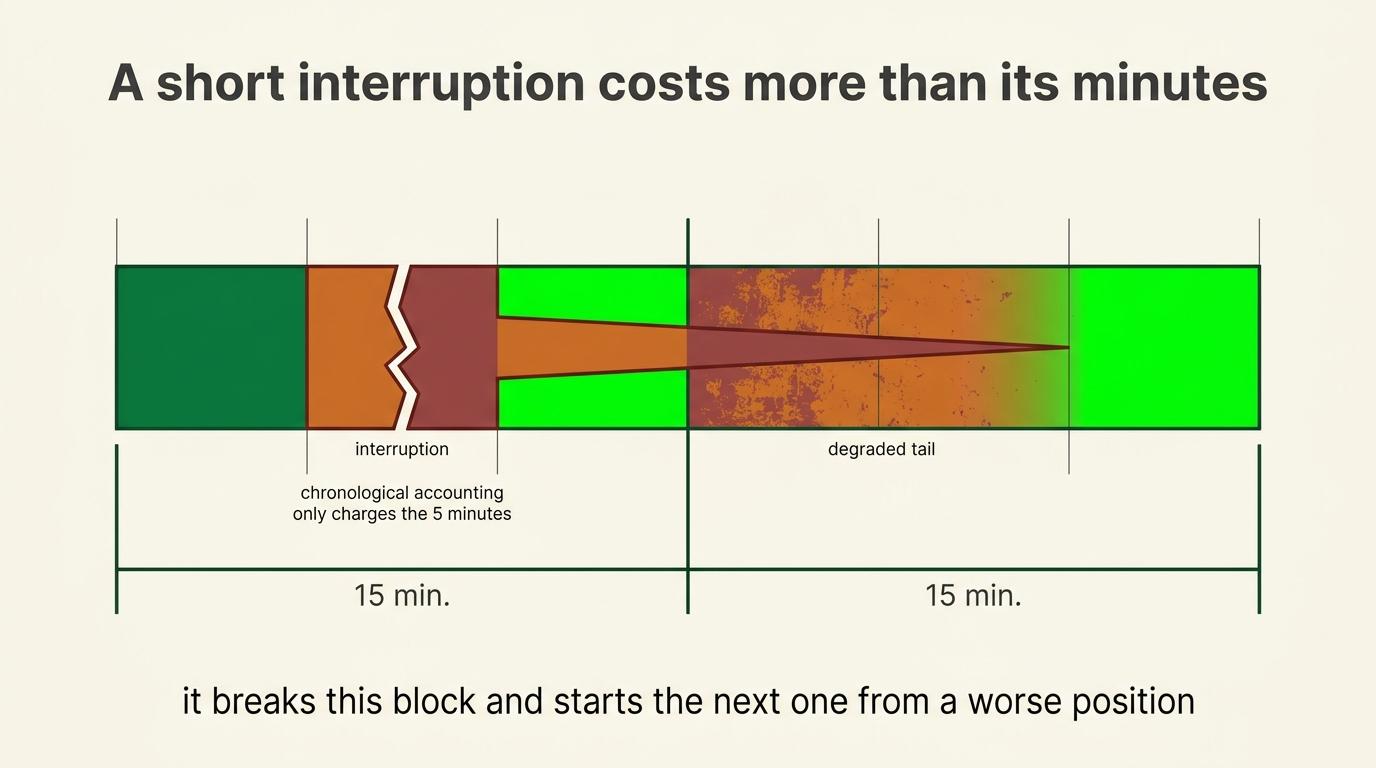
Not because I literally lost fifteen minutes of clock time. It is because the five-minute distraction damaged the full focus block.
The interruption broke the workflow, created a context switch, raised my stimulation level, and made getting back in harder, so the next block starts from a worse position. The true cost was larger than the five minutes.
Chronological accounting records the absence and misses the damage, so a day full of shattered blocks posts a respectable percentage while the actual quality was poor throughout.
I would rather the data slightly overstate the failure than hide it inside an interval that looks productive.
What counts as breaking it
Applied to every micro-interruption the strict method becomes self-punishment and produces a twenty-percent day that is not honest either.
The test: did you have to re-orient to get back in?
| Not a break | A break |
|---|---|
| Glanced at a notification and kept typing | Opened the app, read three things, came back, had to re-read your own last paragraph |
| Got up for water still holding the thread | Anything that changed your stimulation level enough that the work felt duller |
| Answered a one-word question without leaving the document |
If you genuinely cannot tell, it was not a break. The ambiguous ones are not where the damage lives.
Picking one
Stay consistent, because comparing across days is worthless if the method switches based on how the day went.
And under the definition in Step 3, this choice matters less than it used to. A broken block is still work time. You were at the desk, the work was the thing you were doing, and the interruption is a fact about the quality of that hour rather than about whether it happened. Label it P.
The one case worth a separate call. If a block collapsed so completely that no work occurred at all, that is U. Fifteen minutes where you opened the file and then answered messages for fourteen is not work happening badly. It is not work.
So what the scoring method actually decides is your duration accuracy, which still matters for two things:
| You want to know | Use |
|---|---|
| How long work actually takes, for estimates and delegation briefs | Chronological |
| True task cost for a handoff | Chronological. Inflated intervals set a teammate up to look slow |
| Whether your attention is fragmenting | Neither. That is a Layer 2 read, and the optional telemetry layer answers it far better |
A hybrid worth using where duration will matter later. Keep the real number in the note: P - VSL, broke focus, ~10min real work before the switch.
This is a measurement choice rather than a punishment. Recording that an interval fragmented is being accurate, not being disappointed in yourself.
Step 5: Run the study
- Mode chosen before tracking starts
- Window matched to the mode
- Biggest attention leaks reduced first using SOP 1, the same way you would clear the pantry before tracking food
- Convention applied consistently
- Notes added as you go on why a task ran long, what made it confusing, whether you were waiting on somebody, whether AI could have helped
Track what actually happened rather than what should have. The system only works while the mirror stays honest.
Those notes are what turn a pile of hours into a diagnosis.
Be imperfect about the right things
You will not run this cleanly and you should not try to. The question is which parts tolerate slop.
| Be imperfect about | Be strict about |
|---|---|
| Interval granularity | One entry every day, minimum |
| A missed loop that ran 30 minutes on one task | The prefix, before you press start |
| Exact boundaries | Nothing else |
| Long known non-work blocks running uninterrupted |
One imperfect tracked day beats a perfect untracked one. That is the whole discipline. My own audit found twelve tracked days out of forty-six with near-perfect resolution inside every one of them, which is the wrong ratio in both directions.
You will miss things. You will think you started a timer and find out an hour later you did not. You will lose whole afternoons.
If this makes you fifty percent more aware of where your time goes, it was worth doing badly, and a day scored at forty percent because you were honest is worth more than a day scored at ninety because you stopped tracking when it got ugly.
It gets harder when you are stressed or overwhelmed, which is exactly when the data would tell you the most. That is a known limitation of the method rather than a failure of yours. Track what you can.
And do not judge yourself. When I looked at why I was not filling entries in, the honest answer was almost never that I was too deep in work to stop. It was that I was scattered, and the gap in the data was the signal rather than the problem.
This is hard at first, and it gets easier
I do not track perfectly. I have gaps, I miss blocks, and there are days I do not run it at all.
And I am considerably more consistent than when I started, which is the actual pattern rather than the exception.
Expect the first attempts to feel clumsy. You will forget to start timers. You will remember an hour late. You will label something and then realise the label was wrong. That is what week one looks like for everybody, and it is not evidence that you are bad at this.
The reason it improves is not discipline. It is that the practice keeps showing you things you did not know, and those things change what you do. You see a fragmented morning and you restructure it.
You see a category eating six hours and you delegate it. The system gets easier because the days get simpler, and the days get simpler because the tracking told you what to remove.
The standard is a run rate that improves over time, not perfection and not a streak. The operational allowance for days that are genuinely not worth tracking is covered above, under the two modes.
What it catches that nothing else does
You catch yourself letting yourself off.
The specific version: you are "really working," and you are also watching a podcast while you do it, and you marked the block productive. Both things are true and only one of them is on the label.
That only surfaces if you are running the fifteen-minute block. At an hour of resolution it disappears into an average. At fifteen minutes it is visible, and once it is visible you stop doing it, which is most of the value.
Getting a fifteen-minute signal
After SOP 1 is installed and your environment is not fighting you, you need something that reliably tells you fifteen minutes have passed.
The requirement is a repeating signal you will actually notice. How you produce it is yours.
| A looping timer video | What I use. Set it to loop, use the expanded video view described in SOP 1 Step 6 so it does not steal the screen, and play music separately if you want it |
|---|---|
| A repeating timer app | Works fine. Some people prefer it |
| A physical timer | Works fine, and it is the least likely thing to get closed by accident |
One warning if you take voice notes. A phone alarm as the interval prompt will cut the recording. You keep talking, the phone stops listening, and you find out five minutes later that the last five minutes are gone. A looping video or a desk timer does not do this, which is most of why I use one.
What you do at each reset
Exactly one of three things, and be clear which one.
| Start a new entry | The activity changed |
|---|---|
| Update the current entry | Same activity, but the description needs the thing that got added to it |
| Check and carry on | Same activity, description still accurate. Touch nothing |
Most resets are the third one. The signal is a prompt to notice, not an instruction to type.
Long blocks
A long block is fine when it is labelled. If you are building furniture for two hours, start one entry and let it run. You do not need a check-in every fifteen minutes on a task that is not going to change. The purpose is time awareness, not compliance.
A long block with no label is almost always a forgotten timer. In my audit the four longest entries were a 12.6-hour overnight, an 8-hour overnight, and two untitled multi-hour blocks. None of those were activities. They were timers nobody stopped.
The morning fix: if you wake up to a running timer, stop it, rename it, and start the day clean.
The smell test: anything over three hours that is not obviously one continuous thing deserves a second look.
If you know you will stop by week two
Put something real on the commitment. One labelled entry a day for the length of the diagnostic, with a consequence you actually feel if you miss it.
The commitment is the entry, not a productivity number. Staking a percentage punishes you for a hard week, which is the opposite of what this is for. Staking the entry is entirely inside your control and takes ten seconds.
Tracking things away from the desk
The fifteen-minute interval structure is for work, and it is not a demand to run a timer through your entire life.
Add long personal activities as one block afterward. An hour-long walk goes in as an hour. A ninety-minute event goes in as ninety minutes.
Forgetting to enter it immediately is fine. What matters is reconstructing it honestly while you still remember.
Long activities do not need splitting into six artificial entries when they were one continuous event.
Step 6: Read the data
Reviewing means diagnosing rather than totaling.
The headline: how much of the tracked time was work at all.
How often the block broke, rather than only how much time went missing. Six broken blocks costing five minutes each is a much worse day than one clean forty-minute break, and only the count tells you that.
Where in the day the breaks cluster. Almost everybody has a window where concentration reliably fails. Mid-afternoon, right after a meeting, or immediately after the first real difficulty in a task. That cluster is a scheduling or energy problem rather than a character one.
What you switched to, because the destination tells you what the break was for.
| Switched to | Usually means |
|---|---|
| Avoidance of ambiguity | |
| A feed | Understimulation |
| A different work task | Avoidance, an unclear next action, or a deliberate AI wait state. The surrounding evidence decides, and the six questions in this section are how you tell |
Re-entry cost around scheduled events. Look at the hour before and after every appointment. A sixty-minute call reliably costing two and a half hours is a scheduling decision waiting to be made.
Actual work hours versus perceived effort. I have said I worked twelve hours on days where I worked five and a half and was available for twelve.
Estimated versus actual on at least one project. The gap is where planning breaks.
Scope you added past the original estimate. A two-hour task takes five because somewhere in hour two you decided it should also do three things nobody asked for.
The energy cost of low-leverage work, rather than only the minutes. Some work costs disproportionate energy because it is fiddly or ambiguous or requires holding several systems in your head.
The frustration cost of working on something misaligned. Doing work you privately believe does not matter is more expensive than doing hard work you believe in, and it shows up as an unexplainable low-output afternoon unless you noted it.
Personal and social time. Track it. The dinner you have been avoiding because it will kill the evening takes two and a half hours.
Return on time, before you judge anything
Layer 1 established that work happened. That is deliberately not the same as establishing that the work was worth doing.
Somebody can spend four completely focused hours on something that should have been eliminated, delegated, automated, simplified, or never started. Every one of those hours is honestly P. The label is doing its job.
The question Layer 2 opens with is what the time actually purchased.
Productivity = valuable output / time investedDo not calculate that. It is a lens rather than a metric, and turning it into a number is how you end up managing the number. Five hours maintaining something can purchase less than two uninterrupted hours building the thing that removes the maintenance permanently.
Keep the tracker mechanically honest. Do not let leverage, importance, profitability or strategic alignment contaminate the P label. A P block is still just work. The return question happens afterward, here, with the data already collected.
Why seeing it creates urgency
The mind protects the ego by minimising interruptions. It tells you there was nothing else you could have done, and it does this instantly and convincingly, every single time.
Tracking removes the argument. A forty-five minute interruption is not forty-five minutes. It is forty-five minutes plus however long it takes to get back to where you were, which is frequently another fifteen.
The question that changes what you do about it
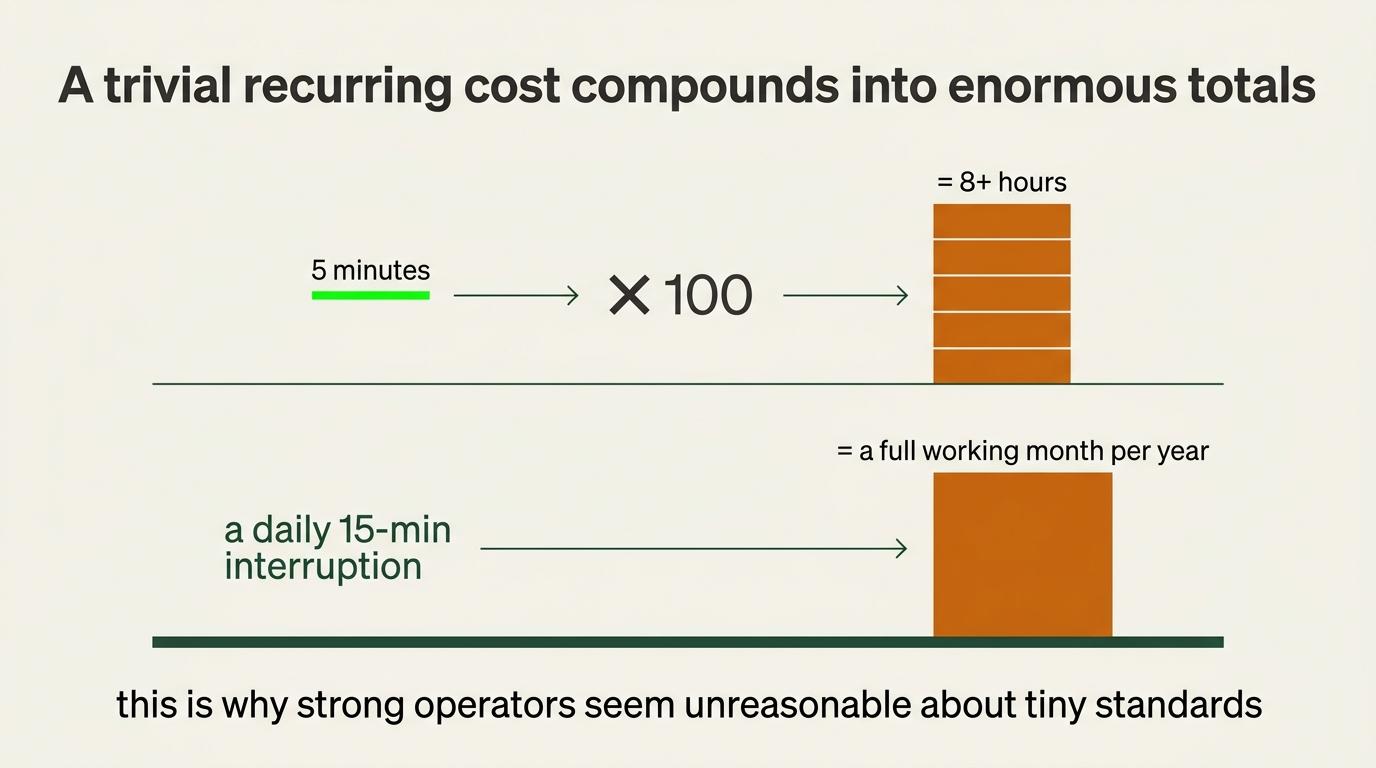
What would this cost if it happened one hundred times?
The intensity is never about the single five-minute delay. It is about the pattern that one event represents, and one hundred is roughly what a year looks like for anything that happens twice a week.
Five minutes becomes eight hours. A daily fifteen-minute interruption becomes a working month.
This is why strong operators look unreasonable about small standards. They are not defending against the instance. They are defending against the repeated version, and they have usually done this arithmetic once and never forgotten it.
Time is finite and unmeasured time gets surrendered
You do not have unlimited time, and subjective time appears to speed up as you get older.
One popular explanation is that each year is a smaller fraction of the life you have already lived. Treat that as one theory rather than settled science. Novelty, memory formation, attention, routine, emotional intensity and how the brain segments events are all implicated, and the research does not agree on the weighting.
The practical argument does not depend on which theory is right. Time is finite, and time you never measured is time you gave away without deciding to.
Not all switching is the same
Three kinds, and the data looks similar for all of them. Sorting them is most of what makes a switching diagnosis useful.
| Impulsive | Discomfort, novelty, ambiguity or distraction moved you |
|---|---|
| Necessary | A meeting or an external interruption moved you |
| Deliberate wait-state interleaving | You submitted work to an AI, hit a real wait point, and moved to a paired project. SOP 1 builds this on top of Project Windows |
The third one is the exception SOP 1 introduces, and it is the reason a raw switch count is not a verdict.
Six questions that separate the third from the first
Ask these of any switching pattern before concluding anything.
- Did the switch happen at an explicit wait state, or at a moment of difficulty?
- Was the second project already selected, or did you go looking?
- Was there a clear re-entry cue left behind?
- Did you return without rebuilding the original context?
- Did the switching recover time that would otherwise have been idle?
- Did total useful output increase enough to justify the re-entry cost?
Mostly yes is bounded interleaving working. Mostly no is impulsive switching with a better story attached to it.
This is the loop closing. SOP 1 set an environment hypothesis. This module measures what actually happened inside it.
You redesign the environment based on the evidence, and the next tracked window verifies whether the redesign worked. Bounded interleaving only earned its place here because the numbers said the recovered time exceeded the re-entry cost. If yours say otherwise, the correct move is to drop it.
Tab scanning in the same window is the other tell. Moving anxiously across unrelated tabs is not interleaving, because nothing was submitted and nothing is pending. SOP 1 treats it as a warning signal rather than a habit, and it usually means the project boundaries have collapsed.
My own pairing, as an example rather than a stack to copy: one demanding exploratory project developed through twenty to forty minute Apple Voice Memos, paired with one lighter refinement project handled through shorter Wispr Flow instructions. The tools are incidental. The pairing of cognitive modes is the part that matters.
What Toggl is actually recording
Active human attention, not unattended AI processing.
Once a prompt or job has been submitted and you have moved to another project, the timer follows your attention rather than the machine's. The AI working is not you working.
This is why some fifteen-minute intervals read P - [Project 1] + [Project 2]. That is not sloppy labelling. It is an accurate record of an interval where attention genuinely moved at a wait point, and it is the entry shape that makes interleaving measurable later.
Layer 2: now ask whether it was the right work
Layer 1 told you what happened. This is where judgment goes, and it goes here rather than into the labels for the reason in Step 3.
On the P time, ask five questions.
Was this aligned with the current priority. Was it leverage, or was it motion. Should somebody else have done it. Should it have happened at all. Would I do it again next week knowing what I know now.
The fourth one first, always. Elimination is the only answer that gives the time back completely rather than moving it, and Step 7 covers what to do with the answers.
On the U time, sort recovery from leakage. Both are correctly not-working and they are not the same thing. Forty minutes with people and forty minutes scrolling both read as U and only one of them returns anything.
You are reading descriptions here, not labels. That is the point of keeping the labels mechanical. In my own data these were roughly nine hours of naps sitting next to three hours of podcasts, appearing as one twelve-hour number until I looked at what was actually in it.
The re-entry practice, for the gap after an interruption
The expensive part of an interruption is the gap afterward rather than the interruption itself.
After a walk or a call or an appointment you land in an intermediate state, no longer doing the previous thing and not restarted either. That is where the scrolling and the sitting around and the waiting to feel motivated happens.
The tracker gives that moment a cue. Get back to the desk, turn the timer on, and most of the negotiation disappears, because now you have to decide what you are willing to record.
Am I starting a productive block, or knowingly logging fifteen minutes of random browsing?
You do not need to feel motivated. You need to begin the next tracked interval.
It also separates fatigue from avoidance
If you cannot bring yourself to start, you now have to make an honest call about whether you need to work or whether recovery is correct.
Without the tracker you spend an hour doing something meaningless while telling yourself you are resting, and that hour produces nothing and restores nothing, which makes it the most expensive one in the day.
With it, you either begin a productive interval or intentionally choose recovery. The nap still sits outside the work total and that is correct, and it means you made a deliberate decision instead of losing the hour unconsciously.
When the data looks wrong, check the instrument first
This applies to the optional telemetry layer hardest and it applies to all of it.
I have had stretches where Rize showed almost nothing and I assumed I had a bad week. Days later I found out the application had updated and had not been capturing properly, or permissions had changed, or it was sitting paused from something I did on Tuesday.
Incomplete data almost always has a capture explanation before it has a behavioral one.
The order to check. Is it running, meaning paused state and application open. Is it current, because updates change permissions more often than you would expect.
Are permissions intact, since accessibility and screen access reset on OS updates. Is it the right device.
Is the schedule right, because a schedule you set months ago is still running. Then, and only then, conclude something about the week.
The rule this produces: system health before human judgment.
A tracker that stopped recording and a person who stopped working produce identical charts. One of those is a five-minute fix and the other is a real conversation, and getting them backwards costs you either way.
You either beat yourself up over a broken permission, or you accept a genuinely bad week as a software glitch.
Write down which one it was. A note on the day saying the tracker was paused Tuesday through Thursday is what stops a future read of the same chart producing a wrong conclusion.
The same principle goes one layer down when an integration looks broken. Validate the exact credential before building any theory about the platform. A dead key and a fundamental incompatibility look identical from the outside, and the second explanation sends you reading about subscription tiers and API versions for a day.
What an AI job does with two layers
If you are running the optional AI layer, having both layers becomes concrete.
The AI job is not another tracker and not another dashboard. It reads the evidence streams you already have, compares them, and notices when they disagree.
The disagreement is the signal. Toggl says six hours of work yesterday. Rize says almost no computer activity.
One of those is wrong, or neither is, and the possibilities are worth different responses. You were working from your phone, which is fine.
You were in meetings, which is fine. You were thinking or working offline, which is fine and worth noting.
The tracker stopped, which needs fixing. Or you logged time you did not work, which is worth being honest about.
Its job is to surface the mismatch in Command OS and ask, not to decide which one it was.
The same shape applies across everything eventually. Habits should show activity. Toggl should show work. Rize should make sense relative to Toggl for desktop work specifically. Your task system should show execution. Your calendar should show the intended structure.
No single one of those is the truth. The picture is the truth, and the useful moments are where two streams contradict each other, because that is where either the system or your account of it is wrong.
Redesign the calendar around the work
Tracking answers where the time went. This answers where future time should go, and skipping it is why time studies so often change nothing.
Finding eight wasted hours does not make anybody more productive. Those eight hours get immediately refilled with Slack, approvals, inbox and reactive work, and the person becomes busier without becoming more effective.
So the review has two questions rather than one. What should disappear, and what deserves the space that becomes available.
Maker work and manager work
Two fundamentally different ways work produces value. Neither is better. They need different calendar structures.
| Manager work | Maker work | |
|---|---|---|
| Produces value through | Interaction, coordination, information, decisions | Creating something that did not exist |
| Looks like | One-on-ones, approvals, client calls, interviews, reviewing, training, reporting | Writing, coding, editing, designing, building a funnel, developing strategy, recording, building an SOP |
| Productive unit | 15, 30, 45, 60 minutes. Moving between things is the work | Often three hours, half a day, a whole day |
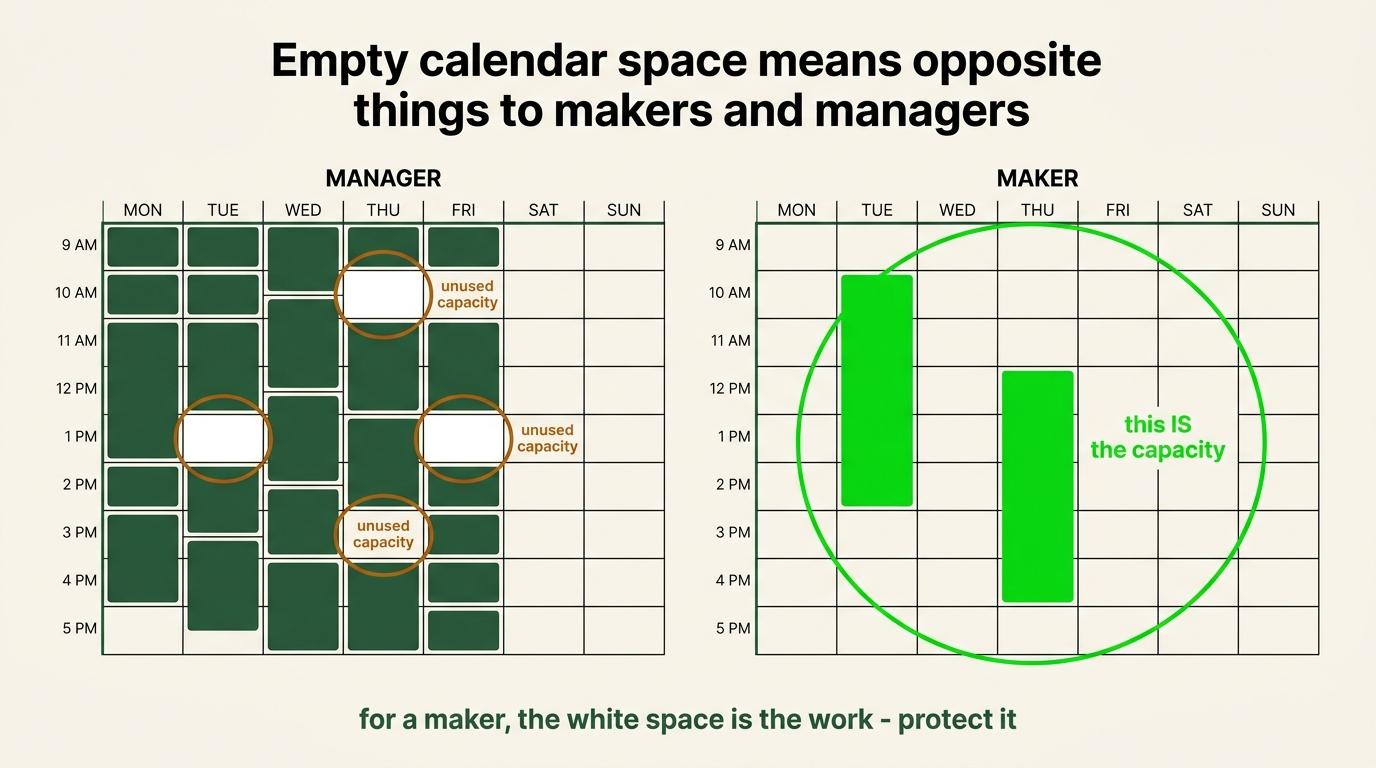
| Empty calendar space is | Unused capacity | The capacity |
That last row is the whole section. For a manager, filling an open slot with a useful conversation increases output. For a maker, the open slot was the output.
Do not turn these into identities
You are not a maker or a manager. Most founders and most operators do both, frequently in the same week.
Monday might be strategy, writing an offer, building a system. That is maker work. Tuesday might be one-on-ones, reviews and decisions. That is manager work. Same person, same job.
The useful question is not which type of person am I. It is what kind of work am I trying to do in this block, and then design the block around that.
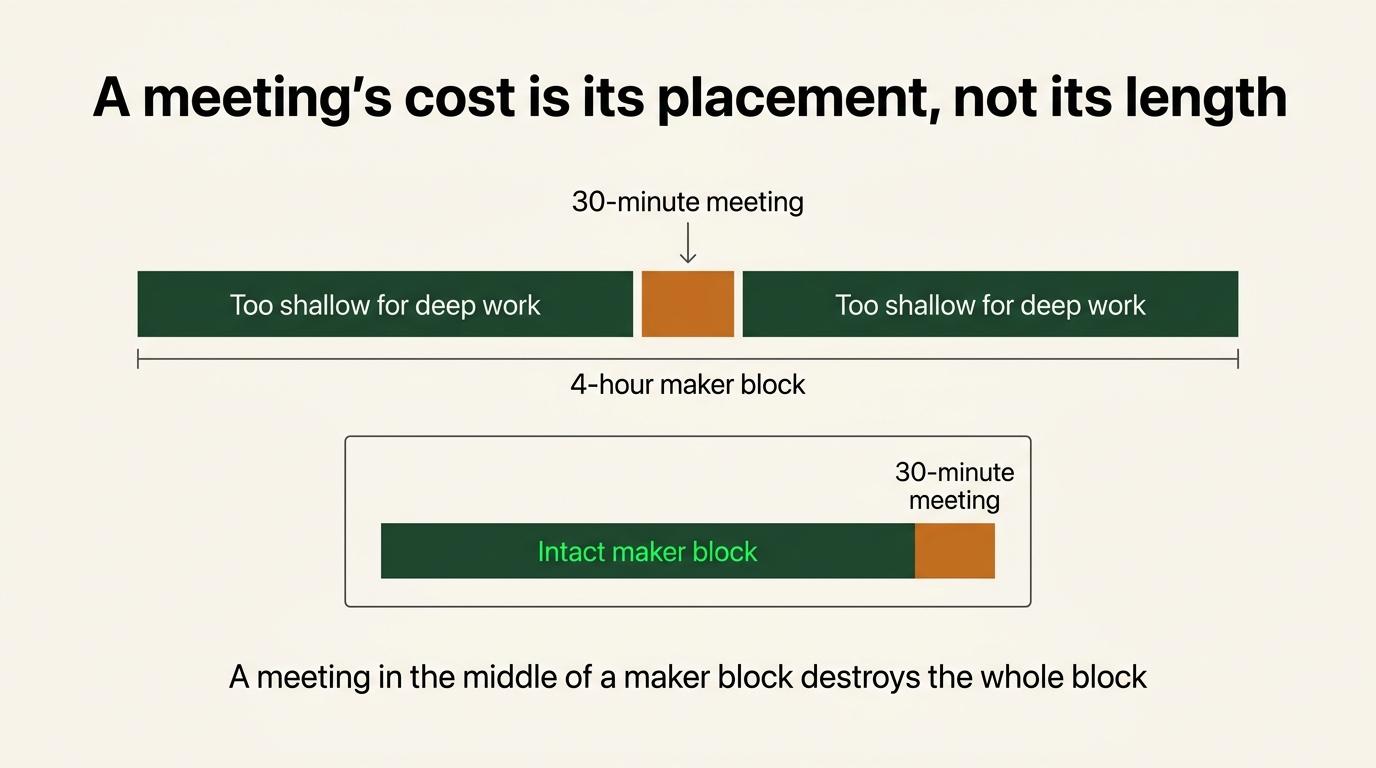
The cost of a meeting is not its duration
A manager with twenty usable slots loses one to a thirty-minute meeting. A maker with two meaningful production blocks can lose half the day's capacity to the same thirty minutes, if it lands in the middle of one of them.
Identical meeting. Wildly different price. Which is why evaluating meetings by their scheduled length is misleading.
And the shadow cost is real. An interruption consumes more than its minutes. There is anticipation before it, preparation, the loss of depth, the switch, the recovery, and the difficulty getting back to where you were.
A four-hour maker block with one thirty-minute meeting in the centre does not produce three and a half hours of maker work. It frequently produces two fragments of shallow work.
So the review question is: what did this appointment do to the hours around it? If a one-hour call reliably destroys forty-five minutes before and forty-five after, its real cost is closer to two and a half hours. That does not mean it should go. It means the decision should use the actual number.
Three stages of calendar design
As you get more control over your own calendar, the separation can get more aggressive.
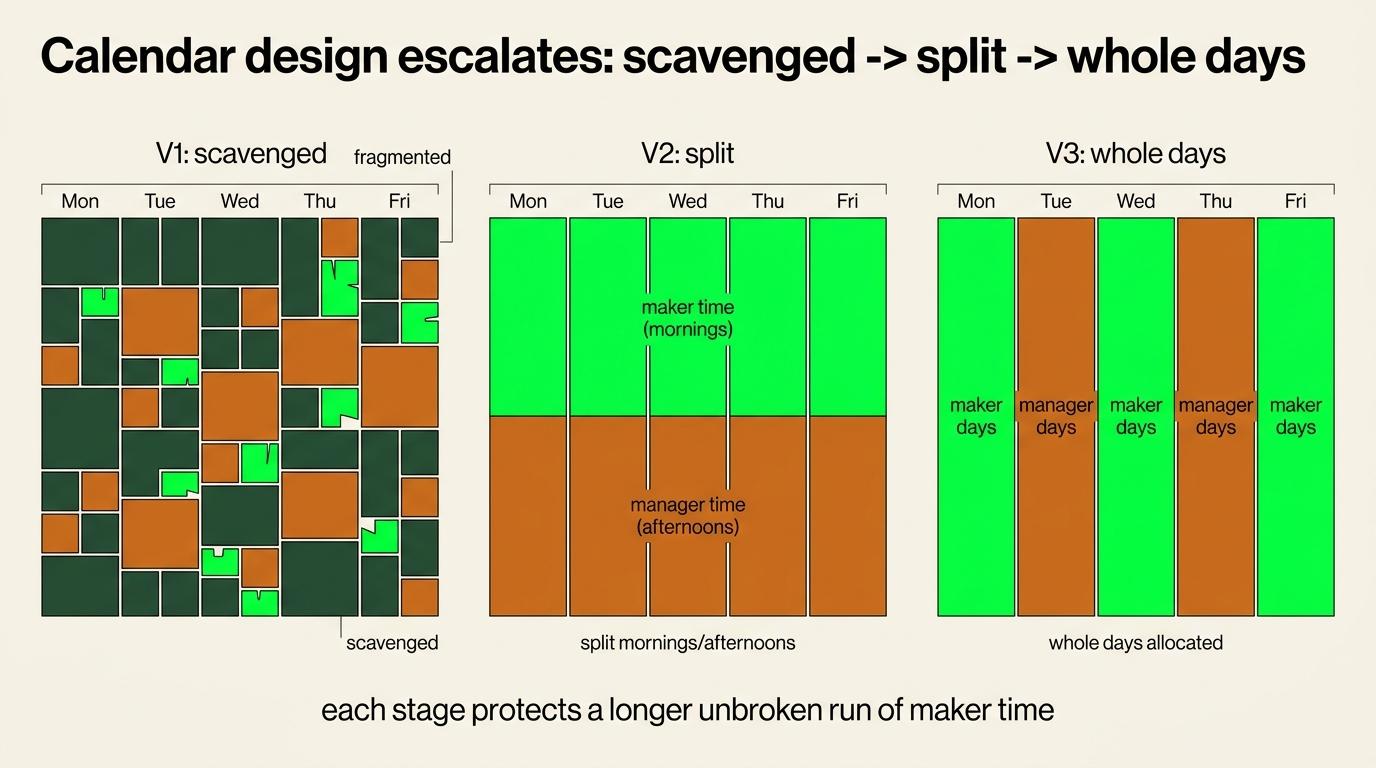
V1: find maker time wherever it exists. Early stage. You do not control the calendar. Client calls, sales, team interruptions, delivery, fires. Maker work happens early mornings, evenings, weekends.
There are genuinely two jobs happening at once here. Run the current version of the business, and build the systems that let it become something else. The second one needs maker time, and without it you stay at the same stage indefinitely.
V2: maker first, manager second. Split the day. Mornings for strategy, content, systems, writing, product. Afternoons for meetings, approvals, reviews, calls.
V3: maker days and manager days. The strongest version. Monday maker, Tuesday manager, Wednesday and Thursday maker, Friday manager.
The manager day gets deliberately dense and the maker day gets deliberately empty. It removes the expectation that deep work should somehow happen between scattered meetings.
Schedule manager work back to front
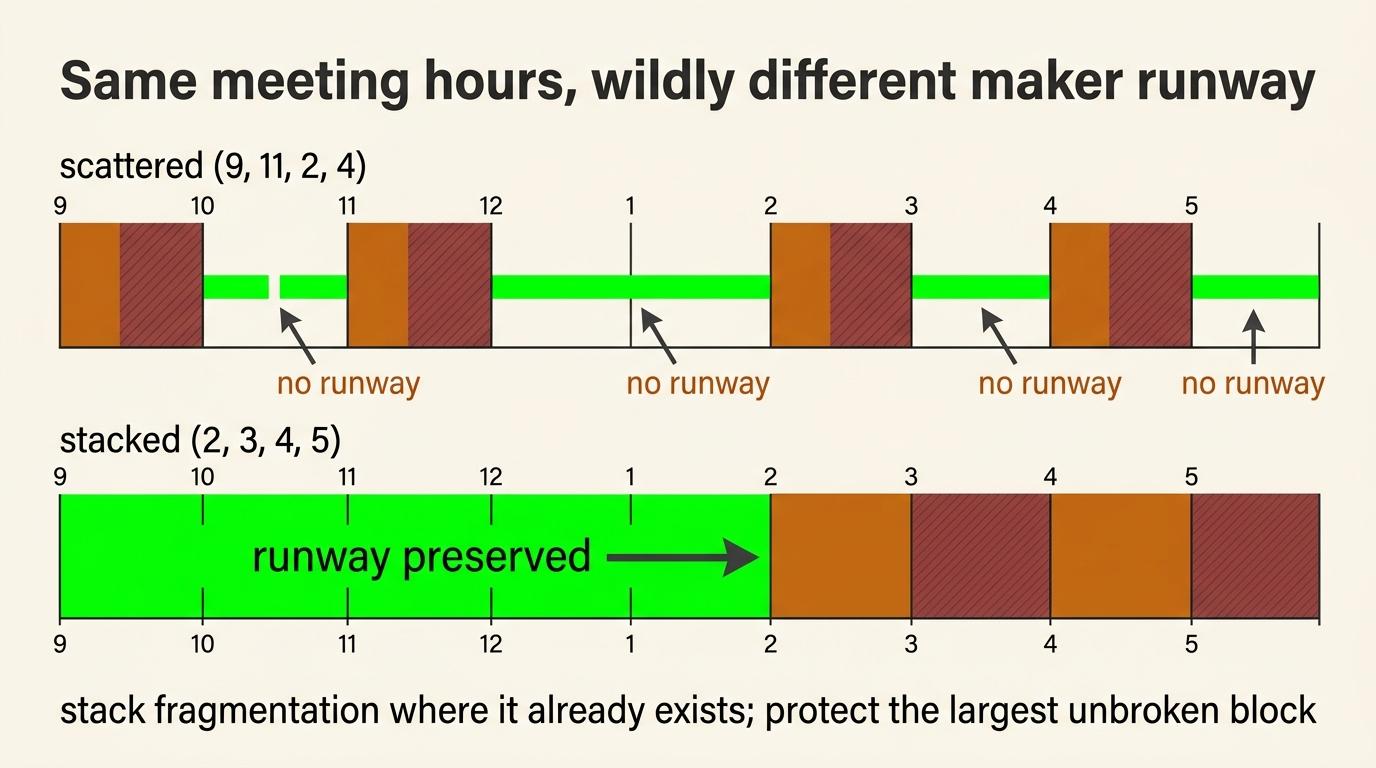
When maker mornings matter, do not scatter meetings across the day.
Instead of    9:00, 11:00, 2:00, 4:00
Prefer        2:00, 3:00, 4:00, 5:00
Identical meeting hours. Completely different amount of usable maker time.
The rule: protect the largest uninterrupted runway first, then stack fragmentation where fragmentation already exists.
When a maker block breaks, consider flipping modes
Sometimes the interruption cannot move. A required 10:30 meeting destroys the middle of an 8:00 to 12:00 block.
Do not pretend the fragments still work like maker time. Instead of salvaging forty-five minutes of writing, then a meeting, then Slack, then a partial task, deliberately convert the damaged period into manager mode. Take calls. Do approvals. Clear short decisions.
Then protect a different window for the maker work.
Cluster fragmentation instead of distributing it.
Give meetings a standard territory
Do not let meetings land wherever there is white space. Pick a default window. Tuesday and Thursday afternoons, or Fridays only, or after 2pm.
When somebody wants to meet outside it, the question becomes whether it is important enough to break protected work. That is a much better default than "the calendar looked empty."
Empty maker space is not unused capacity. It is allocated capacity.
The maker's no
Teams need language that lets somebody protect work without every declined meeting feeling personal.
A maker declining a meeting is usually saying: I am protecting the larger thing you already need me to finish. It is not disengagement or laziness.
Managers can still override it. Sometimes the meeting genuinely is more important. But the override should be deliberate, and the manager should understand they are knowingly trading production capacity for attendance. That is a healthier decision than "they had nothing on their calendar."
What managers owe makers
The maker should not carry the whole burden of protecting maker work.
Understand interruption cost. A short interruption can have long consequences.
Ask what an ideal productive day looks like. An editor, a developer, a strategist and a salesperson should not inherit the same calendar architecture. Ask the people doing the work.
Measure output, not calendar occupancy. An empty maker calendar is not evidence that nothing is happening. It may be evidence that the right conditions exist. Use deadlines, deliverables, quality standards and agreed outputs.
Respect protected work by default. Interrupt when the value of the interruption exceeds its cost, not when it is convenient.
Organisational quiet time
Individual protection gets much stronger when the company backs it. Quiet mornings, no-meeting blocks, no-meeting days, department-specific deep work periods.
This does not have to apply everywhere. A sales team creates value through conversations all day. A development or editing team creates value through sustained concentration. Design the schedule around the work.
Remote work needs output-based trust
Remote removes physical visibility, and managers often compensate with more messages, more check-ins, more status meetings.
The result is self-defeating. The manager interrupts the maker to verify the maker is working, and the maker produces less because they were interrupted.
The better system: define the expected output, the deadline and the quality standard, give the person the conditions to produce it, then evaluate the result. If outputs repeatedly fail, intervene.
Protected maker time is not permission to disappear without accountability. It is a shift from prove you were visibly busy to produce the agreed result.
Which is the same principle as system health before human judgment, one layer up. Do not mistake invisible work for absent work.
Count human hours, not meeting hours
A one-hour meeting with ten people costs the organisation ten human hours. If any of them were in maker blocks, more.
Before adding somebody to a meeting: what is this person expected to contribute that justifies the time being consumed? If there is no clear answer, remove them. Giving somebody their time back is a real operational improvement.
Your calendar is organisational evidence
For a founder this is the part that matters most, and it feeds directly into Delegation Mode.
If large amounts of your time repeatedly go to basic approvals, routine coordination, repetitive admin, simple client issues, or work somebody else could do, the problem is probably not that you need better discipline.
It is more likely missing documentation, unclear ownership, weak delegation, missing training, poor systems, lack of trust, unnecessary centralisation, or missing automation.
Ask what your calendar reveals the business still depends on you for. Then ask whether it should.
A crowded founder calendar is an organisational bottleneck report.
What to look for in the data
Add these to the Step 6 read.
Fragmented maker blocks. Was high-value work repeatedly broken by small interruptions?
Event shadow cost. What happened in the hour before and after meetings?
Reactive-first days. Did communication start before proactive work had a chance?
Manager work scattered through maker territory. Could those have been consolidated?
High-leverage work in scraps. Is the important thing being squeezed between lower-value commitments?
Repeating calendar damage. Does the same meeting destroy the same window every week?
These should produce calendar changes rather than observations.
Proactive before reactive
Do the proactive work before letting anybody reach you.
Reactive work is Slack, inboxes, queues, notifications, inbound requests, approvals. All of it lets the outside world decide what your attention works on next.
Proactive work is writing, strategy, research, building, deliberate sales activity, creating assets. It builds leverage, and it is the thing that keeps working after you stop touching it.
Reactive work costs less energy, and that is not the problem. The problem is that it requires you to be unfocused, demands constant switching, and has no depth available inside it.
Where possible, finish the highest-value proactive work before the reactive environment takes the day. For a founder that is strategy, content and systems. For a salesperson it is the dialling block before the inbox. For an operator it is the build before the queue.
The 168-hour principle
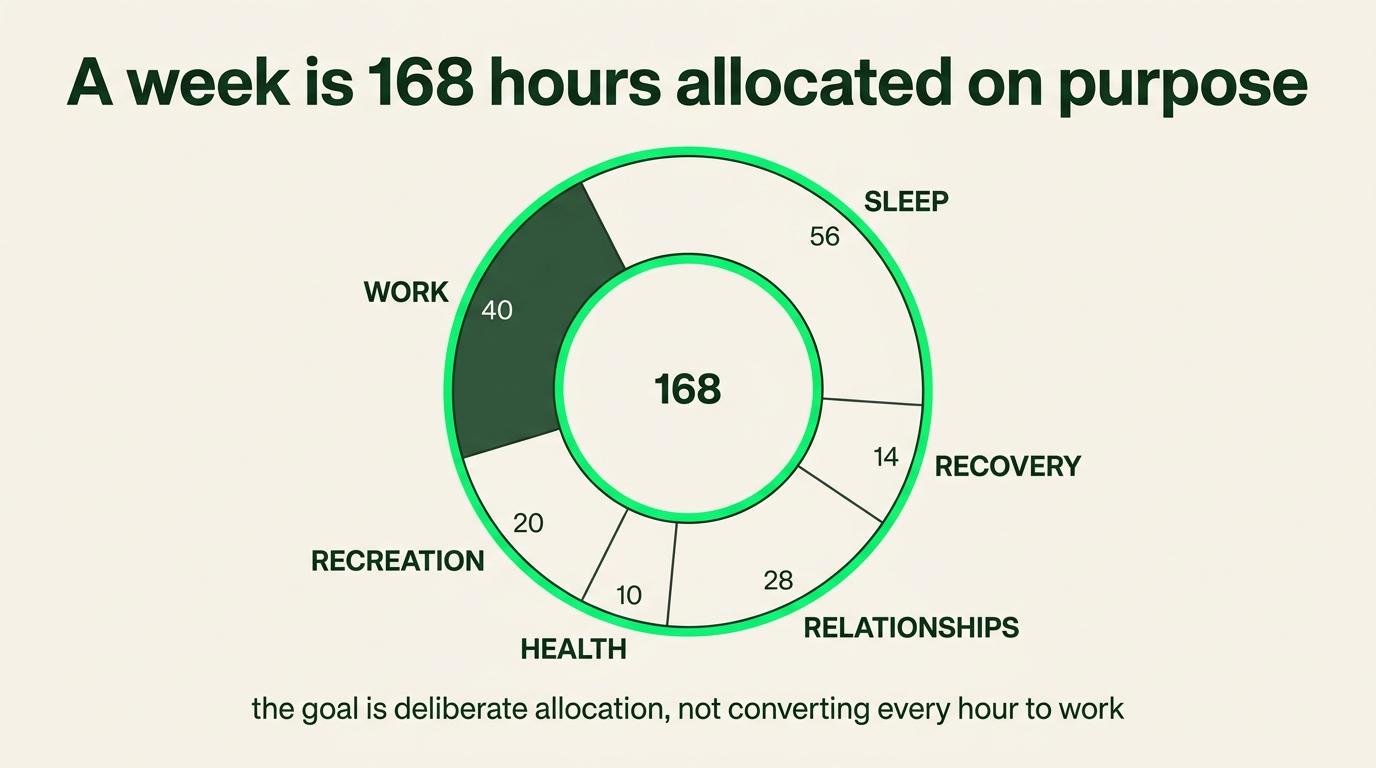
There are 168 hours in a week and the objective is not to convert all of them into productive time. That is an unhealthy reading of this whole module.
The point is to understand what those hours purchase. Sleep, recovery, relationships, health, recreation and work all belong in the allocation deliberately.
The system is not permission for compulsive overwork. It is a way of making sure the hours you do choose to spend on work go to work worth them, under conditions that let that work succeed.
Which matters most in Domination Mode, where the tracking is easiest to turn into a scoreboard.
Step 7: Decide what happens to each activity
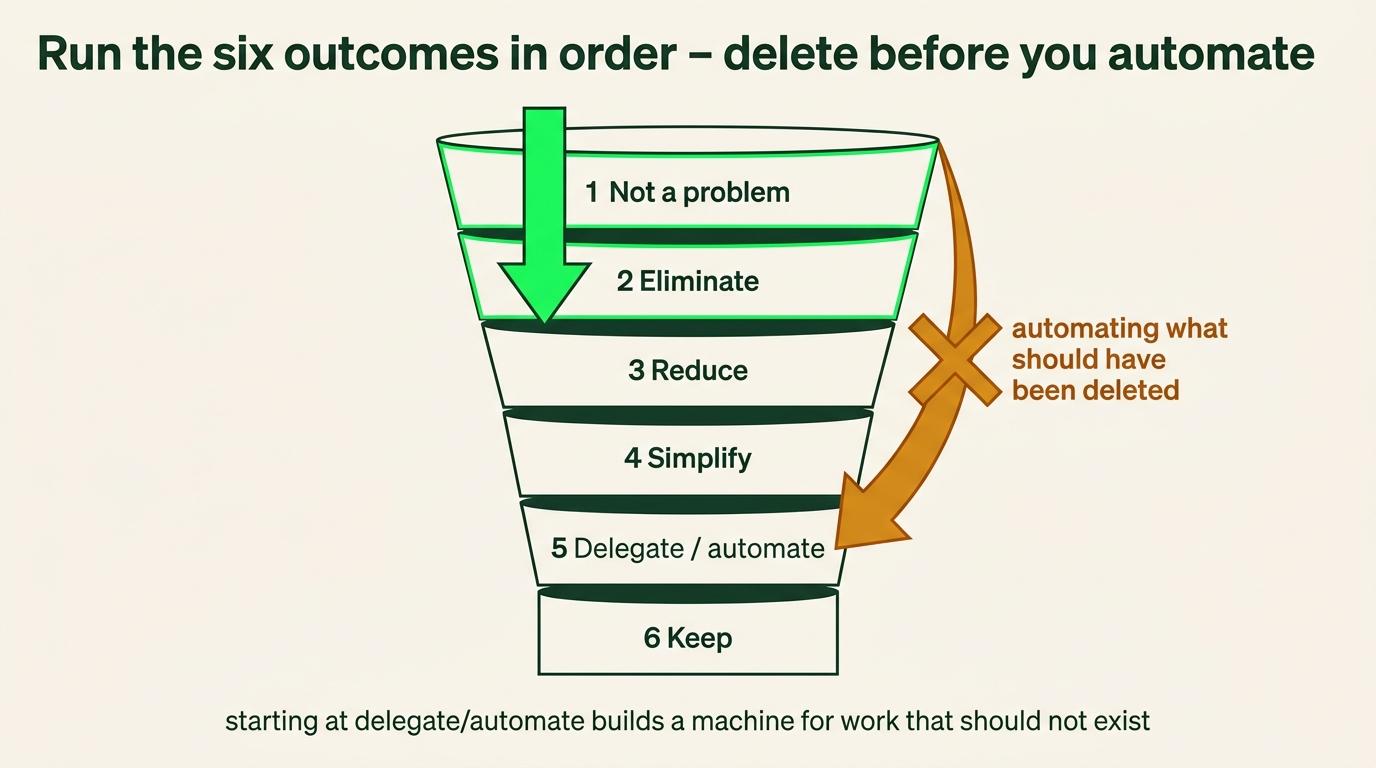
Run this on every meaningful block from the study. Six outcomes, in a fixed order, and the order does most of the work.
| 1. Not a problem | The thing you have been managing around stopped mattering at some point and nobody said so. Declare it and stop treating it as work |
|---|---|
| 2. Eliminate | It does not need to happen at all |
| 3. Reduce | It needs to happen less often, for less time, or to a lower standard than you have been giving it |
| 4. Simplify | It needs to happen, and the current version is more complicated than the job requires |
| 5. Delegate or automate | Somebody or something else should own it |
| 6. Keep | Genuinely high-value work that is yours |
Work top to bottom and stop at the first one that fits. Most people start at five, which is how you end up with a beautifully automated process for something that should have been deleted in week one.
Why the order matters more than the list
Most people run a time study and jump straight to delegation. They find a category eating six hours a week and immediately ask who could do it, without first asking whether it should happen at all.
That produces a well-run version of work that should have been deleted.
The same ordering shows up in Musk's five-step design process, which is worth knowing because it is the clearest articulation of the principle I have found and because he applied it at a scale where the cost of getting it wrong was visible.
His sequence is: make the requirements less dumb, delete the part or process, simplify, accelerate, then automate. The line that carries it is that the most common error of a smart engineer is optimising something that should not exist.
His own example. At Tesla he spent enormous effort automating a robotic process for building battery mats, streamlined it thoroughly, and only then asked what the mat was actually for. It had been added to reduce sound and was no longer required. He had automated something that should have been deleted.
Two more that transfer directly. If you are not adding things back at least ten percent of the time, you are not deleting enough. And every requirement should be accountable to a person rather than a department, because work that exists because "we have always done it" has no owner you can ask.
This is a supporting lens rather than the origin of this module. The elimination-first instinct came from running time studies and watching what happened when I skipped that step. Musk's version is the sharpest statement of the same finding.
Not every decision becomes a task
Some of these produce work and some of them are just a decision.
| Produces a task | Delegate, automate, simplify. Somebody has to build or hand over something |
|---|---|
| Is only a decision | Not a problem, eliminate, reduce. You stop doing it, or you do less of it, and there is nothing to assign |
Do not create a task to stop doing something. That is administrative theatre and it is how a clean elimination turns into a backlog item that survives for months.
Write down what you decided and why, somewhere you will see it again. That is the record. Whether it becomes a task depends entirely on whether somebody has to do something.
Recurring meetings get the same six
Meetings are work. They do not need a separate framework.
For every recurring meeting: does this still need to happen, does it need to be this frequent, this long, with these people, in real time, and could a process or a document replace it.
Run it top-down like everything else. Do not optimise the agenda of a meeting that should not exist.
Step 8: Hand off what should not be yours
Two things have to work together or the handoff fails.
The delegation document manages how the work gets completed. The standard, the examples, the edge cases, the definition of done.
The task system manages ownership and deadlines and dependencies and visibility. Who has it, when it is due, what it blocks.
Hand over the work without the document and you get a bad version, and hand over the document without the task system and you get no version at all, on no timeline, with no way to check.
Delegation saves more than minutes. It protects attention, decision energy, and the emotional cost of repeatedly doing work you know should not be yours. Doing a task you resent for the two hundredth time costs something that never shows up in a time report.
On buying time: you can buy access to lessons that took somebody else years, pay somebody to do work that would consume your finite hours, and buy tools removing repeated manual effort. Money buys compressed experience and rented time.
The delegation build itself is not taught here. Turning these decisions into a system your team actually runs is a Phase 2 deliverable, and it is done for you rather than taught. What this module produces is the decision and the reasoning behind it, which is what that build consumes.
A worked example, from the twelve days I actually tracked
Five consecutive days, 84.6 hours captured, which was my first real streak after months of starting and stopping.
What the audit found, in order of size.
Twenty-eight percent of tracked time had no label. Fifteen entries with nothing typed. The two largest were a 12.6-hour block from 11:29 PM to 12:06 PM and an 8-hour block starting at 3:46 AM, both of which were sleep with a timer left running. This was the single biggest data problem and the fix costs nothing.
Sleep was distorting the ratio. One entry labelled U - Sleep at 11.5 hours was my largest single entry, and roughly twenty more hours of sleep were sitting in the blanks. Raw split read 31 percent working.
With sleep and blanks stripped out, the real figure was 44 percent. The number was wrong by thirteen points, not harsh by thirteen points.
Consistency, not granularity, was the limiting factor. Twelve tracked days, with one stretch of twenty-eight where I was not genuinely trying. Inside the days I did track, coverage ran 87 to 100 percent of the active window and there were eight intra-day gaps in the entire dataset.
Recurring activities had three names each. Morning Routine, Morning Routine plus House Clean Up, and Workout plus Shower plus Morning Routine, which is why the naming rule in Step 3 exists.
Projects were never used once. Zero of 152 entries, which is the whole argument for the section below.
Read all of that gently. Most of the window had too little data for the percentages to mean much. The one week with real volume said just under half my labelled waking time was work, and that is a baseline rather than a verdict.
What I actually found, and the reaction I had to it
I thought my morning routine took three hours. That was the number in my head and I had never questioned it.
Then I tracked it. And inside that window I was also cleaning the house, and doing several other things I had never counted as part of a morning routine, and the routine itself was maybe forty minutes of it.
My honest reaction was: wait, what the fuck?
That is the general shape of what this produces. Four separate fifteen-minute tasks is an hour, and that hour could have been the morning routine done clean, finished early, with the day starting from a clear position instead of a scattered one.
You do not notice the fragmentation until you see it at fifteen-minute resolution. At the end of a day it reads as "the morning got away from me." At fifteen minutes it reads as four specific things, three of which did not need to happen then.
These are realisations about your relationship with time, and they are the actual output of this module. Not the percentage. The moment where you look at a block and cannot justify it.
On stems, softened
Stems are not necessary. They help.
What they give you is the ability to look back and see what you assigned yourself and what got added to it while you were doing it. That is what explains why something took so long, and it is invisible if every instance carries a different name.
And they are optional because the analysis layer does not need them. You will be reading this data through the Toggl API or an AI pass anyway, and both can find the pattern in free-form descriptions.
Stems are for you reading it yourself, which is a real use and a different one.
Allocation, and when to add it
Everything above measures whether work was happening. It cannot tell you which client or project it went to, and eventually you will want that.
Add it when the labelling habit is holding and you have a reason to want the split. That reason is usually a client whose profitability you cannot explain, or a project you suspect is eating more than it returns.
Why not immediately. The second dimension doubles what you have to get right at the moment you press start. In my own audit, twenty-eight percent of entries did not carry the first dimension.
Adding a second one while the first is unreliable produces two unreliable dimensions rather than one good one.
Decide the naming convention once, centrally, and apply it to everything, because free-form project names cannot be compared to anything.
The cost of waiting, stated honestly. Your first tracked window will not answer allocation questions retroactively. That is real, and it is smaller than the cost of the labelling habit staying unfinished.
Reading your own data
The cheapest thing in this module and most people never open it.
Toggl, then Reports, then Detailed, then Today
Then click the back arrow, one day at a time
What you see immediately: general patterns, which activities take large blocks, how much is actually allocated where. No analysis required. Five minutes of looking.
On the paid tier. Custom reports are around nine dollars a month on the starter plan. I do not pay for it, because the detailed view plus the API covers everything I have wanted.
The deeper reports, on demand
Give Claude Code your Toggl API key, or have it in your environment already, then ask in plain language. "Give me a full report of my Toggl data over the last seven days" builds a small dashboard in about a minute.
Why this rather than an automated pipeline. You are curious at a specific moment about a specific question, and a quick voice note into Claude Code returns everything.
A recurring AI job pulls the high-level numbers into Command OS because that is what a daily surface needs.
Deeper reports go through the API directly.
The API layer, optional
For operators who want the data to feed a dashboard or an AI workflow.
The normal SOP gets the time tracked. This turns it into a daily read without you opening anything.
The seven numbers worth watching daily
If you build nothing else, build these.
| Coverage | Tracked share of your active window, first start to last stop |
|---|---|
| Label rate | Share of tracked time carrying a prefix |
| P share | P hours over P plus U hours |
| Deep work blocks | Count of P entries of 50 minutes or more |
| First entry | When the first timer started |
| Gaps | Untracked holes over 15 minutes |
| Streak | Consecutive days with at least one entry |
These are signals to prompt judgment rather than verdicts.
Your scoring method changes what several of them mean. Do not compare a month scored one way against a month scored the other, and record which method a period used so the comparison can be refused rather than made wrongly.
Cleaning the data is a manual re-tag, and both paths should only write after approval. Remember the request quota, since each rename is one call, and the real fix is upstream. Label correctly in the moment and there is nothing to re-tag.
If you are running the AI layer, most of this is unnecessary. The AI job reads the output rather than becoming another dashboard, and the reason to build a custom layer is a specific question the AI layer cannot answer rather than the technical ability to build one.
By role
Founder or CEO. Deciding what to delegate, automate, eliminate, or document. Run a 3 to 5 day Delegation study every four to six weeks. Output is protected room for the work only you can do.
Project leader, operator, integrator, or EA. Locating broken handoffs, recurring bottlenecks, and missing standards. When something keeps costing more than it should, fix the keyboard rather than pushing the person harder.
Technical operator or VA. Making execution visible without needing a meeting to explain it. Track so somebody can understand your work without asking, and identify what should become an SOP.
Sales rep, setter, or CSM. Separating an effort problem from a workflow problem from a tooling problem. If the numbers are down, the record usually shows the CRM process costing you or hours spent inside a bad workflow rather than in front of leads. That distinction protects you.
Completion check
- Mode chosen before tracking started
- Scoring method chosen deliberately and applied consistently
- Window matched to the mode
- Every day you tracked has honest coverage. A missed day does not reset the practice, and the difficult days are usually the ones worth capturing
- Label rate above ninety percent
- Recurring activities named consistently enough that you can read them back, if you chose to use stems
- Every meaningful block carries a clean label
- Data read and sorted, with U split into recovery and leakage
- Number of elimination decisions made
- Number of delegation decisions made
- Time zone, recorded here and matching every other system
- When your day ends for reporting, recorded here
Next: SOP 5, The Habit System.