
The Habit System and Operating Cadence
About 17 min read
What this produces
A working Habitify system, deployed by Claude Code, that you can run the next morning.
Four things come out of it:
- Recurring behaviors live in a dedicated habit tracker, scheduled, with reminders that fire and recurrence that is correct
- A durable configuration file holding the approved definition, so the system can be edited or redeployed later without reconstructing it from memory
- Calendar behavior that renders correctly and does not let meetings land inside your routine windows
- A first review scheduled for one week out
This is the last of the five modules for a reason. The first four decide what deserves to become recurring. This one makes the recurring part run without you deciding it every morning.
Before you start
The enemy is decision fatigue. Every "what now" is a tax, and dozens a day spend your best attention before real work starts.
So the job is to pre-decide the repeatable part of the day, which conserves judgment for the part that actually requires it. That is a design problem rather than a willpower problem, and treating it as willpower is why most habit systems die in week two.
And the point is not output. It is preserving state, buying back attention, reducing reactivity, and being in a condition to be present with people outside work. A system that pushes toward more hours and away from that is off-target by this document's own standard.
One structural rule underneath all of it. Personal state maintenance should not live on the same surface as client fires and business tasks. That single principle is why this module exists in the shape it does, and the reversal at the end explains what it cost to learn.
Definition of Done
- Every behavior you approved is fully accounted for, in the right area and order, with any intentional split marked as such
- Reminders fire at the right times and recurrence is correct
- Completion records and history updates
- Calendar events render as timed blocks rather than all-day
- Booking windows are protected on the account that actually hosts your booking page
- The approved configuration is saved somewhere you can find it again
- A first review is on the calendar
Step 1: Decide what belongs in the system
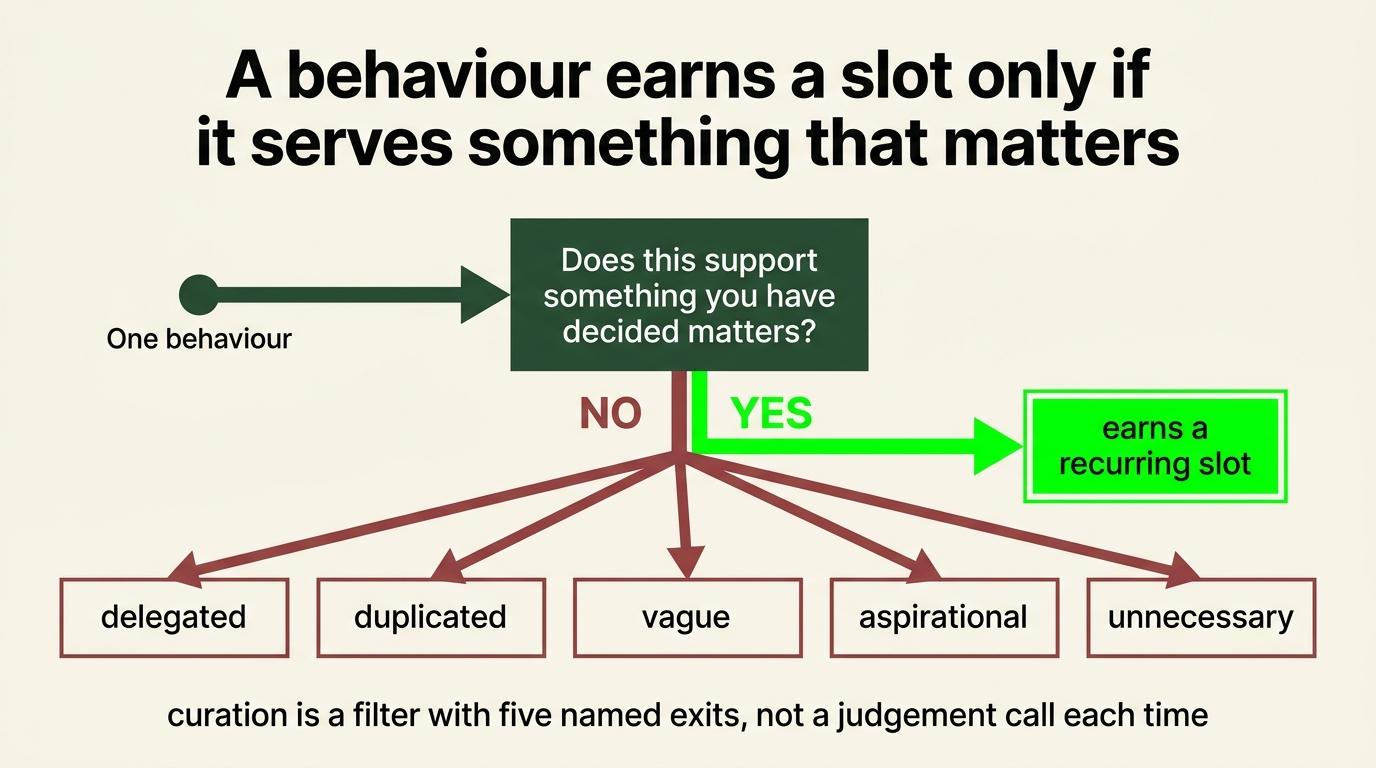
A behavior earns a slot if it deliberately supports something you have decided matters. That is the whole filter, and it is broader than a business outcome.
| Preserves the operating floor | The environment, clarity and cadence the first four modules produced. Left alone, all of it decays |
|---|---|
| Strengthens the operator biologically | Sleep, movement, food, recovery. The machine everything else runs on |
| Strengthens the operator psychologically | Whatever keeps you steady when the week goes badly |
| Supports a chosen personal outcome | Something you decided you want that has nothing to do with the business |
| Supports a role or business outcome | The stated direction from SOP 3 |
| Prevents a routine collapsing under pressure | The things that go first in a hard month, which are usually the ones holding the rest up |
The test is not whether it looks like a good habit. Almost everything looks like a good habit in isolation. The test is whether you decided it matters and can say why.
What gets cut
Delegated or automated. SOP 4 produced that list. Anything marked delegate or automate becomes somebody else's job or a system, not a recurring slot of yours.
Duplicated. Two behaviors installing the same thing is noise. Inspect what the behavior actually does rather than matching on the name, because three similar-sounding actions are frequently three different jobs.
Vague. "Eat healthy" forces you to decide what it means every single time, which reintroduces the exact tax the system exists to remove. "Protein and fruit, two bottles of water" does not.
Aspirational. A behavior you would like to be the kind of person who does, but have never done, does not belong in the first build. Add it in the first review once the system is holding.
Unnecessary. If nothing breaks when it stops, it is a preference. Preferences are fine and they do not need a tracked slot.
Step 2: How the architecture works
The outcome, stated without a product
Recurring behaviors are clear, scheduled, easy to complete, and accumulate history you can actually read.
Any tool that delivers those four is acceptable. Two criteria worth adding from experience: the interface should not contain your work, and the tool should already do the thing rather than requiring you to build recurrence, rollover or history yourself.
The recommended implementation is Habitify
It is a habit tracker rather than something else that also does habits. Most trackers try to become everything: dashboards, gamification, social feeds, forty features nobody asked for. I want to open the thing, see what needs to happen, do it, mark it, and close it.
It handles recurrence natively, which sounds obvious and is the entire reason the previous version of my system collapsed. I had built generation, rollover, permanent history and a dashboard by hand to reproduce capability a dedicated product already had.
It has areas, reminders, progress and history built in.
It has API access on the Pro plan, which is what lets Claude Code deploy it in one pass rather than you creating thirty habits by hand.
And it is not your work environment. Opening it does not put you in front of client tasks, overdue work and notifications. I underrated that for a long time and it is the reason the previous system stopped getting opened.
My implementation, as a worked example rather than a target
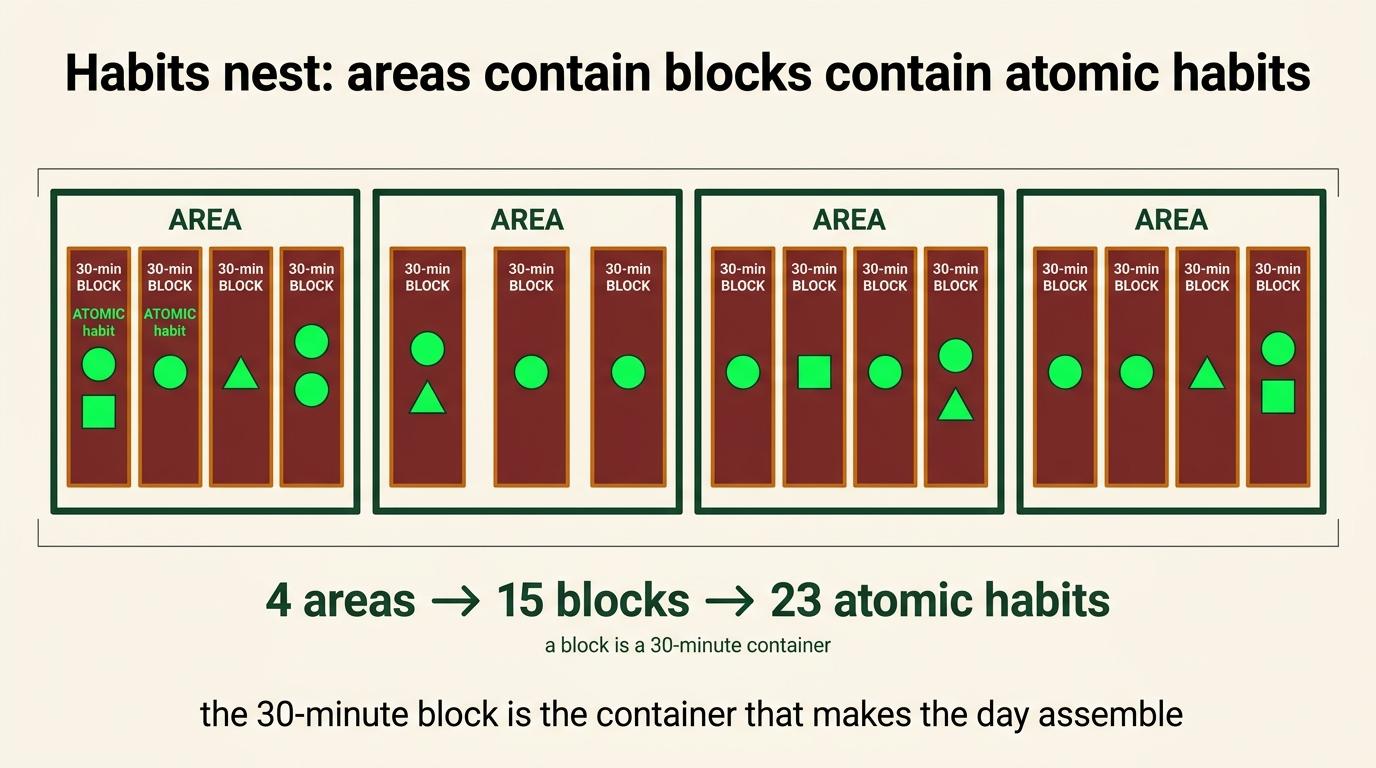
4 areas          the routines: two morning, one midday, one evening
23 atomics       the individual behaviors
15 blocks        thirty-minute containers, each holding one or more atomics
Each block carries an ordered code in its name, so the routine sorts in sequence rather than alphabetically. The atomic instructions live inside the block description.
Reminders are set to the slot start. Activities longer than thirty minutes split across consecutive blocks. Morning blocks use a sun icon, evening blocks a moon.
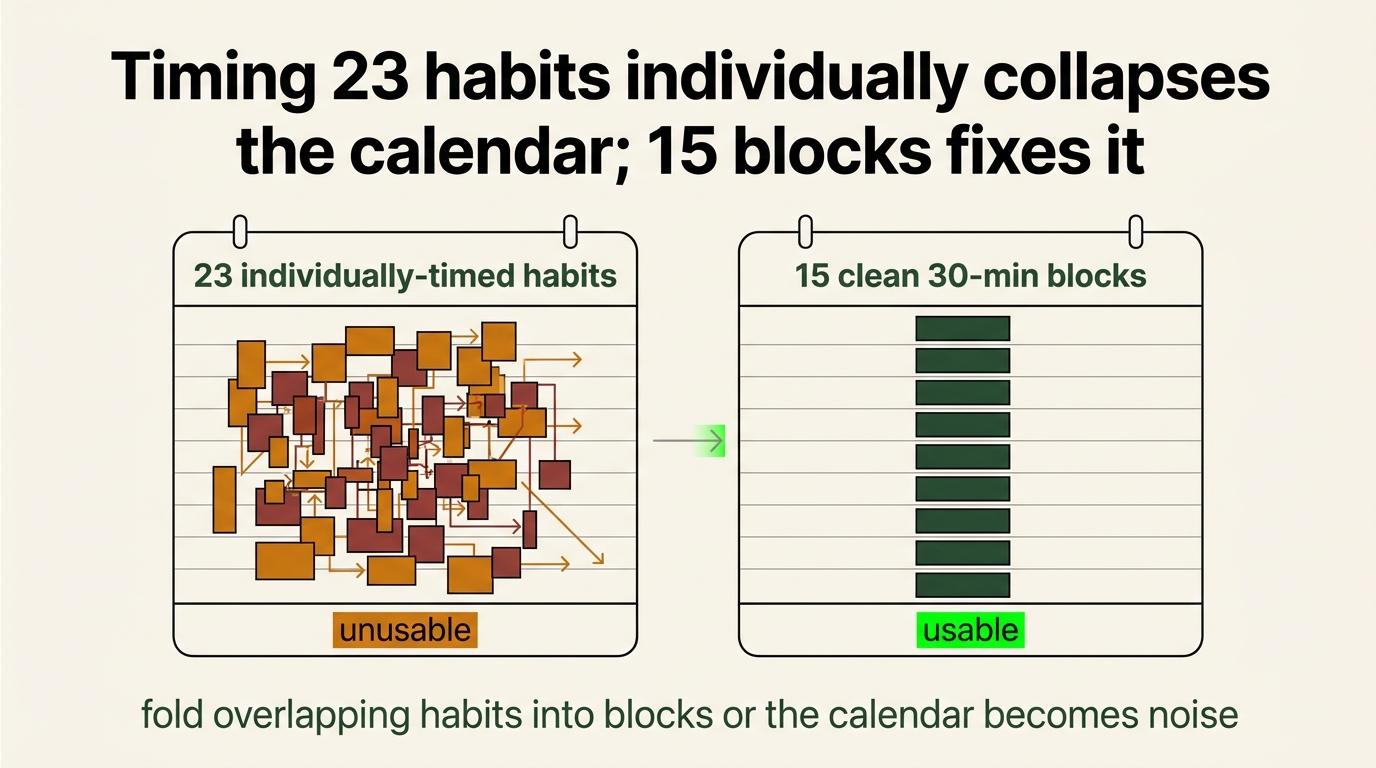
Why blocks rather than one habit per behavior, in my case. Habitify's calendar sync renders every habit as a roughly thirty-minute event with no duration control and no per-habit exclude. Twenty-three individually timed habits overlapped into a calendar that was useless for the thing a calendar is for. Folding the atomics into fifteen blocks fixed it.
That constraint produced fifteen. It does not produce fifteen for you.
When you need grouping and when you do not
| One habit per behavior | Your list is short, or your behaviors are spread far enough apart that the calendar does not collide |
|---|---|
| Grouped into blocks | You have many small actions close together, and one-per-behavior would produce an unreadable calendar |
| Grouped into blocks | You have many small actions close together, and one-per-behavior would produce an unreadable calendar |
|---|
Claude Code decides this from your actual routine, not from a template. It looks at how many behaviors you have, how tightly spaced they are, and whether the calendar would collide, then proposes a structure and waits for you to approve it.
Where the truth lives
Five things, each with one job. Getting these confused is what produced the previous system.
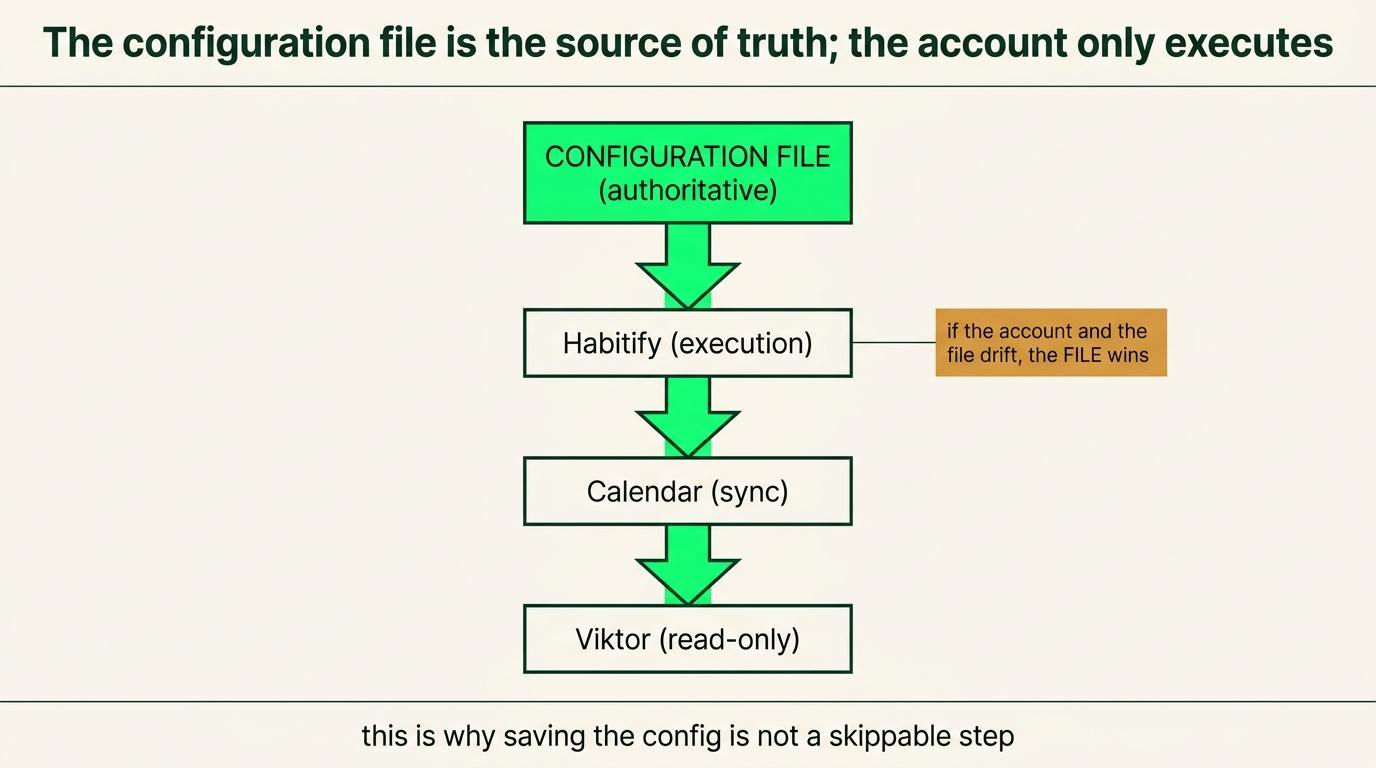
| The approved configuration | The authoritative definition. Areas, behaviors, block mapping, order, timing, recurrence, reminders, descriptions, icons |
|---|---|
| Habitify | Live execution. Completion and history |
| Habitify calendar sync | A downstream visual schedule. Read-only in practice |
| Google Calendar busy guardrails | Booking protection. Not habits, not a second definition |
| AI jobs + Command OS, later | Reads and displays the data |
The configuration is authoritative, not the account. Account state carries whatever was true at the last partial edit, so rebuilding from it recreates things you deliberately removed. Step 5 is where you save that configuration, and it is the step people skip.
Step 3: Prepare the input
Rough is fine. You are not writing the final structure, you are giving Claude Code enough to argue with.
- The behaviors = what you actually do, or intend to
- The routine order = what comes before what
- Timing = roughly when each block of them happens
- Recurrence = daily, weekdays, one specific day
- Why each one matters = one line.
- Calendar constraints = which windows must not be bookable, and which Google account hosts your booking page
Write it as a list or record a voice note and paste the transcript. Both work. Do not try to produce something clean, because the next step exists specifically to clean it.
Step 4: Run the refinement gate
Claude Code audits before it builds anything. This is the step that stops you deploying a tidy version of the wrong system.
What it looks for
- Duplication. Two behaviors installing the same thing, judged on what they do rather than what they are called
- Vagueness. Anything that makes you decide what it means at the moment you are supposed to be doing it
- Wrong order. Sequences that do not survive contact with how a morning actually runs
- Missing reasoning. A behavior with no stated why, which is the one most likely to be dropped in a hard week
- Excess complexity. Six habits where two would do
What it proposes
Areas, the habit or block structure, which behaviors sit where, order, times, reminders, recurrence, and whether you need grouping at all.
Then it stops and waits.
Read the plan properly
This is the review step and it is the one that matters, because everything after it is mechanical.
Look for behaviors that landed in the wrong place, a slot time that does not match when you actually do the thing, anything merged that should not have been, and anything that survived that you already know you will not do.
Argue with it. A gate you accept wholesale is not a gate.
Step 5: Save the approved configuration
Before anything gets written to Habitify, have Claude Code produce the approved structure as a file and give it to you.
Keep it somewhere you will find it in six months. Not in a chat window.
Why this step exists. When you want to change something later, or redeploy after an account problem, this file is what gets read. The alternative is reconstructing the system from whatever is currently in the app, which carries every partial edit and every abandoned experiment.
The rule: the configuration is the definition, the account is the execution. They will drift, and when they do the file wins.
Step 6: Deploy through Claude Code
Seven things happen and Claude Code does five of them.
- Be on Habitify Pro
- Generate an API key in Habitify settings
- Open Claude Code, paste the deployment prompt and your approved configuration
- Claude Code proves the key, then builds
- It reports back a table of what exist
- You verify
- You complete the manual settings in Step 7
The deployment prompt is a separate document. It carries the API detail Claude Code needs and you do not.
**FF | Habitify One-Shot Deployment Prompt**
On the key
Habitify Pro only. The API rejects non-Pro keys with the same error it gives a dead key, which sends people looking for the wrong problem.
Give the key to Claude Code during the deployment session and nowhere else. Not in Slack, not in a shared chat, not in an email to yourself, and not written into the reusable prompt document. Chat history keeps credentials. A habit tracker key is low stakes and the habit is the point.
If something fails
Tell Claude Code what you saw and let it diagnose. The prompt already contains the known failure modes and how to test for them. You do not need to learn the API to run this.
Step 7: Complete the manual settings
Complete the remaining manual setup. Claude Code will tell you which of these apply to your build.
Time-of-day boundaries
Set them in Habitify settings so morning, afternoon and evening match your actual day rather than the defaults.
Auto-skip
Habitify can auto-skip unlogged daily habits late at night. Worth turning on, because the alternative is a permanent pile of yesterday sitting in front of you every morning.
Optional per-behavior ticking
If you want to tick individual behaviors rather than the whole block, add them as Actions in the Habitify app by hand.
Actions cannot be written through the API, which is why the deployed behaviors live inside each block description as instructions rather than as ticked items.
This is optional and most people should skip it. The deployed atomics already live inside each block description as instructions. Adding Actions gives you finer-grained ticking at the cost of more taps every day.
Connect the Google Calendar integration
In Habitify: Settings, then Integration, then Google Calendar, then Connect. Sign into the correct account, grant permission, and set the deletion behavior you want.
Then verify two things. That Habitify created its own calendar, and that habits carrying reminders render as timed events rather than all-day ones.
A habit with no reminder renders as an all-day event. A habit with a start-time reminder renders at that time. If everything is showing up all-day, the reminders did not deploy.
Booking guardrails, and this is the one that gets built wrong
The calendar integration is a visual schedule, not booking protection. Habitify's synced events do not reliably stop a booking system putting a call inside a multi-hour routine window.
So create recurring Busy events covering each routine window, on the Google account that hosts your booking page.
Mine, as an example:
Morning 05:00-07:30 daily
Sunday     05:00-10:00   weekly
Night      18:00-20:30   daily
Claude Code derives your windows from the routine you approved and reports them. It can only create the events if it has authorized access to that specific Google account. Usually it does not, so you create them by hand from the list it gives you.
The trap. If your booking page is on a different Google account than your main calendar, and it often is, these have to be created over there. It is easy to build them in the right shape on the wrong account and believe you are protected.
These are guardrails, not habits. They do not duplicate the behavioral definition and they are not a second source of truth.
Step 8: Verify the whole path
Do this before you trust any of it. A structure that looks right and never fires produces a month of data saying you did nothing, and you will not find out until you go looking for a trend that is not there.
| Check | Pass Condition |
|---|---|
| Structure | Every behavior is included once, assigned to the right area, and ordered correctly. Any intentional split is clearly labeled Part 1 / Part 2. |
| Timing | Reminders fire at the correct time and all recurrence rules, including weekly ones, work properly. |
| Completion | Completing a block records correctly and updates the history. |
| Calendar | Events render as timed blocks rather than all-day events. |
| Booking Protection | Blocked windows actually prevent bookings when tested. |
Complete one block end to end today, rather than reading the list and assuming. The reminder test in particular has to happen on the device you carry.
Step 9: Run the day
- Open Habitify
- See what is due
- Do it
- Mark it
- Add a note only if something is worth recording
- Close it
That is the whole thing, and the simplicity is the feature.
On notes. Optional. Use them when something is genuinely worth knowing later, which is usually why a block did not happen or why it took twice as long. A note on every block every day becomes a chore and then the whole thing gets abandoned.
On time. This system records whether the behavior happened. It does not record how long your day went, because SOP 4 already does that. Do not track the same time twice.
| Habitify | Recurring behavior and completion |
|---|---|
| Toggl | Declared time allocation |
| Rize | Optional observed computer behavior |
| A note | Qualitative, when it is worth it |
Step 10: Review after the first week
Put it on the calendar now, because the first week is when the friction is visible and it is also when you are most likely to just stop.
Four questions:
What created friction? A block in the wrong place, a reminder at the wrong time, something that takes three taps when it should take one.
What timing was unrealistic? The most common finding. Something scheduled for twenty minutes that actually takes forty, which then breaks everything after it.
What is not earning its slot? A behavior you have skipped every day for a week is telling you something, and it is usually either that it was aspirational or that it belongs somewhere other than a habit tracker.
What is missing? Things you have been doing anyway that should be in the system, and things you deliberately held back from the first build.
Then edit the configuration file from Step 5, redeploy the changes through Claude Code, and set the next review.
On imperfect days
The previous system had a formal rule: a day counted as complete at eighty percent of that day's target.
Do not turn that into a requirement. It was useful as a way of thinking and it became a number to manage.
Keep the idea. A good operating system survives imperfect days. Consistency does not mean never missing. One missed behavior should not turn into a collapse, and a system that treats a miss as a failure state is a system that gets abandoned after the first bad week.
What happens with the AI layer later
Nothing you do here. Recorded so the picture is complete.
| Habitify | Runs the habits, records completion, holds the history |
|---|---|
| AI jobs + Command OS, later | Reads that data and displays it across whatever dates you ask for, alongside the rest of the Command OS |
The AI layer does not replace Habitify and does not become a second habit engine. It reads.
No AI connection happens in this SOP. That is part of the deployment work at the end of Orientation.
What the previous system taught
We originally put personal habits inside ClickUp, on the theory that centralization was the advantage and that switching apps was what killed every tracker before it.
Opening the tracker put us in front of business work. Client tasks, overdue items, notifications. The system built to maintain state was routing us through the environment most likely to destroy it, and that turned out to matter more than the app switch ever did.
We built recurrence by hand. Generation, rollover, permanent history, a dashboard, scheduled deployment. Most of it technically worked.
It never became reliably hands-off, and the completion evidence was close to nothing. The machine kept building days into a space nobody opened.
Habitify already solved the core job. Recurrence, reminders, completion, progress and history are what the product is.
The lesson, and it is the one worth carrying: do not build infrastructure around a platform's missing core capability when a focused product already does it. That is subtraction applied to our own stack, and it is why this module is a fraction of the length it used to be.
Layer 5 of the context document has the full account. It does not need repeating here.
What has actually been proven
Worth being precise, because these are two different claims.
Verified live: authentication, the initial creation path used in the original deployment, reminders, recurrence, and calendar rendering. Claude Code deployed the full structure and it behaves as described.
Not yet independently revalidated: the complete current partial-update field matrix documented in the V2 specification. Editing an existing habit in place follows the official spec, and the full field set has not been retested since.
Not verified at all: long-term adherence. The current blocks were deployed recently and do not have months of completion history behind them. The system that came before had almost none.
So this is proof of progression and verified infrastructure. It is not proof that the behavioral system has been validated over a long period, and the Day 30, 60 and 90 updates in the context document are where that gets tested honestly.
On other people
Nobody inherits somebody else's habits. Build your own list. A copied system is compliance and it dies the moment nobody is watching. Somebody else's structure is a useful reference for shape, never for content.
If you are thinking about prescribing this to somebody, run it yourself for a month first. A rollout does not repair a weak system, it multiplies it, and a team reads a ritual the leader does not keep for exactly what it is.
Completion check
- Behaviors chosen against something you decided matters, with a stated why for each
- Vague, duplicated, delegated, automated and aspirational items removed
- Refinement gate run, and its findings argued with rather than accepted wholesale
- Approved configuration saved as a file, outside any chat window
- Deployment verified: every behavior accounted for, splits marked as intentional, right area and order
- Reminders tested on a real device
- Recurrence correct, including anything weekly
- One block completed end to end, with the completion showing in history
- Calendar events rendering as timed blocks
- Booking guardrails created on the account hosting the booking page, and tested
- Manual settings completed: time-of-day boundaries, auto-skip
- First review on the calendar
Next: the context document has what to do when this stops working, and when to run the Reset again.