
Tech Teardown and Spring Cleaning
About 38 min read
If you need persuading on why any of this is worth doing, go back to The Operator's Reset. This document assumes you are already convinced and want to install it
What this produces
A cleared list of open loops, a master inventory of every recurring cost, a smaller stack, recovered cash, and a system that stops it rebuilding.
Time: about an hour for the software teardown. Then fifteen to twenty minutes a month.
Separate from that: the Productivity Clearance is its own project and runs several hours to a full day depending on how much has piled up. Schedule it rather than fitting it in.
Window: two weeks.
Next: SOP 3, Post-Mortem, Mission, Vision, and Values.
Definition of Done
Facts. You know every recurring charge you carry, which tools earn their place, and what your unfinished obligations actually are.
Feelings. Lighter, in the specific way that comes from looking at the thing you were avoiding and finding it survivable.
Functionality. A before-and-after monthly number, refund requests sent, and guardrails so the bloat does not rebuild.
Step 1: Build the list
Set aside an hour for this and do not clear anything yet. Building and doing are separate jobs, and mixing them means you clear three things and stop.
Go wide. Use these prompts so a whole domain does not get missed.
- Basic health. Appointments, checkups, prescriptions, the thing you have been meaning to get looked at
- Advanced health. Training, nutrition, sleep environment, anything optimizing rather than fixing
- Basic living and admin. Documents, renewals, registrations, insurance, forms
- Advanced living and environment. The desk, the car, the closet, the room you avoid, the thing that broke four months ago
- Existing business. Unfinished internal work, overdue decisions, half-built systems
- New business or future projects. The thing you keep saying you will start
- Money. Untracked receipts, the accountant you have not called, unclaimed reimbursements, accounts you meant to open
- Technology. Devices, backups, passwords, storage, subscriptions you already know about
- Relationships. The call you owe, the message you never answered, the visit you keep postponing
- Hobbies and experiences. The trip, the instrument, the thing that used to matter
- Miscellaneous open loops. Everything that fits nowhere and has been nagging anyway
The specific ones worth checking
These are the ones people miss because they have stopped registering as items.
- Recurring calendar events you never use
- Meetings you finished with months ago and are still invited to. Delete yourself. Nobody else will, and each one costs a decision every week
- Anything you already decided to throw away eventually. The decision is made, so the only variable is whether you carry it for another eight months
- Anything broken you decided to fix. Book somebody, fix it now, or put it on the day
Step 2: Sort it
Every item goes into one of four buckets. Mark the delegatable ones as you go rather than in a second pass.
| Bucket | Meaning |
|---|---|
| Online or administrative | Can be done from a screen |
| Physical or in-person | Requires going somewhere or handling something |
| Delegatable | Does not actually require you |
| Genuinely mine | Needs your signature, judgment, relationship, or presence |
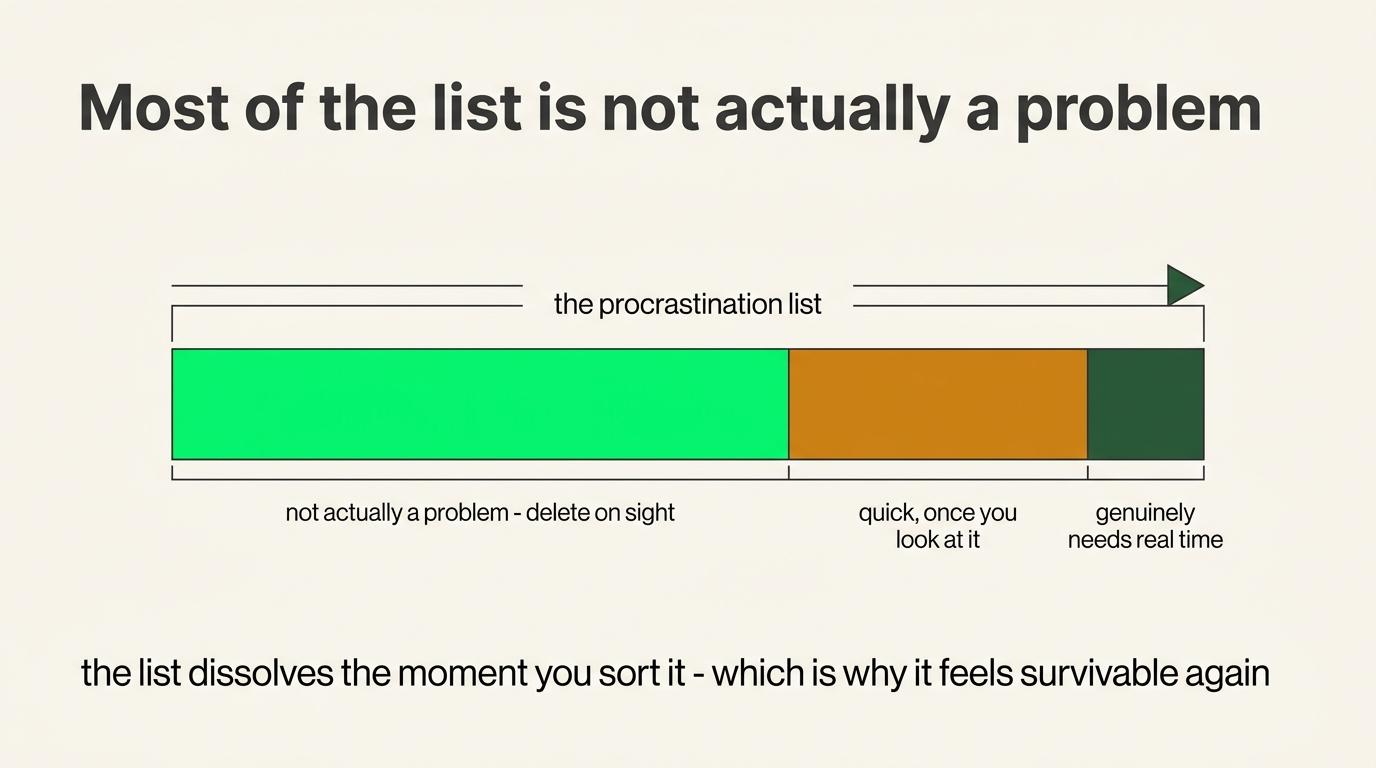
The last list should come out shorter than you expect. That surprise is one of the more useful outputs.
Then run the second sort, which is where most of the value is
Review the whole list once more and put each item into one of five outcomes.
| Outcome | Typical share | What to do |
|---|---|---|
| Not actually a problem | 30 to 60% | Delete it. It happens twice, once while writing and again on review |
| One item pretending to be several | \~10% | Eight things to buy is one ten-minute order |
| Somebody can help | 10 to 20% | Ask a family member, friend, or partner |
| Delegate | Varies | Assistant, work or personal. Usually just getting the ball rolling |
| Needs a real block of time | The remainder | Calendar it with a date |
On asking for help: almost nobody says no, because when people see you taking real action to improve your life they want to be part of it. If you do not have people like that, you have a considerably bigger problem than this list, and I cannot help you with that one.
On the last category: the date is the point. Once it has one it is on the track of things getting done rather than existing in the ether inside your head.
Step 3: Activate what is too large to finish
Some items are real projects needing weeks. Do not try to finish them in a day.
For anything too large, activate it:
- Name what it actually is, in one sentence
- Identify the next physical action
- Gather the relevant information into one place
- Hand off whatever can leave your hands
- Put a date on what genuinely needs more time
Most large items on a procrastination list are undefined rather than large, and undefined has no edges. Once it has a name, a next action, and a date, it stops radiating.
Step 4: Run the day
Block one concentrated period. A full day is ideal, half a day works if the list is short.
Dispatch the delegatable items first to get them moving while you work on the rest.
Do not schedule other work into it. The value comes from the concentration, and a clearance day with three meetings is a normal day with a longer list.
If you cannot do it now
Two options and both work.
Do it now, in a scheduled block.
Or attach it to a marker. When I hit this revenue number, that is when I run the clearance. It is then planned and set aside rather than living in your head as a vague obligation you keep failing to meet.
One operational warning
This is a quarterly one-shot rather than a daily structural lift.
If you have any tendency toward compulsive checking, ordering, or list-building, this can feed it. The satisfaction of clearing is real and available on demand, which makes it an effective thing to do instead of the work that matters.
Running a clearance every three weeks means the clearance has become the avoidance.
Part 2: The Tech Teardown
Task type: recurring. Full pass quarterly, spot-clean monthly. Who: founder first, then delegate to an EA, finance admin, or support VA once proven.
Step 5: Do the personal one first
Run both a personal and a business teardown. If you have a business, run the personal one first, which is the opposite of how most people do it.
The personal pass shows you which charges should be moving onto the business card, and you cannot see that until the list exists.
For the personal side: create a Rocket Money account. It shows everything you pay monthly in one place, plus which emails you need to send.
If your business stack is small, that does not exempt you. A sales rep or individual professional may have almost nothing on the business side and a messy personal list, and the personal one is often worse because nobody reviews it and no accountant asks questions.
Do both in the same session. The statements are already open.
The three returns, in order of size
A teardown pays you back in three ways:
- Recurring subscription cost - the big one. Every dollar of monthly fee you kill compounds every single month.
- Refunds - one-time cash back on what you cancel, when you have a real angle.
- Time and focus - fewer tools means less clutter, fewer logins, less to keep track of, and less surface area for surprise bills, leaked keys, and cost spikes.
The $19 was never the expensive part
Here is how it actually happens. It is never one bad decision.
It creeps in as you build - more people doing more things, everyone moving at once, more tools piling up to make all of it work. Each one felt right in the moment.
None of it felt like a problem. That is the trap.
It is death by a thousand cuts - no single charge is worth stopping for, so you never stop for any of them, and they pile up in the dark.
And it does not just cost money. It quietly eats your mental bandwidth.
A charge pops up - maybe a notification straight to your phone - and your first honest thought is what the fuck is that? Now you are digging through emails, hunting the login, trying to remember what past-you signed up for. You are context-switching, mid-build, to chase down a $19 line item.
That is the real tax. Not the $19. The focus it stole to go find out.
Profit is not a default state
Worth understanding before you start, because it explains why this is recurring rather than a one-time heroic cleanup.
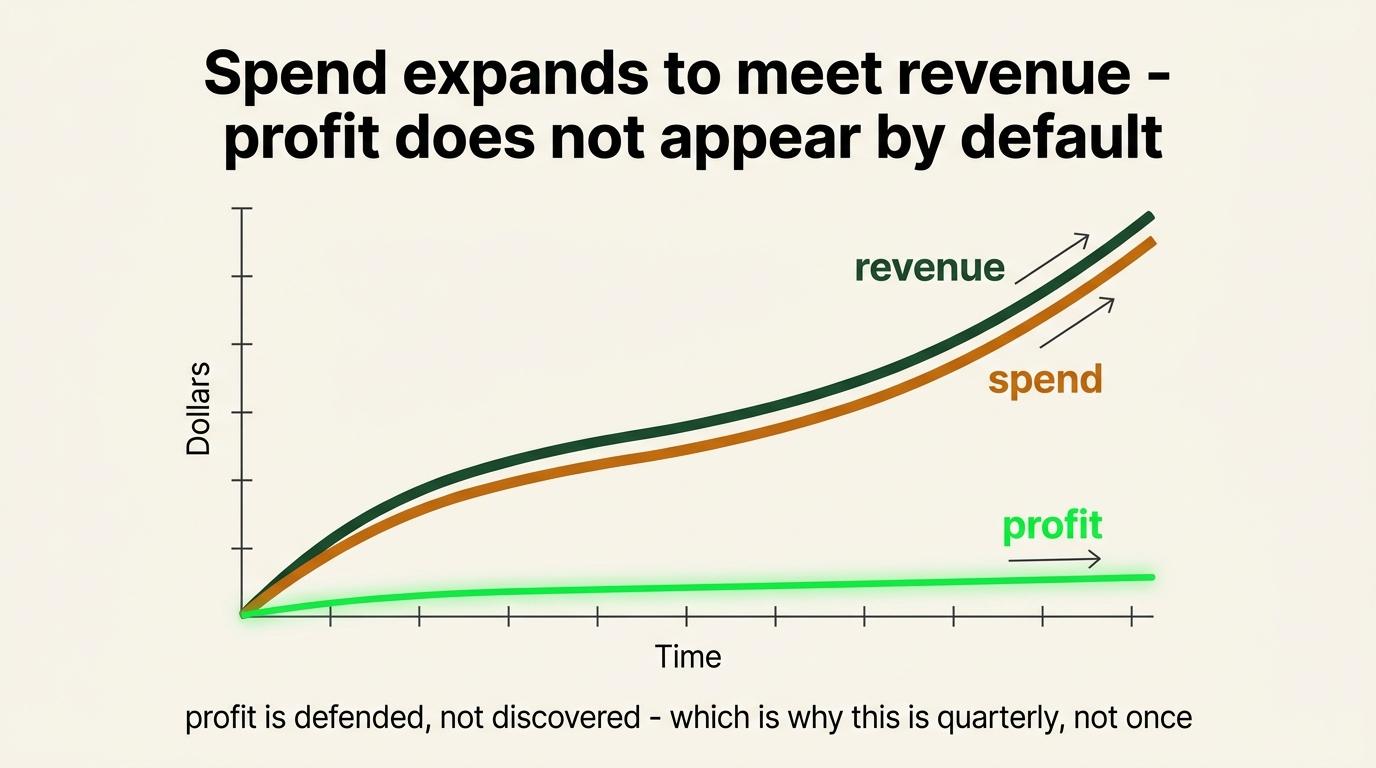
As revenue grows, people and companies naturally find new places to put it. New tools, new seats, better plans, another subscription that seemed obviously worth it at the time. The spending expands to meet the income, and the business drifts back toward break-even at a higher revenue number.
Profit has to be defended rather than assumed. That is the whole reason this runs quarterly. The stack does not stay clean because you cleaned it once, any more than a room stays tidy because you tidied it in March.
Step 6: Build the Personal CFO before the teardown
Build this before Steps 7 through 11, because those steps are a manual hunt through statements and this does that hunt for you. It then keeps doing it, which is what stops the stack drifting back.
Steps 1 through 5 were the personal clearance. This is where the financial layer starts.
What it is. A financial operating system that runs against your connected accounts and maintains one sheet. It classifies every transaction, tracks recurring commitments, models your tax position, holds your decisions about ambiguous charges, and runs a control register against itself before it reports anything.
Who it is for. Founders, operators and digital 1099 workers, not only traditional business owners. If your income arrives from a few payers, your expenses are a mix of business and personal, and nobody is doing your books, this is the gap it fills.
What it will not do. It will not produce a cosmetically perfect workbook, and it is not a filed tax return. What it will do is give you roughly ninety-five percent of the clarity you are currently missing about expenses, cash obligations, decisions, assumptions, tax preparation and recurring reality. Professional accounting, tax and legal verification still applies on top.
Before you paste anything: connect Google Drive
ChatGPT cannot create a Google Sheet without the Drive connector. This is the step that decides whether the next twenty minutes work or produce a confusing failure.
1  Be on a ChatGPT paid plan
2  Settings, then Connectors
3  Connect Google Drive, and sign into the account you want
   the workbook to live in
4  Open Manage on that connector and set it to allow all actions
Allow all actions matters. Without it, ChatGPT stops and asks before every single read and write, and a build that touches a hundred cells becomes a hundred permission prompts.
The Drive connector covers Docs, Slides, Drive and Sheets in one. You only connect it once.
Also connect your financial accounts through whichever connector your setup uses. That is the data the build reads.
One prompt, not two
The build prompt ends by producing the recurring prompt and telling you to schedule it. You paste one thing.
| What you paste | The build prompt below, once, into a normal chat |
|---|---|
| What it does | Creates the sheet, builds all eight tabs, reads and classifies your history, surfaces every recurring charge, then hands you the daily prompt |
| What you do next | Paste that daily prompt into a scheduled task and never think about it again |
The two operations are still different. The build creates the machine and the daily one runs it. Running the build daily would rebuild things that should be stable, and running the daily one against nothing produces a report about an empty sheet.
The difference is that you no longer have to remember to set up the second one.
The architecture it builds
Read this before pasting, because you cannot review what you do not understand.
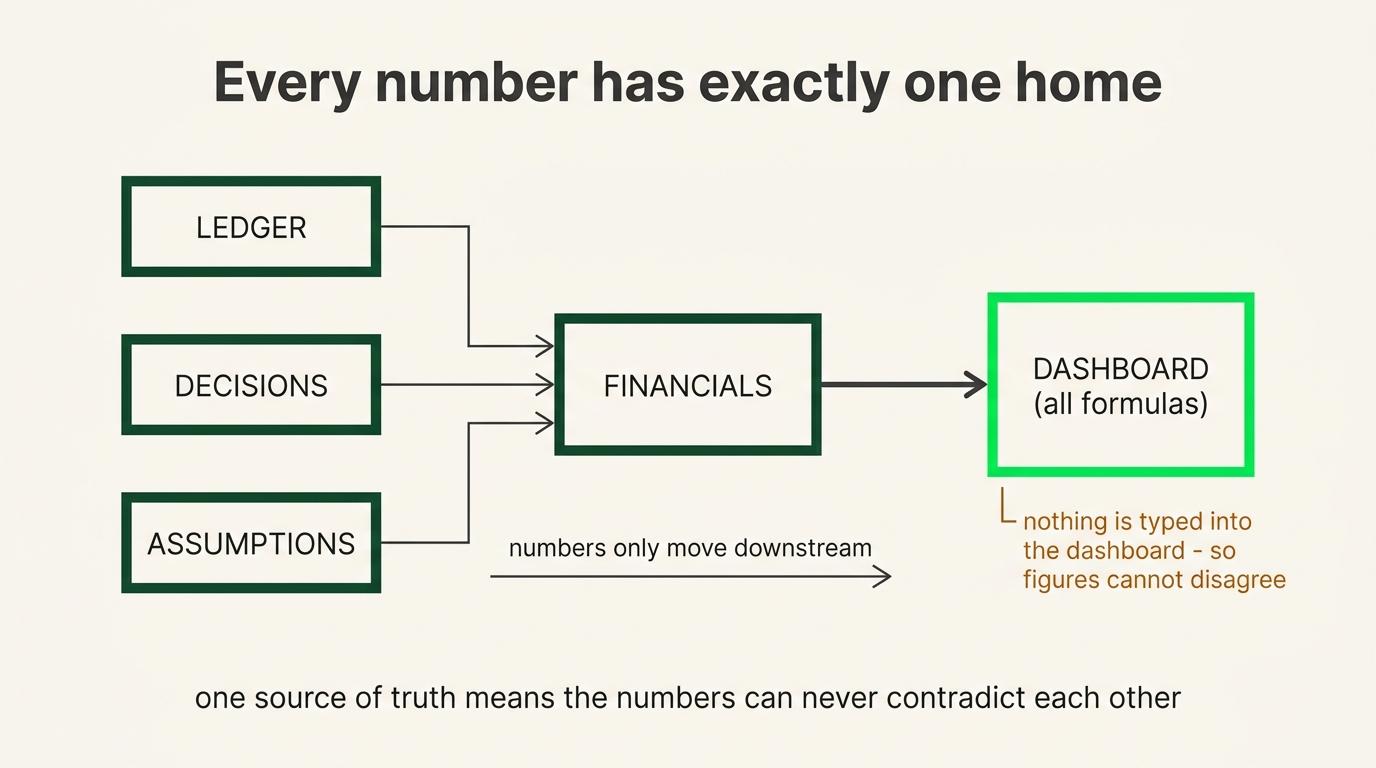
| Dashboard | The daily read. Every cell is a formula pulling from somewhere else. Nothing is ever typed here |
|---|---|
| Ledger | Every transaction, one row each, keyed by the provider's own ID so the same charge cannot land twice |
| Decisions | Your rulings on ambiguous items, keyed to the transaction. The automation reads this and never overwrites it |
| Financials | Monthly and year-to-date profit and loss, the tax model, and a period close register |
| Commitments | Recurring charges, upcoming obligations, expected income, account balances, liabilities |
| Assumptions | Every threshold, rate and policy in one place, referenced everywhere else |
| CPA Package | What your accountant receives, and what evidence is still missing |
| History | One appended row per day, so you can see trend rather than just today |
The load-bearing idea is that every number has exactly one home. Summary figures are formulas reading a single canonical source. Nothing gets computed two different ways in two different places, which is how spreadsheets normally start disagreeing with themselves.
What it will not do. It is a management workpaper, not a filed tax return. It will not be cosmetically perfect.
What it gives you is roughly ninety-five percent of the clarity you are currently missing about expenses, cash obligations, decisions, assumptions and recurring reality. Professional accounting and tax verification still applies on top.
The build prompt
Paste this into a normal chat, not a scheduled task. Expect it to take a while, because it is reading and classifying a year of history.
Build me a Personal CFO financial operating system.
I am self-employed. This is a management and accounting workpaper,
not a filed tax return. Reference architecture:
https://docs.google.com/document/d/1QqP0dMJwlZZwB3ydQ4dScUUbeegsHsqrCrtUOtKVkOk/edit

The structure and documentation are already built. Read the
reference, then build my instance of it. Do not redesign it.

STEP 1 - CREATE THE WORKBOOK
Create a new Google Sheet named "Personal CFO Financial OS - <year>"
in my Drive. Give me the link before you do anything else.

STEP 2 - INSPECT WHAT YOU CAN ACTUALLY SEE
Check my connected accounts. Report coverage, sync status, and the
earliest date you can genuinely reconcile from.
Tell me what you cannot see and what that does to the numbers.
Never invent data to fill a gap.

If the account sync is still catching up, say so and offer me the
fast path in Step 3 rather than waiting.

STEP 3 - GET THE TRANSACTION DATA
Default: read it directly from my connected accounts. No exports,
no uploads.

Fast path, only if the sync is slow or incomplete: tell me I can
paste or upload a CSV or PDF of recent statements and you will work
from that in the meantime, then reconcile against the live feed
once it finishes. Offer this rather than making me wait.

STEP 4 - ASK ME THE FIVE THINGS YOU CANNOT KNOW
Do not guess any of these. Ask, and propose an answer where you can
reasonably infer one so I am correcting a draft rather than
composing from nothing.
  Who currently owes me money, how much, and when
  Card terms on every card: APR, minimum payment, due date, limit
  Vehicle business use: percentage, and mileage or actual expenses
  Prior-year total tax, federal and state
  My ambiguous recurring charges: business, personal, or a split

STEP 5 - BUILD THE EIGHT TABS
  Dashboard    daily decision surface. All formulas, nothing typed
  Ledger       every transaction, keyed by the provider's own ID
  Decisions    my rulings on ambiguous items, keyed to the
               transaction. You read this and never overwrite it
  Financials   monthly and YTD P&L, tax model, period close register
  Commitments  recurring charges, upcoming obligations, expected
               income, account balances, liabilities
  Assumptions  every threshold, rate and policy, referenced
               everywhere else rather than repeated
  CPA Package  accountant-facing handoff and evidence tracker
  History      one appended row per date

STEP 6 - POPULATE AND CLASSIFY
Backfill the Ledger with every posted transaction for the current
tax year. Classify each one.

Where a transaction is ambiguous, flag it and hold it out of every
total rather than guessing. An unresolved item that is visibly
excluded is worth more than a confident wrong classification.

Surface every recurring charge you find: amount, cadence, last
charge, next expected charge, and whether it still looks active.
That list is what the teardown in this module runs on, so make it
complete and put it somewhere I can read it.

STEP 7 - BUILD THE FORMULA LAYER
Every summary number is a formula reading one canonical source.
No number appears in two places computed two different ways.

RULES WHILE BUILDING
Never invent an inflow. If nothing is confirmed, say so on the face
of the sheet rather than assuming money arrives.
Missing evidence is BLOCKED, never PASS.
Do not ship a structure and promise to test it later. Any control
you add gets executed once against a deliberate test case, proven,
then the test case removed.

STEP 8 - HAND ME THE RECURRING PROMPT
When the build is finished, report:
  what was built and what is populated
  what is blocked, and on exactly which missing input
  the workbook link

Then generate the daily maintenance prompt for this specific
workbook, with my actual sheet link already in it, and tell me to
paste it into a scheduled daily task. Include the schedule you
recommend and the time zone it should run in.

The daily prompt maintains and checks the finished system. It does
not rebuild it. Write it so it stands alone in a fresh context,
because it will run every morning with none of this conversation
available to it. Every durable fact it needs must live in the
workbook rather than in chat history.

--

Daily Prompt Example
Expect the first run to surface things you did not know about. That is the point, and it is why this sits ahead of the teardown rather than after it.
Step 7: The filter
The whole framework is one question:
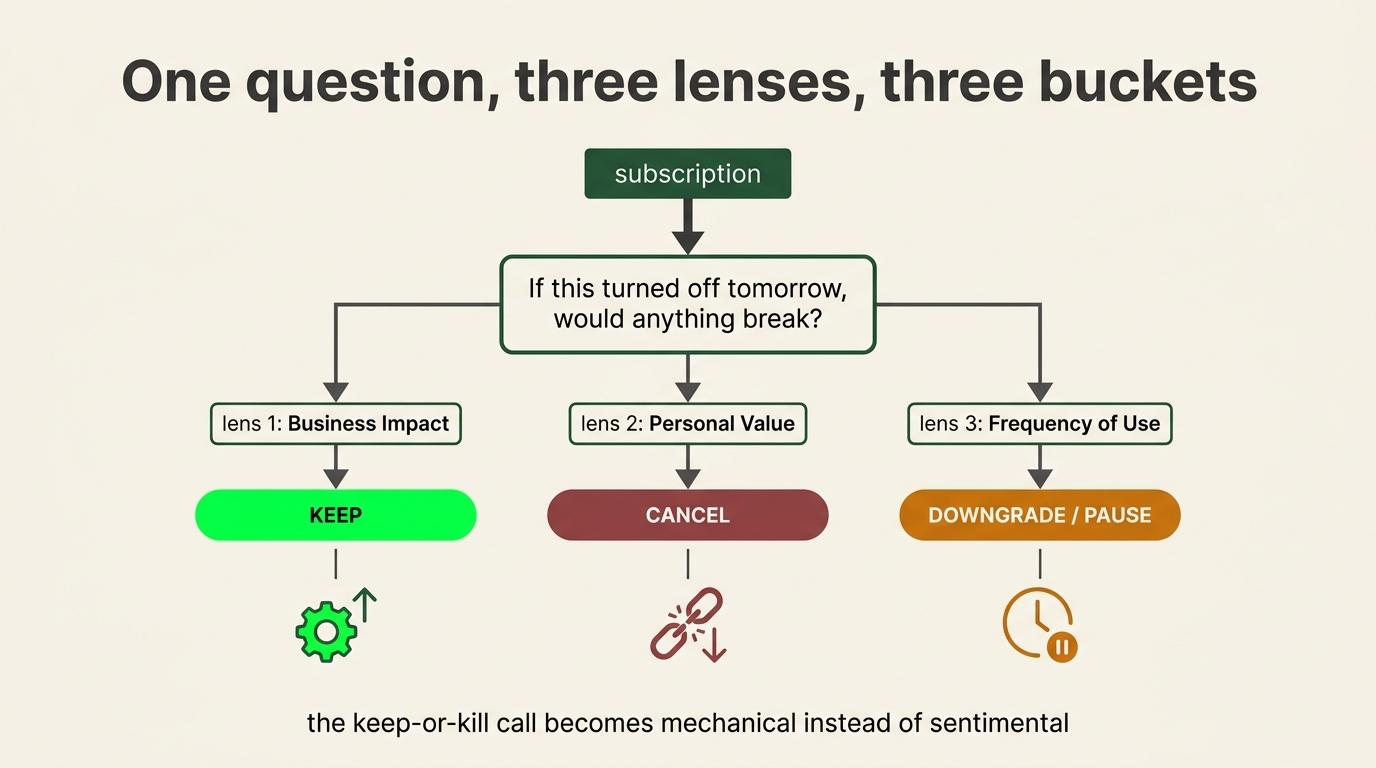
If you turned this tool off tomorrow, would anything actually break?
When it is unclear, run it through three lenses. If turning it off would hurt any one of them, it is a need-to-have.
| Lens | Question |
|---|---|
| Client acquisition | Would this impede getting new clients? Does it directly support a revenue-generating activity? |
| Time cost | Would your time cost go up? Would fast things become slow or manual? |
| Fulfillment | Would it reduce delivery quality, or slow down how fast you deliver? |
If the honest answer to all three is that nothing much changes, that is dead weight.
Three buckets
| Bucket | Meaning | Action |
|---|---|---|
| Need to have | Supports acquisition, saves meaningful time, or protects fulfillment | Keep, but check the plan tier |
| Nice to have | Useful, nothing breaks without it | Cancel, downgrade, or pause. Most of the leak lives here |
| Dead weight | Forgotten, redundant, duplicated, unused | Cancel, and chase a refund if recent |
Step 8: Build the master inventory
Write down your starting number before cancelling anything. That is your BEFORE figure and once you start cutting there is no recovering it.
Check all of these so nothing hides:
- Bank and credit card statements, last 2 to 3 months
- App Store and Google Play subscriptions
- PayPal recurring payments
- Stripe or direct-billing tools charged to a card
- Team members' cards, if anybody has expensed a tool
- Personal accounts
Two checks while you are in there:
Scrape the seat counts. You may be paying for people who left.
Compare your current plan to the one you originally bought. Vendors raise prices quietly and a bump nobody approved can sit on the bill for months.
The fast way
Pull at least 3 months of statements, or a full 12 to catch annual plans. Export as CSV, which reads best.
Act as a sharp, detail-oriented financial analyst.
I am going to give you between 3 and 12 months of bank statements and/or credit-card statements in CSV or PDF format.

Your job is to identify every recurring subscription, software charge, membership, service, or other repeating expense.

Be thorough. I would rather you flag a questionable recurring charge for review than miss a real subscription.

For every recurring or potentially recurring charge:

1. Identify the vendor, tool, or service name.
2. List the amount charged.
3. List the exact date of every charge you found.
4. Determine the likely billing cadence:
   - MONTHLY
   - YEARLY
   - OTHER / UNCLEAR
5. Estimate the next expected charge date based on the cadence and most recent charge.
6. Flag any irregularities such as:
   - Price increases
   - Duplicate subscriptions
   - Multiple plans from the same vendor
   - Charges that stopped
   - Charges with inconsistent billing dates or amounts

IMPORTANT:
- Do not assume something is not a subscription just because it only appears once.
- A single charge may be an ANNUAL subscription.
- Flag every one-time charge that reasonably looks like software, a membership, SaaS, a digital service, or another potentially recurring expense as "POSSIBLE ANNUAL / NEEDS REVIEW."
- If I provide less than 12 months of statements, explicitly tell me that annual subscriptions may be missing and recommend that I provide a full 12 months for a complete audit.
- Normalize vendor names when the statement descriptor is messy, but preserve the original transaction description somewhere in your analysis if it helps verify the charge.
- Do not silently exclude uncertain charges.

Then give me one master table sorted by NEXT CHARGE DATE, with the soonest expected charge first.

Use these columns:

Tool / Vendor | Amount | Monthly or Yearly | All Charge Dates Found | Last Charge | Estimated Next Charge | Likely Still Using It? | Cut / Keep / Review | Notes

For "Likely Still Using It?" make a reasonable inference from the transaction history, but clearly label uncertainty rather than pretending to know.

For "Cut / Keep / Review":
- KEEP = appears intentional, active, and likely useful
- CUT = appears duplicated, obsolete, unused, unusually expensive, or otherwise suspicious
- REVIEW = there is not enough information to confidently decide

Do not make aggressive assumptions about whether I still use something. If you need context from me, flag the item for review.

After the table, calculate:

- Total recurring MONTHLY spend
- Total recurring YEARLY spend
- Annualized cost of monthly subscriptions
- Total expected recurring spend per year
- Average recurring spend per month

Keep annual subscriptions separate from monthly subscriptions when calculating totals so nothing gets double-counted.

Then create these short sections:

1. SUBSCRIPTIONS TO REVIEW FIRST
Highlight the charges with the highest savings potential, duplicates, suspicious subscriptions, or services that may no longer be needed.

2. POSSIBLE ANNUAL SUBSCRIPTIONS
List every charge that only appeared once but could plausibly recur annually.

3. UNCERTAIN / POSSIBLY RECURRING CHARGES
List anything that showed some evidence of recurring behavior but could not be confidently classified.

4. DATA GAPS
Tell me whether the statement window is long enough to reliably identify monthly and annual subscriptions and what additional statements I should provide to make the audit complete.

Do not stop at obvious brands. Analyze every transaction and look for recurring patterns in merchant names, amounts, dates, and billing intervals.

If you need clarification from me about a vendor, transaction, or whether I still use something, ask me after completing as much of the audit as possible first.
On privacy: you are handing financial data to an AI tool. Check its data-use policy and decide what you are comfortable with. Scanning manually works, and so does a trusted teammate or a dedicated subscription tracker.
A note on privacy - read this first.
You are handing financial data to an AI tool. Before you do, check that tool's privacy and data-use policy and decide what you are comfortable with - this is at your own discretion.
Prefer to keep it off AI? Do it manually by scanning the statements yourself, or have a trusted teammate do it.
There are also dedicated subscription-tracking tools built for exactly this. Use whatever fits your comfort level.
Master subscription tracker. Copy this exactly, including the header row. This becomes your approved technology stack and the only record of what your software actually costs, so the column names matter more than they look.
| Tool | What it does | Owner | Seats | Cost/mo | Billing cadence | Renewal date | Last used | Bucket | Action |
|---|---|---|---|---|---|---|---|---|---|
| Video tool | Clip editing | Ops | 2 | $39 | Monthly | 2026-09-14 | 5+ mo ago | Dead weight | Cancel + refund |
Owner is who is accountable for it, not who signed up. Seats is the count you are paying for rather than the count in use, and the gap between those two is usually the fastest money in the whole teardown. Renewal date is what makes annual plans visible before they bill rather than after.
This list is also what gets connected at the end of Orientation if you are running the optional AI layer. Nothing to do about that now beyond keeping it current, and it is the reason the columns are fixed rather than suggested.
Step 9: Categorize and decide
Run every line through the filter. Do it fast and honest, because your first gut answer to whether anything would break is usually right.
| Decision | When |
|---|---|
| Keep | Need-to-have on the right plan |
| Downgrade or pause | You use it, on a bigger plan than you need. A pause keeps data and settings |
| Cancel | Dead weight, or a nice-to-have that lost |
| Cancel and pursue refund | Recently charged, annual plan barely used, renewal you meant to cancel, double-charge, auto-upgrade |
| Cancel and pursue refund | Recently charged, annual plan barely used, renewal you meant to cancel, double-charge, auto-upgrade |
|---|
Step 10: Execute cancellations
- Screenshot every confirmation with the date. This protects you when they bill you again anyway
- Note the effective date. Some are immediate, some run to period end
Watch for retention offers. A discount does not change the math, and half off a thing you do not use is still money leaking. Only reconsider if the tool was genuinely borderline and the new price changes the arithmetic.
Expect the gauntlet. Some companies keep it clean. Others bury the button, add steps, and throw a wall of are-you-sure screens at you. That is deliberate.
If the interface is a maze, stop spinning and escalate to a human by email using the templates in Part 3.
Watch for the retention gauntlet.
Some companies keep it clean - cancel or downgrade right in the app, two clicks, done. Others semi-hold-you-hostage.
They bury the button, add steps, and throw a wall of "are you sure?" screens at you to make quitting feel like a chore. That is not an accident. They are protecting revenue, and friction is the tool.
The second you reach for the exit, expect a bribe.
Win-back offers fire on cue - "if we gave you 70% off next month, would you stay?" LinkedIn Sales Navigator runs a "50% off if you buy two months," which is buy-one-get-one dressed up as a favor. Here is the trap: a discount does not change the math.
If the tool failed the "would anything break if I killed this?" test, half off a thing you do not use is still money leaking. Push through. Do not let the offer rewrite your framework.
- If the UI is genuinely a maze and you are stuck - dead-end menus, hidden links, a bot running you in circles - do not spin on it. Run the unstuck protocol and get out clean.
Step 11: Set up prevention
- Recurring calendar blocks for a monthly spot-clean and a quarterly full teardown
- Route subscriptions through one dedicated card with a spending limit. Wise, most corporate-card services, and many banks allow caps
- Run new tools through the filter before adding them
- Cap API spend on anything usage-based, so worst case is a known number that shuts off
- Audit usage-based tools on the API before cutting. Pull the dashboard so you know which workflows depend on it
If a tool runs on an API, audit it on the API.
Before you cut or downgrade a usage-based tool, pull its usage dashboard and see how you are actually using it - which workflows depend on it and what you would really lose by dropping a tier.
That is exactly how we sized up Cloudinary. We were on the $99 plan and about to cut it. The usage dashboard said we were at roughly three percent of what we were paying for, so we downgraded to the free tier knowing exactly what we were giving up, which was nothing. $99 a month gone with zero risk attached, and the only reason we could be confident was the two minutes spent looking.
The same check works in reverse. Sometimes usage says you are close to a ceiling and the downgrade you were about to make would have broken something in week three.
Cap your API spend while you are in there. For any usage-based API, set a hard monthly spend limit. Worst case - a key leaks or a job runs wild - you are capped at a known number and it shuts off, instead of an open-ended bill.
Reduce scope, reduce spend. Aligning people on exactly what they need to do means fewer tools touched less often.
Step 12: What the daily layer actually does
Everything above is a pass you run quarterly. The daily layer is what stops the stack getting back to where it was.
You already have it. The build prompt in Step 6 generated it and told you to schedule it. This section explains what it is doing every morning, so the report makes sense when you read it.
What it produces
One daily report that opens with six lines you can read in ten seconds.
| Free cash | What is actually spendable now, after obligations due before your next expected income |
|---|---|
| Days of runway | Available cash divided by daily essential burn |
| Next hard hit | The single next thing that hurts if missed |
| Collected MTD | Against target, and what you need per day to close it |
| Tax reserve gap | Money already earned that is not yours |
| Status | One word |
Below the six lines it tells you what changed, what it needs from you, and one piece of analysis that rotates by weekday.
Why this replaces most of the manual teardown
It catches what stopped charging, not just what charged. A subscription you cancelled that is still billing looks identical to one you meant to keep, unless something is watching each vendor's own rhythm. That is the failure a quarterly teardown cannot catch, because by the time you run the next one it has been three months.
It refuses to guess. Ambiguous transactions get flagged and held out of every total rather than filled in with something plausible. You resolve those once each, and the answer is permanent.
It removes the need for the dedicated tech card in Step 11. A model reading across every connected account finds what is recurring without you pre-sorting by card. Keep the card if you want a clean statement. Skip it if the daily layer is doing the job.
Four rules the daily prompt enforces, and why each one exists
The prompt the build handed you is long, and long prompts get scheduled without being read. These four are the ones worth understanding, and each came from something going wrong.
The passes never reorder. Data, then controls, then judgment. It cannot produce the report without showing the control results first. That single rule is why the numbers can be trusted.
Missing evidence is BLOCKED, never PASS. A control that cannot run because an input is missing reports as blocked with the input named. It does not quietly pass.
Never invent an inflow. If nothing is confirmed, free cash uses an explicit fallback and says so on the face of the report. The alternative is a system that makes your position look better by assuming money arrives.
Do not ship a structure and promise to test it later. Every addition ships with its own test in the same pass. That one came from repeatedly finding controls that had been declared complete and had never executed once.
Pointing the CFO at the refund process
Once the recurring costs are visible in one place, the same tool that found them can help you recover the money.
What it can do without any special permissions: search your connected mailbox for the signup confirmation, the price-change notice, or the last invoice. Identify which charges have a real refund angle against the leverage ladder above. Draft the outreach for each one, with the account details and dates already filled in.
What it can do where you have granted the permissions: send the emails and work the follow-up sequence.
Do not assume that permission exists. Check what your setup actually allows before designing a workflow around it, and decide deliberately whether you want an AI sending email on your behalf.
The point is not automation for its own sake. It is that the expensive part of refund recovery is searching six inboxes and writing eleven near-identical emails. Hand over the searching and the drafting, and spend your own time on the judgment call about which ones are worth pursuing. That is the part that actually requires you.
The scheduled task has to stand alone
Write the daily prompt so it is self-contained. It runs in a fresh context every morning with none of the conversation that produced it.
Every durable fact it needs lives in the workbook rather than in chat history. Every threshold lives on Assumptions. Every ruling lives on Decisions. If the prompt needs something to be true, that thing is in the sheet, not in a message you sent in August.
Step 13: Consolidate the billing dates
Most SaaS runs billing on Stripe, Paddle, or Chargebee, and all three support setting a billing anchor to a fixed date and shifting an existing subscription's date.
What varies is whether a vendor will do it for you, because the capability sits in their billing system and the decision sits with support. There is usually no self-serve control.
One detail makes the ask clean. All three platforms handle a date change by prorating the partial period as a small charge or credit. Say that in the request and you remove the main reason a rep hesitates.
Prioritize annual renewals. A plan bought eleven months ago bills at full year price on a date nobody remembers, which is a much bigger cash-flow shock than scattered monthly charges.
Subject: Quick request - aligning our billing date
Hey [name],
[Your name] here from [Company]. We're consolidating our software billing so
all our recurring costs land in the same window each month, which makes budgeting
and reconciliation a lot cleaner on our end.
Would it be possible to move our subscription's billing date to [preferred date,
e.g. the 1st of the month]? If that exact date isn't available, the closest
option in the first week would work just as well.
I understand this would likely involve a prorated charge or credit for the
partial period - that's completely fine, and we're happy to settle whatever
the difference is.
Account email: [email]
Current billing date: [date]
Preferred billing date: [date]
Thanks for the help.
[Name]
[Company | role]
The fallback that always works: every recurring cost on one card consolidates visibility into a single statement regardless of what vendors say.
Part 3: Refund and Recovery
Cancel the tool first, then come here.
The posture: warm, low-conflict, temporary. A customer who values the product and is briefly pausing to manage costs and plans to come back. Never angry, never burn the relationship.
The grind reality - refunds are a probability game
Here is the honest part. Refunds are not a button you press. They are a grind.
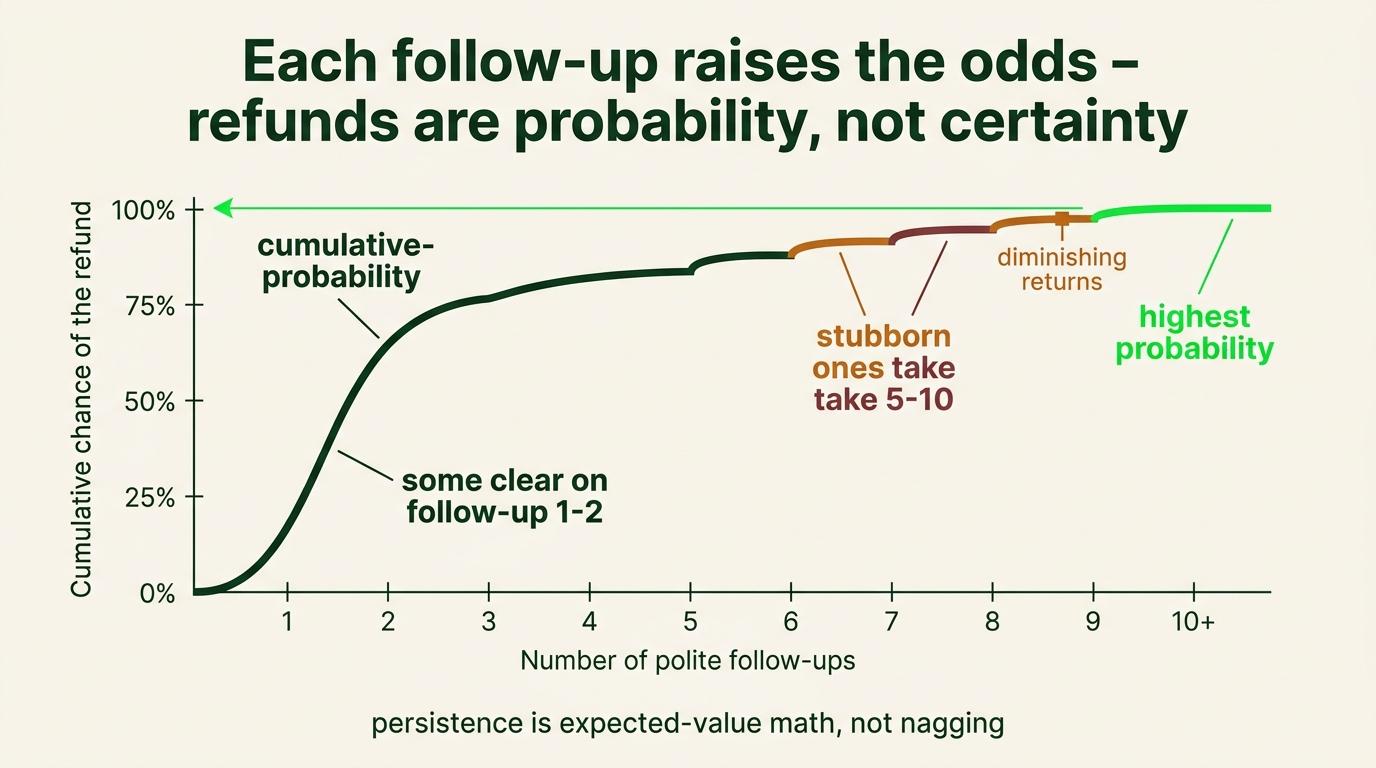
Sometimes you send one clean message and the money is back in two days. Other times it takes a genuine back-and-forth - follow up, provide documentation, show them exactly why a refund is warranted, and keep going until someone with authority says yes or no.
The ones that clear fast usually clear in a short, clean thread - a clear ask with the details attached, and the money is back within a few days. That was true for most of what we actually recovered.
The hard ones are a different animal. On a genuinely stubborn charge, expect to send 5 to 10 follow-ups, attach documentation, and keep pushing - and even then you may only get part of it back. That is normal. It is not a sign you are doing it wrong, it is just the nature of it.
Think about it as probability, not certainty. Every polite, well-documented follow-up raises the odds. Some will refund, some will offer credit, some will say no. Your job is to run the play consistently, not to win every single one.
A hard case, for contrast. We stopped using Submagic in May but did not ask for a refund until June. Between the gap since our last use and Submagic's strict "no refund on unused portions" policy, the odds were against us going in - and that is exactly how it played out.
How fast you ask matters almost as much as what you ask for. A denial is still worth logging: it tells you the angle was not there, not that you did something wrong.
Step 14: Assess leverage before writing anything
Write the verdict next to each candidate before drafting.
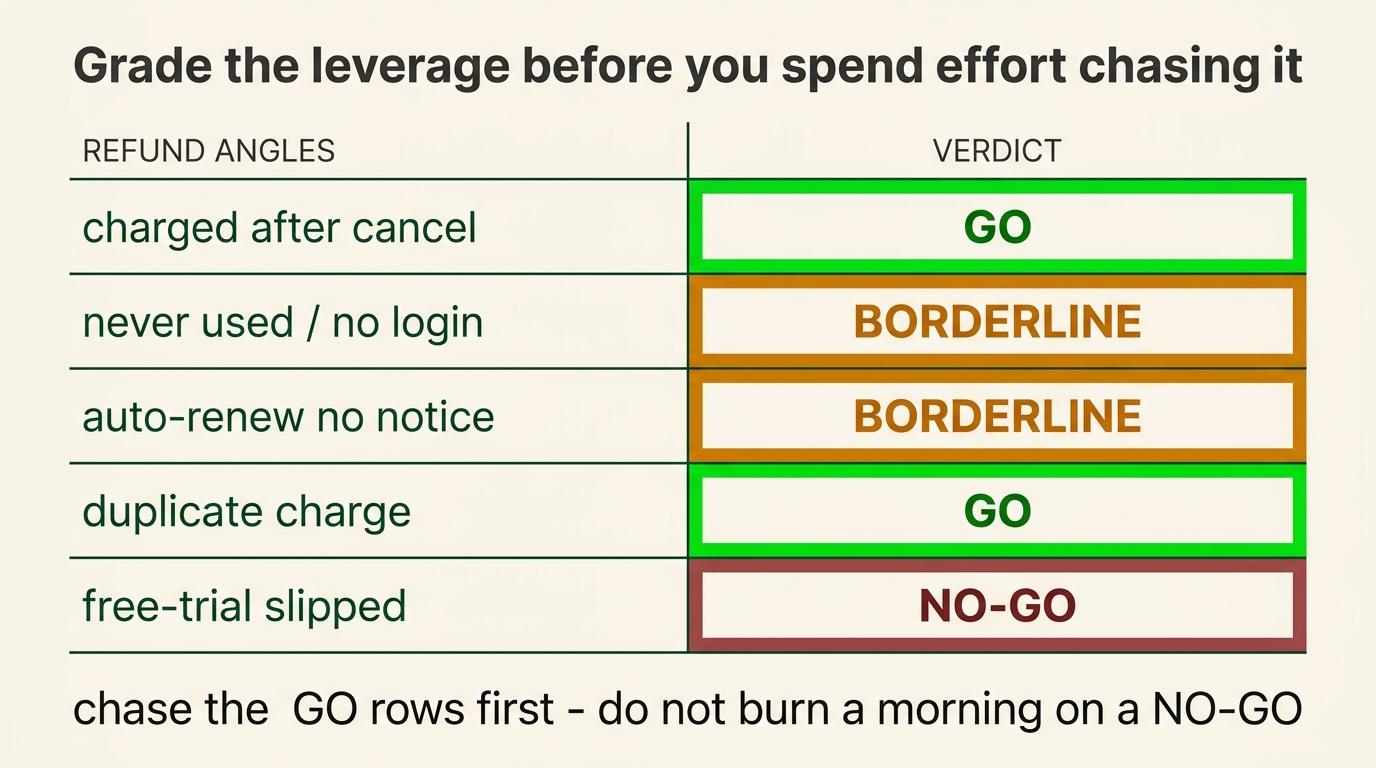
| Angle | What it is | Verdict |
|---|---|---|
| Double-billing or billing error | Two accounts on the same tool, a double-charge, a charge after cancellation. Not a cancellation ask, a billing error to fix, which takes you outside standard refund policy | GO |
| Non-delivery | The tool did not do what was promised, or a paid feature was broken | GO |
| Unused or unintended | Annual plan barely used, renewal that processed before you cancelled, auto-upgrade, trial that converted unnoticed | BORDERLINE. One ask, one follow-up |
| No angle | Monthly plan, you used it, you want out | NO-GO. Cancel and move on |
Factor the relationship, not just the leverage. Even a slam-dunk angle does not mean pushing for the maximum. Ask for what feels fair rather than what you could argue for, especially where a mistake happened in good faith.
Speed matters almost as much as the angle. Ask within days of the charge rather than a month later.
Step 15: Prepare
- Note the last active date. Log in and find the last month you actually used it
- Cancel in-app first. Most platforms require it before processing a refund
- Screenshot the cancellation confirmation with the date
- Scrape the seat count. You may be paying for people who left, which is both a cut and an angle
- Find the buried support email. Check account settings, the billing page, and the help-center footer before deciding there is no human
Documentation speeds everything up. Attach or reference the signup date, the cancellation confirmation, screenshots of usage or the lack of it, and the exact charge line. Refund reps approve what is easy to justify.
- Find the hidden support email. Some vendors bury it on purpose (Fireflies did). Check account settings, the billing page, and the help-center footer before assuming there is no human to email.
The templates
1. Refund request
Subject: Assistance request - [Tool] subscription cancellation & refund
Hey [name],
[Your name] here from [Company], [role]. I'm doing a software audit and
noticed we've had a [Tool] subscription running that we haven't really
been using - last active around [month from the app].
We'd genuinely love to use it again down the line, but budget is tight
right now and we're cleaning things up. Would it be possible to get a
refund for the unused portion, or for the charge on [date] for [$amount]?
Happy to send over any account details you need. Thanks so much for the help.
[Name]
[Company | role]
2. Cancel and keep the door open
Subject: Quick help - pausing our [Tool] subscription
Hey [name],
[Your name] from [Company] here. We've genuinely valued using [Tool]. We're
in a temporary cost-cutting phase right now, so I would like to pause or
cancel our subscription for the time being.
We fully plan to come back once things free up. If there is a pause option,
or a way to keep our data and settings on file for when we return, we would
much prefer that over a hard cancel.
Thanks for making this easy.
[Name]
3. Downgrade
Subject: Moving to a smaller [Tool] plan for now
Hey [name],
[Your name] from [Company]. We've valued [Tool] and want to keep using it -
we're just managing costs right now, so I'd like to move us down to [lower
plan / fewer seats].
Can you apply that now and prorate or credit the difference? We expect to
scale back up later. Appreciate the help.
[Name]
4. Follow-up when nothing comes back
Subject: Re: Refund request - [Tool] (following up)
Hi [name],
Following up on my refund request from [date] (original below). I haven't
heard back and wanted to keep this moving.
Quick recap: [one-line reason]. Details again for convenience:
- Account email: [email]
- Charge date: [date]
- Amount: [$amount]
- Invoice / transaction ID: [ID]
Could you let me know the status, or what you need from me to process it?
Happy to hop on a quick call if that's faster.
Thanks,
[Name]
5. Escalation
Subject: Re: Refund request - [Tool] (escalation)
Hi [name],
I've followed up a few times on my refund request from [date] without
resolution. I'd like to escalate this to a supervisor or billing manager.
To summarize: [one-line reason + charge details]. I have been patient and
provided everything requested. I'm asking for a full refund to the original
payment method.
If we can't resolve this directly, my next step would be to dispute the
charge with my payment provider, which I'd rather avoid. I'd much prefer to
sort it out with you.
Please let me know how you would like to proceed.
Thanks,
[Name]
Why these work
Casual opener with a name and role rather than Dear Support Team. Honest framing, because a software audit and a tight budget move faster than any corporate version. One clear ask per paragraph, no filler, warm but direct sign-off with a first name.
Support reps answer hundreds of template emails a day, and the ones that read like a person wrote them get answers from a person.
What the grind actually looks like
Real threads, compressed to the operational lesson.
Senja, $108.92. Good-faith double-billing across two accounts. Pulled dated transactions across three months as proof, flagged it matter-of-factly, asked for a fair number of months back rather than the bare prorate.
Lesson: the skill is looking closely enough to notice you are being charged for something you should not be.
AppointWise, $97. Cancelled first, then asked as a separate follow-up with no unique leverage. Approved as goodwill. Lesson: sometimes a polite direct ask just works.
Replit, $100. Pro plan barely used, price had just gone up. Asked to downgrade and refund the last charge, issued in full with no back-and-forth. Lesson: a real angle plus a single direct ask usually does it.
Higgsfield, ~$52 of $110. Two unauthorized charges, no order history anywhere. Thirteen back-and-forth messages.
One pack refunded less a 6% processing fee, the other denied on their logs. Lesson: some are worth grinding and some hit the point where the hours are worth more than the money. Know which.
Plus Docs, $25. Cancellation confirmed, then pushback citing a 24-hour policy, then one direct follow-up asking for a final answer with no re-explaining. Came through. Lesson: ask once, follow up once if it goes quiet, hold the line politely.
Opus Clip, $114. Three separate bumps over a week with no resolution, then approved. Lesson: bumping is the least glamorous and most normal part of this.
Submagic, denied. No refund on unused portions, asked a month after last use. Lesson: log the denial. It tells you the angle was not there.
Expect 5 to 10 follow-ups on a stubborn charge, with documentation attached, and even then you may only get part of it. That is normal.
Log every ask. Pending, then approved or denied or partial. It stops you double-chasing one thread or silently dropping another.
Benchmark: what one pass returned
From running this on our own stack, so you can calibrate.
About $1,100 a month in recurring cost cut. Unused AI seats, eight unused Workspace licenses, a $169/mo video tool cancelled, two tools downgraded rather than cut, five paid Slack seats cleaned up, and a $99/mo plan dropped to free after checking real usage on the API showed 3%.
About $680 recovered across twelve refund requests. Most approved, a couple partial, one clean no.
And the part with no number. Fewer logins, fewer overlapping tools doing the same job, and much less of the wait-what-does-this-one-even-do overhead.
The excuse worth naming: it is only $17 a month and the utility is kind of there. It is always only $17 a month. If you are not using it, stop negotiating with yourself.
Refunds recovered - the tally
So far this teardown has clawed back about $581.63 in one-time cash across seven tools (one a partial win), with one more thread still in flight. This is money that was already gone - recovered just by asking, with the right angle and a few follow-ups.
Here is the excuse everyone makes. I make it too.
"It is only $17 a month, and the utility is kind of there." That is the lie. It is always only $17 a month - that is exactly why they win. If you are honestly not using it, stop negotiating with yourself. Be honest, and go fix it. Or in plain terms: just go fucking fix it.
How to actually get it done:
- Block one session, blinders on, knock it out. Or tag-team it with your finance person and split the list.
- Make it a real task or a small project in whatever you use to track work. If it does not have a name and an owner, it does not happen.
The payoff is simple: more bandwidth, more cash, less expense. That lifts your blended margins and buys you more runway to build. Do it once, and you feel it every month after.
Our first pass, for reference: $793 a month before, roughly $1,100 a month cut across the business stack, eleven refund requests sent, $581.63 recovered.
By role
Founder or CEO. You own the card and the decisions. Run the first one yourself so you see the leak, then delegate once proven.
Project leader, operator, integrator, or EA. Most likely to become permanently yours. Maintain the inventory, run the monthly spot-clean, own the refund pipeline. You are also best placed to catch seat sprawl.
Technical operator or VA. Usage-based tools and API spend. Pull the usage dashboards before anything gets cut, and hand back a recommendation with numbers rather than a guess.
Sales rep, setter, or CSM. Your business stack may be small and your personal one probably is not. Run the clearance half properly too.
Completion check
| Question | Answer |
|---|---|
| Monthly subscription spend BEFORE ($) | |
| Monthly subscription spend AFTER ($) | |
| Personal teardown run as well as business? (Y/N) | |
| Refund requests sent (\#) | |
| Refunds recovered so far ($) | |
| Clearance items completed (\#) | |
| Clearance items delegated (\#) | |
| Items that turned out not to be problems (\#) | |
| Large items activated rather than completed (\#) | |
| Which clearance item had been sitting longest, and how long did it actually take? | |
| Daily financial layer set up? (Y/N) | |
| Billing-date requests sent (\#) | |
| What was least clear, or what did you skip? | |
| What is the win you want to brag about? |
| What is the win you want to brag about? |
|---|
Screenshot your before-and-after and drop it in your team channel. Send it to us too.
Next: SOP 3, Post-Mortem, Mission, Vision, and Values.